UiPath certification · Exam UiPath-ADAv1

UiPath-ADAv1 Mock Exam Page 3

UiPath Automation Developer Associate v1

Free UiPath-ADAv1 mock exam questions 21–30, each with the answer and an explanation.

20 questions · 33 minutes · free, no sign-up

Free UiPath-ADAv1 questions

21–30 of 76 free
Question 21 Choose 1
Which is the recommended variable type for storing password values that are composed solely of numbers?
Show answerHide answer

Correct answer: A SecureString

Explanation

Explanation: The recommended variable type for storing password values, even if they are composed solely of numbers, is SecureString. A SecureString is designed to provide a more secure way to handle sensitive information as it keeps the data encrypted in memory, making it less vulnerable to potential risks such as memory dumps compared to regular string types.
Question 22
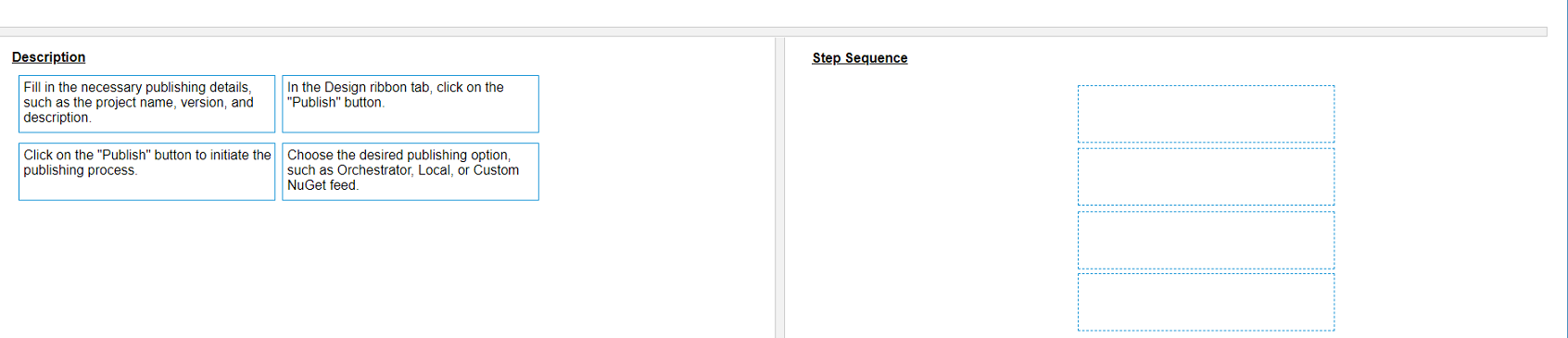
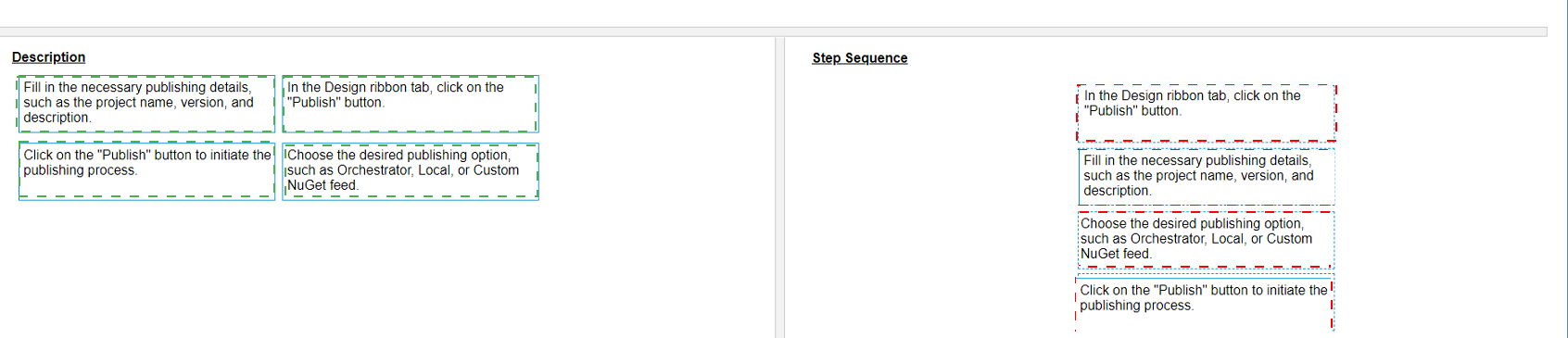
What are the steps to publish a project from UiPath Studio?
Instructions: Drag the Description found on the "Left" and drop on the correct Step Sequence found on the "Right".

Show answerHide answer

Explanation


Explanation:
The steps to publish a project from UiPath Studio are:
In the Design ribbon tab, click on the “Publish” button. The Publish Project window opens. (UiPath Studio documentation1)
Fill in the necessary publishing details, such as the project name, version, and description. You can also add release notes and select the environment where the project will run. (UiPath Studio documentation1)
Choose the desired publishing option, such as Orchestrator, Local, or Custom NuGet feed. Depending on your choice, you may need to provide additional information, such as the Orchestrator URL, the local folder path, or the custom feed URL. (UiPath Studio documentation1)
Click on the “Publish” button to initiate the publishing process. A confirmation message will appear when the project is successfully published. (UiPath Studio documentation1)
Short Explanation: Publishing a project from UiPath Studio means creating a package that contains all the files and dependencies required to run the automation process. The package can be deployed to different locations, such as Orchestrator, a local machine, or a custom NuGet feed. Publishing a project from UiPath Studio involves four main steps:
clicking on the Publish button, filling in the publishing details, choosing the publishing option, and confirming the publishing process. (UiPath Automation Developer study guide2)
Question 23 Choose 1
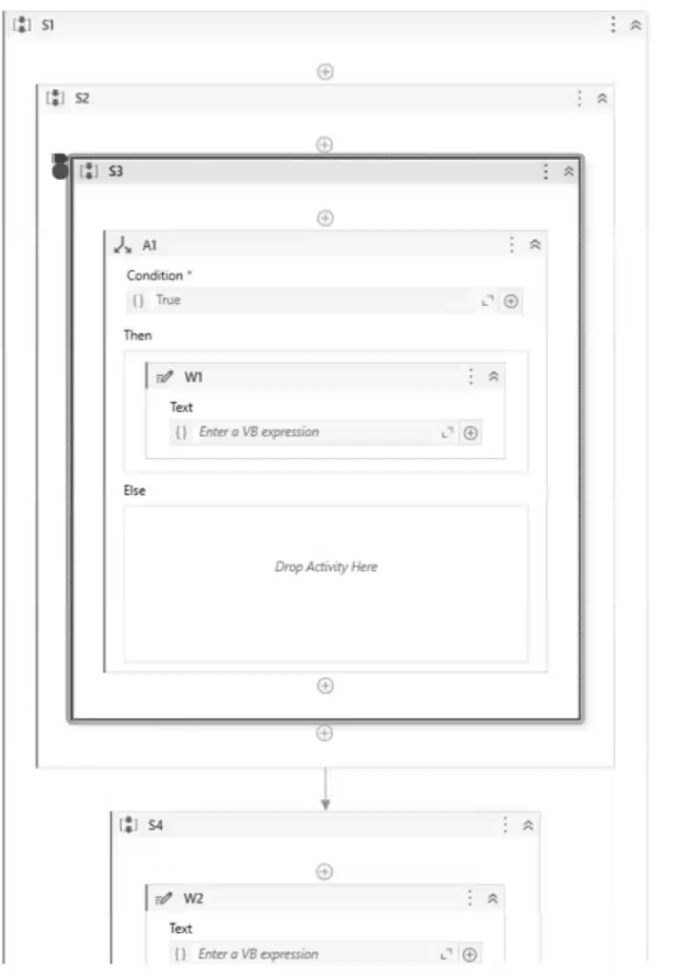
When a developer is examining a suspended state upon reaching a breakpoint, which activity will the Executor be directed to if Step Out is selected from the Debug section in UiPath Studio's ribbon interface?

Show answerHide answer

Correct answer: B S1

Explanation

Explanation: When a developer selects "Step Out" from the Debug section in UiPath Studio's ribbon interface while examining a suspended state upon reaching a breakpoint, the executor will be directed to the activity that called the current container (or the next activity in the higher scope). In the context of the provided sequence structure, stepping out from A1 (assuming that's where the breakpoint is) would go to the next higher scope, which is S2, as it is the sequence that contains A1. Therefore, the correct answer is D (S2 in the image).
Question 24 Choose 1
What is the use of job priorities in unattended automations within UiPath Orchestrator?
Show answerHide answer

Correct answer: A To determine which processes should be executed first when dealing with multiple jobs.
Explanation

Explanation: Job priorities in unattended automations are used to assign different levels of importance to the processes that are triggered by the Orchestrator1. The job priority can be set as High, Normal, or Low when creating or editing a trigger2. The Orchestrator will execute the jobs based on their priority and the availability of robots3. This feature helps to optimize the performance and efficiency of unattended automations.
Question 25 Choose 1
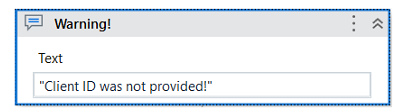
While working in an RPA testing project, you encountered the following activity in one of the workflows included in the project.


What action can you perform in your mocked file to replace the functionality of the MessageBox with a LogMessage during mock testing?
Show answerHide answer

Correct answer: C Surround activity with mock.

Explanation

Explanation: The Surround activity with mock option is used to create a mock activity that wraps around the original activity in the workflow. The mock activity can have different properties and actions than the original activity, depending on the testing scenario. In this case, the MessageBox activity can be surrounded with a mock activity that has the LogMessage action. This will replace the functionality of the MessageBox with a LogMessage during mock testing, which can be useful for logging the test results without interrupting the workflow execution. (UiPath Studio documentation1)
Question 26 Choose 1
What is the purpose of the Capture All Elements feature in Object Repository?
Show answerHide answer

Correct answer: D To capture all elements of an application from multiple screens simultaneously using the Computer Vision technology.

Explanation

Explanation: The Capture All Elements feature is a tool that lives inside Capture Elements from Object Repository, and it extracts all the elements of an application from multiple screens simultaneously using the Computer Vision technology. It adds them to your Object Repository library, so that you can use them in your automation projects without having to manually add them one by one1. This feature is available in Studio and Studio Pro, but not in StudioX2.
Question 27 Choose 1
A developer is building a robot to validate that the birth date is in the correct format within the submitted forms. Which method or activity is best-suited to validate the format?
Show answerHide answer

Correct answer: D Activity. Is Match

Explanation

Explanation: The Is Match activity is used to check if a string matches a given regular expression pattern. The regular expression pattern can be used to validate the format of a string, such as a date. In this case, the developer wants to validate that the birth date is in the correct format, which is dd-MM-yyyy. The regular expression pattern for this format is “\d{2}-\d{2}-\d{4}”, which means two digits, followed by a hyphen, followed by two digits, followed by a hyphen, followed by four digits. The Is Match activity will return True if the input string matches this pattern, and False otherwise. Therefore, the answer is D. Activity. Is Match.
Question 28 Choose 1
What distinguishes the Settings sheet from the Assets sheet in the "Config.xlsx" file?
Settings sheet contains Credential Assets stored in Orchestrator. Assets sheet contains hard-coded values.
Show answerHide answer

Correct answer: C Settings sheet contains hard-coded values. Assets sheet contains all names of Orchestrator Assets except those of type Credential.

Explanation

Explanation: The Config.xlsx file is a configuration file that stores the values of various parameters used in the automation process1. It has three sheets: Settings, Constants, and Assets2. The Settings sheet contains hard-coded values that may need to be changed occasionally, such as file paths, file names, timeout values, etc23. The Constants sheet contains values that are universal variables for the process, such as selectors, URLs, etc23. The Assets sheet contains the names of Orchestrator Assets that are used to store dynamic values that can be accessed across different processes, such as credentials, text, boolean, integer, etc24. However, the Assets sheet does not contain the names of Credential Assets stored in Orchestrator, because they are retrieved using a different activity (Get Credentials) than other assets (Get Asset). Therefore, the Credential Assets are stored in the Settings sheet instead of the Assets sheet.
Question 29 Choose 1
A developer has defined a variable named "CurrentDate" of type Date Time. Which of the following expressions can be used to show what hour was 12 hours prior to the date from the variable?
Show answerHide answer

Correct answer: A CurrentDate.AddHours(-12).Hour
Question 30 Choose 1
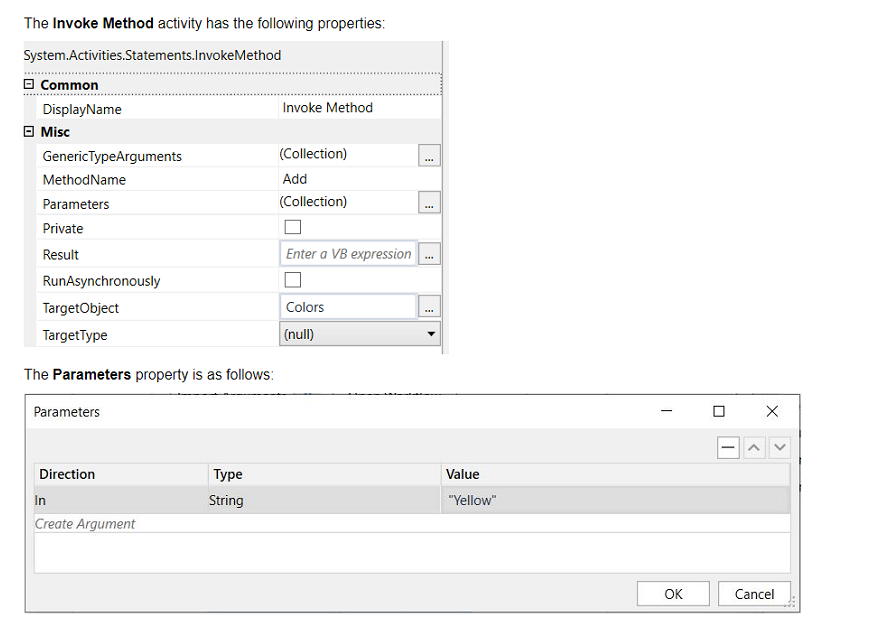
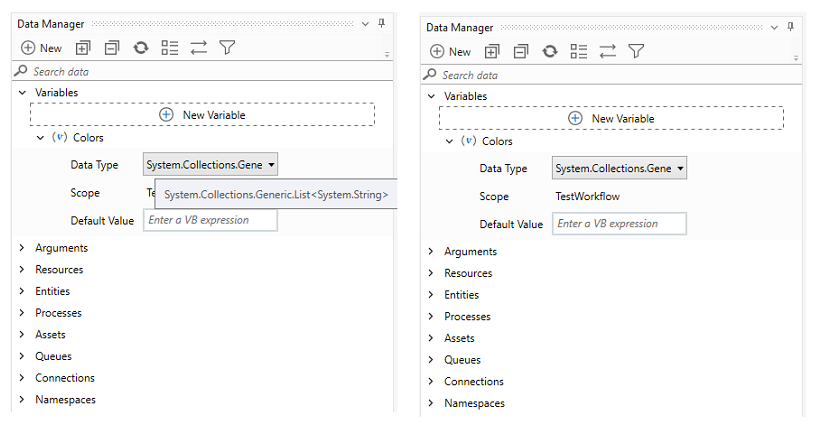
A developer wants to add items to a list of strings using the Invoke Method activity. The list is declared as follows:


Based on the information shown in the exhibits, what is the outcome of the Invoke Method activity?
Show answerHide answer

Correct answer: C Colors will contain an item with the value "Yellow".

Explanation

Explanation: The Invoke Method activity is used to add items to a list of strings. In this case, the list is declared as “Colors”. The outcome of the Invoke Method activity will be that the list “Colors” will contain an item with the value “Yellow”. This is because the TargetObject property is set to “Colors”, which is the list variable, the MethodName property is set to “Add”, which is the method of the list class, and the Parameters property is set to “Yellow”, which is the value to be added to the list. (UiPath Studio documentation1)
Full mock exam

Sit the UiPath-ADAv1 exam before exam day

Full-length mocks with the same number of questions and the same time limit as the real UiPath-ADAv1 exam. Every attempt draws a new set of questions from the full bank, so you can keep going until you pass comfortably.

Get full UiPath-ADAv1 mock exam
  • 65questions per mock
  • 105 mintime limit
  • 254questions in the bank
  • Newmock on every attempt