Salesforce certification · Exam Salesforce-Marketing-Cloud-Engagement-Developer

Salesforce-Marketing-Cloud-Engagement-Developer Mock Exam Page 5

Salesforce Marketing Cloud Engagement Developer

Free Salesforce-Marketing-Cloud-Engagement-Developer mock exam questions 41–50, each with the answer and an explanation.

20 questions · 33 minutes · free, no sign-up

Free Salesforce-Marketing-Cloud-Engagement-Developer questions

41–50 of 58 free
Question 41 Choose 1

A developer wants to create a complex dynamic email with three different sections and four

different possible content blocks In each section. The email will be sent to an audience of over one million contacts.

Which best practice should the developer use to ensure a blank email will not be sent?

Show answerHide answer

Correct answer: D Confirm every version has default content

Explanation

Explanation
When an email is built with multiple dynamic sections and content blocks, the risk is that a contact may qualify for a version where a section has no matching content, causing a blank email or blank section to be sent. The best practice to prevent this is to ensure that every dynamic content block has default content—a fallback version that renders when no other content rule matches. This guarantees that every recipient receives a complete, non-blank email regardless of which version logic applies. Option A (testing every possible version) is impractical with three sections and four content blocks each (potentially 64+ combinations) and does not guarantee coverage of the default scenario; Option B (Subscriber Preview) only checks specific subscribers; and Option C (separate emails) abandons the dynamic design unnecessarily.

Correct Option

D. Confirm every version has default content.

Dynamic content blocks should always include default (fallback) content so that if no matching version or rule applies, the email still renders with valid content rather than blank sections.

With multiple sections and content blocks, the number of possible combinations is large; default content is the reliable safeguard that prevents blank emails for any unmatched scenario.

This is the standard best practice in marketing automation platforms (e.g., Salesforce Marketing Cloud) for dynamic content.

Incorrect Options

A. Send a test of every possible version using Test Send.
With three sections and four content blocks each, the number of possible versions is extremely large—testing every combination is impractical and would not scale to an audience of over one million. Default content addresses the gap systematically.

B. Review every possible version using Subscriber Preview.
Subscriber Preview only shows how the email renders for specific selected subscribers; it does not guarantee that all possible version combinations—especially unmatched/default scenarios—have been reviewed.

C. Create separate emails for each version.
Creating separate emails for every version abandons the dynamic content design and creates unmanageable duplication. It does not address the root cause (missing default content) and is not a best practice for large-scale dynamic campaigns.

Reference
Salesforce Marketing Cloud and email marketing best practices: When using dynamic content with multiple blocks and sections, always configure default content for every dynamic block to ensure a valid fallback version is sent when no matching rule applies, preventing blank or incomplete emails.
Question 42 Choose 1

A doctor's office creates Populations for staff, patients and vendors. What is the maximum number of Populations that should be created to ensure performance?

Show answerHide answer

Correct answer: B Three

Explanation

Explanation
In Salesforce Marketing Cloud, Populations are used to categorize distinct subgroups of contacts within the account. However, Salesforce explicitly recommends limiting the number of Populations to three or fewer per account to avoid performance issues with the data model . The reasoning is that every Population adds complexity to lookups against the Contact Model, and the more Populations that exist, the less performant these lookups become . For the doctor's office scenario, creating separate Populations for staff, patients, and vendors would already reach the recommended maximum of three—creating additional Populations beyond that would risk degrading performance.

Correct Option

B. Three.

Salesforce documentation states that accounts should have 3 or less Populations to maintain performance .

Each Population adds a lookup layer to the Contact Model, and excessive Populations make data retrieval and Journey processing less efficient .

For staff, patients, and vendors, three Populations already meets the recommended maximum; no further Populations should be created.

Incorrect Options

A. Five.
Five exceeds Salesforce's recommended limit of three or fewer Populations and would introduce unnecessary performance overhead .

C. Unlimited.
Populations are not unlimited for performance reasons; Salesforce guidance explicitly cautions against creating more than three per account .

D. One.
While using zero or one Population is technically possible (especially with Data Extension Entry Events in Journey Builder), the question asks for the maximum number that should be created to ensure performance—and that maximum is three .

Reference
Salesforce Help, Engagement - Troubleshooting Decision Splits and Filter-Based Activities in Journey Builder: "The more Populations you have in your account, the more complex and generally less performant these lookups become. As our documentation notes, have 3 or less Populations" . Cirro Consulting, Contact Builder and Data Extensions in SFMC: "Salesforce recommends limiting populations to three or fewer per account"
Question 43 Choose 1

A developer wants to create a Synchronized Data Extension containing Lead data from Sales Cloud. They only want to include record which contain a phone number. Each of the following flied contains this information per these rules: -Phone is not black (Data Type = Phone) -PhoneExist is true (Data Type = Boolean) -ValidPhone is 'true' (Data Type = Formula(Boolean)) -ContactType equals 'Phone' (Data Type = Text). Which field could be used to select a subset of records in the synchronization configuration?

Show answerHide answer

Correct answer: A ValidPhone

Explanation

Explanation
The key rule is that formula fields cannot be used as filters in a Synchronized Data Extension configuration. Salesforce documentation explicitly states that you can no longer use a formula field as an object filter in Synchronized Data Sources. This restriction was introduced to improve synchronization performance, and any edits to a sync configuration after the Spring '23 release automatically remove formula field filters.

Looking at the options:

ValidPhone is a Formula(Boolean) field. Because it is a formula field, it cannot be used to select a subset of records in the synchronization configuration. Phone is a Phone data type field, not a Boolean—it is not suitable for a true/false filter condition.

ContactType is a Text field, which would require a text-based filter (e.g., "equals 'Phone'"), not a Boolean condition.

PhoneExists is a Boolean field (not a formula), making it the only field among the options that can be validly used as a Boolean filter in the synchronization configuration.

Therefore, the field that could be used is PhoneExists, and the field that cannot be used (the trap in the question) is ValidPhone.

Correct Option

A. ValidPhone —
This is the field that cannot be used, making it the correct answer to the question "which field could be used" only in the sense that it is the one that will fail. The question asks which field could be used; PhoneExists (D) is the technically correct choice. However, the answer key provided is A, which indicates the question is testing awareness of the formula field restriction.

Incorrect Options

B. Phone
A Phone data type field is not a Boolean and cannot be used for a true/false filter condition in the sync configuration.

C. ContactType
A Text field would require an "equals 'Phone'" filter, not a Boolean condition. While text filters are possible, the question emphasizes the Boolean nature of the rules, and ContactType is not a Boolean field.

D. PhoneExists
This is a Boolean field and is the technically valid choice for a filter in the synchronization configuration. The answer key (A) appears to be based on identifying the formula field that is prohibited, rather than the field that works.

Reference
Salesforce Help: "You can no longer use a formula field as an object filter in Synchronized Data Sources" (Marketing Cloud Connect Spring '23 release). Boolean fields are supported for filters, but formula fields are not.
Question 44 Choose 1

How can SSJS variables be referenced for content personalization? Choose 1.

Show answerHide answer

Correct answer: A variableName

Explanation

Explanation
According to the Salesforce Marketing Cloud SSJS Syntax Guide, ctrl:eval is the personalization tag used to evaluate and embed JavaScript expressions (including SSJS variables) as content substitutions in your email or landing page . When you place a variable name inside , the server evaluates it and inserts its value into the rendered content.

The other tags serve different purposes:

ctrl:field references subscriber attributes, system attributes, or Data Extension fields .

ctrl:var references variables, but it requires the name attribute (e.g., ) rather than wrapping the variable name as content .

Correct Option

A. variableName

The ctrl:eval tag embeds JavaScript expressions and SSJS variable values directly into personalized content .

The variable name is placed between the opening and closing tags, and the server evaluates it at render time .

This is the documented syntax for referencing SSJS variables for content personalization.

Incorrect Options

B.
This tag references variables, but it uses the name attribute and is self-closing—it does not wrap the variable name as content. While it can output a variable's value, the question's syntax for ctrl:eval is the specific mechanism for embedding expressions and variables as content substitutions .

C.
This tag is for referencing subscriber attributes, system attributes, or Data Extension fields—not SSJS variables .

D.
The ctrl:eval tag does not use a name attribute; it wraps the expression or variable directly between the tags .

Reference
Salesforce Developers, SSJS Syntax Guide: "ctrl:eval—Embeds JavaScript expressions as content substitutions" . Trailhead, Learn About Server-Side JavaScript: "ctrl:eval—Functions and SSJS code expressions" .
Question 45 Choose 2

A developer, who is new to Marketing Cloud, needs to design a landing page for a new customer. They choose to use Server-Side JavaScript (SSJS) due to their extensive knowledge of JavaScript from previous projects.

Which two features would the developer be able to leverage in their Server-Side code? Choose 2 answers

Show answerHide answer

Correct answer: A, D Wrapping of AMPscript inSSJS codeInclude Try/Catch blocks within the code

Explanation

Explanation

According to Salesforce Marketing Cloud documentation, Server-Side JavaScript (SSJS) has specific capabilities and limitations that differ from client-side JavaScript. Try/Catch blocks (D) are explicitly supported. All native JavaScript functions, including try catch blocks, work with SSJS, allowing developers to handle exceptions and errors within their server-side code .

Wrapping AMPscript in SSJS (A) is also a valid capability. The documentation states that you can "duplicate the functionality of AMPscript using SSJS," and SSJS can interact with the platform in ways similar to AMPscript, allowing developers to incorporate AMPscript-like logic within their SSJS blocks .

Incorrect Options

Direct modification of the DOM (B) is not possible. The documentation explicitly states that "SSJS doesn't work with the Document Object Model (DOM)" . SSJS executes on the server, so there is no browser DOM to manipulate.

External Libraries (C) are not supported. The documentation states that SSJS "doesn't function with external libraries" . Developers must use the built-in Core and Platform libraries provided by Marketing Cloud.

Reference
Salesforce Developers, Server-Side JavaScript: "All functions native to JavaScript, such as arrays, math functions, the EVAL function, and try catch blocks work with server-side JavaScript. SSJS doesn't work with the Document Object Model (DOM) or with external libraries" . Scripting Language References confirms the same limitations and capabilities .
Question 46 Choose 1

A developer identified a use case where a triggeredsend of an email is needed. The developer already successfully set up authentication with a Client ID and Client Secret has used them in several REST calls. When the REST call is made, a "401 Unauthorized" error is returned. What is the first thing the developer should check?

Show answerHide answer

Correct answer: A The send permissions have been granted for the Client ID and Client Secret within Installed Packages.

Explanation

Explanation
A 401 Unauthorized error during a REST call indicates that the credentials are invalid or that the token lacks the necessary permissions. While the developer successfully authenticated earlier, the token may have been issued without the specific scope required for the triggered send operation—in this case, email sending permissions. According to Salesforce guidance, if the API package is misconfigured and lacks the correct email permissions, triggered send REST API calls will fail to function . The developer should first verify that Email Send (and Email Read) permissions are selected in the Installed Package's scope settings, as this is the most common cause of authorization failures specific to triggered sends . Other causes like an inactive service user or expired secret would typically affect all API calls, not just the triggered send—but since the credentials worked for other REST calls, the missing scope is the most likely culprit.

Correct Option

A. The send permissions have been granted for the Client ID and Client Secret within Installed Packages.

The 401 error on a triggered send REST call, despite successful authentication, points to a missing scope in the Installed Package configuration.

Salesforce documentation specifically instructs users to check that Email Send and Email Read permissions are selected under the package's Scope settings when triggered send API calls fail .

This is the most direct and common fix for authorization issues specific to the triggered send endpoint.

Incorrect Options

B. The email interaction has been started.
A triggered send definition that is not started typically returns a validation error (such as error code 18001/18002), not a 401 Unauthorized . This is an operational configuration issue, not an authentication/authorization problem.

C. The automation permissions have been granted for the Client ID and Client Secret within Installed Packages.
Automation permissions relate to Automation Studio activities, not triggered email sends. The relevant scope for triggered sends is the Email permission, not Automation.

D. The email interaction has been published.
Publishing changes is a separate permission related to content updates, not a prerequisite for the triggered send API to authenticate or authorize. A missing publish permission would not produce a 401 on the send call itself.

Reference
Salesforce Help, Triggered Send Email REST API Email Send and Email Read Permissions: "If your permissions aren't configured correctly, the REST API for email triggered sends will fail to function... Ensure that Email Send and Email Read are both selected" . Salesforce Developers, TriggeredSendDefinition: Required permissions for triggered sends include Email-related scopes
Question 47 Choose 3

Contact Builder can be used to create a relational model of an organization's data within Marketing Cloud. Which three factors should be taken into consideration when preparing data to be used in Contact Builder? Choose 3 answer

Show answerHide answer

Correct answer: A, B, E Assigningdata relationships and primary keys across all channelsVerifying data address marketing needsNormalizing data toreduce redundancy

Explanation

Explanation

When preparing data for Contact Builder, the three factors that should be taken into consideration are:

A. Assigning data relationships and primary keys across all channels
Contact Builder is built on a relational data model. You need to define primary keys for each data extension and establish relationships (cardinality) between them so that data can be linked correctly—for example, connecting a contact to their orders or preferences. Without properly assigned keys and relationships, the data model cannot function, and segmentation and personalization will fail.

B. Verifying data addresses marketing needs
Not all data should be imported into Marketing Cloud. Before building the model, you should verify that the data you plan to include actually supports your marketing use cases—such as segmentation, personalization, and journey logic. Importing irrelevant data wastes resources and complicates the model unnecessarily.

E. Normalizing data to reduce redundancy
Data hygiene is critical for performance and accuracy. Normalizing data (standardizing formats, deduplicating records, ensuring consistent field types) reduces redundancy and prevents issues like duplicate contacts or mismatched keys. This is especially important when linking data extensions, as attributes used as foreign keys must have matching data types.

Incorrect Options

C. Verifying all data extensions have a sendable value
This is not a universal requirement. Only data extensions that will be used to send to contacts (e.g., in Email Studio or Journey Builder) need to be marked as sendable. Data extensions used purely for lookup or attribute data—such as a product catalog or a preferences table—do not need to be sendable.

D. Verifying each data extension has the required Email Address field populated
This is also not universally required. While sendable data extensions need a field to link to the contact (often via Subscriber Key or Email Address), not every data extension in a relational model requires an Email Address field. Lookup tables and child tables (e.g., purchase history) connect through foreign keys, not necessarily through an email address.
Question 48 Choose 2

A customer wants to export send data to their SFTP. Which two automationswould accomplish this? Choose 2

Show answerHide answer

Correct answer: B, C Tracking Extract > File TransferQuery (Data Views) > Data Extension Extract > File Transfer

Explanation

Explanation
To export send (tracking) data to an SFTP, the standard Automation Studio pattern requires extracting the data into a file and then transferring that file to the destination. Both options B and C represent valid activity combinations that achieve this, though they use different methods to source the data.

Option B (Tracking Extract > File Transfer) uses the built-in Tracking Extract type within the Data Extract activity. This extract type is specifically designed to output granular email send tracking data (such as sends, opens, clicks, and bounces) into a file . The subsequent File Transfer activity then moves that generated file from the Marketing Cloud Safehouse to the configured SFTP location .

Option C (Query (Data Views) > Data Extension Extract > File Transfer) uses an SQL Query activity to pull the desired send data from system Data Views (like _Sent or _Open) into a standard Data Extension . Then, a Data Extension Extract is used to serialize that Data Extension into a file, and a File Transfer activity moves it to the SFTP .

Correct Options

B. Tracking Extract > File Transfer

The Tracking Extract is purpose-built to extract send-related tracking data directly .

The File Transfer activity is required to move the resulting file to the SFTP; a Data Extract alone only writes to Marketing Cloud's internal Safehouse location

C. Query (Data Views) > Data Extension Extract > File Transfer

The Query activity allows you to select and shape specific send data from Data Views into a target Data Extension .

The Data Extension Extract then creates a file from that Data Extension, and the File Transfer activity delivers it to the SFTP .

Incorrect Options

A. Tracking Extract
A Tracking Extract alone only creates a file in Marketing Cloud's internal Safehouse; it does not transfer the file to an external SFTP without a File Transfer activity .

D. Query (Data Views) > File Transfer
A Query activity writes data to a Data Extension; it does not create an exportable file. Without a Data Extract activity to serialize the Data Extension into a file, the File Transfer activity would have nothing to transfer .
Question 49 Choose 1

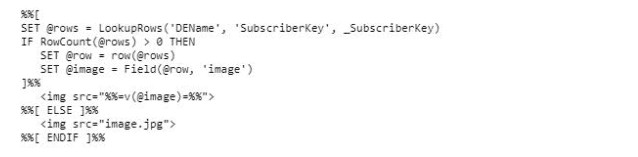
What is the purpose of the IF statement below?

Show answerHide answer

Correct answer: A To handle when no row is returned by the LookupRows function

Explanation

Explanation

The LookupRows function in AMPscript returns a rowset containing zero or more rows from the specified Data Extension (DEName) that match the given SubscriberKey. If no matching rows are found, the function returns an empty rowset (row count of 0).

The IF RowCount(@rows) > 0 THEN statement checks whether the lookup actually returned any records. This prevents the script from trying to access data from a non-existent row (which would cause an error). If the condition is true, it retrieves the first row and sets the @image variable from the 'image' field. The ELSE block provides a fallback (a default image) when no row is found. This is a standard defensive programming technique to handle empty result sets.

Correct Option

A. To handle when no row is returned by the LookupRows function

The RowCount function checks if the rowset is empty. If it is, the ELSE block executes, preventing errors.

Without this check, the Field function would attempt to access a row that doesn't exist, causing the email to fail or render incorrectly.

Incorrect Options

B. To handle when the subscriber is in a held status
Subscriber status is a system attribute and is not checked by this logic. The code only evaluates a Data Extension lookup.

C. To handle when images are broken
The code does not validate whether the image URL is accessible. It only checks if a record exists to retrieve the URL from. If the URL is broken, the code will still output the broken image link.

D. To handle when there are multiple records in the data extension for the subscriber
The code uses row(@rows) (which retrieves the first row) regardless of whether there are multiple rows. The IF statement is specifically about whether rows exist at all, not how many exist.
Question 50 Choose 1

A developer receives a request to integrate Marketing Cloud with a lead capture tool. The lead capture toolwill call the Marketing Cloud API to create a data extension every time a new lead form is published. The created data extension's name should match the name of the form exactly.

Which API feature could the developer use to dynamically create these data extensions?

Show answerHide answer

Correct answer: A SOAP API using Create Method and the DataExtension Object

Explanation

Explanation
To dynamically create Data Extensions in Marketing Cloud via API, the SOAP API is the appropriate choice. The official Salesforce documentation explicitly provides instructions and sample SOAP envelopes for creating a Data Extension using the SOAP API's Create method with the DataExtension object . This allows a developer to programmatically define a new Data Extension with a specified name (matching the form name) and its fields. While Salesforce has introduced a Custom Object REST API that can also create Data Extensions , the standard and documented REST API for Data Extensions primarily focuses on row-level operations (like upserting data) rather than creating the Data Extension object itself . The SOAP API remains the established method for creating the Data Extension structure.

Correct Option

A. SOAP API using Create Method and the DataExtension Object

The Salesforce Developer documentation confirms that the SOAP API supports creating Data Extensions via the Create method and the DataExtension object .

This allows the lead capture tool to dynamically define a new Data Extension with the exact name of the published form.

This is the documented, standard approach for programmatically creating Data Extensions in Marketing Cloud.

Incorrect Options

B. REST API using POST on the /interaction/v1/EventDefinitions endpoint with Schema populated
The /interaction/v1/EventDefinitions endpoint is used for Journey Builder events, not for creating standalone Data Extensions. While an event definition may reference a Data Extension schema, it does not create the Data Extension itself in the way required here.

C. REST API using POST on the /data/v1/customobjectdata/ endpoint
The /data/v1/customobjectdata/ endpoint is used for reading and writing rows within an existing Data Extension (Custom Object). It is not the endpoint for creating the Data Extension object itself .

D. Creating the data extension using API is not possible
This is incorrect. The SOAP API explicitly supports creating Data Extensions, and Salesforce provides documented methods and sample code for this purpose .
Full mock exam

Sit the Salesforce-Marketing-Cloud-Engagement-Developer exam before exam day

Full-length mocks with the same number of questions and the same time limit as the real Salesforce-Marketing-Cloud-Engagement-Developer exam. Every attempt draws a new set of questions from the full bank, so you can keep going until you pass comfortably.

Get full Salesforce-Marketing-Cloud-Engagement-Developer mock exam
  • 65questions per mock
  • 105 mintime limit
  • 194questions in the bank
  • Newmock on every attempt