Salesforce certification · Exam Salesforce-B2C-Commerce-Developer

Salesforce-B2C-Commerce-Developer Mock Exam

Salesforce B2C Commerce Developer

Free Salesforce-B2C-Commerce-Developer questions on Data Management Using Business Manager Usage, each with the answer and an explanation.

20 questions · 30 minutes · free, no sign-up

Data Management Using Business Manager Usage questions

1–9 of 9 free
Question 1 Choose 1
A developer working on a multi country site is asked to store country specific data that drives the creation of a country selector. Examples of the data storedare:
Pricebook to be used
Image URL for country flag
The data used in staging also applies in production, but only for this site.
Which approach should the developer take to implement these requirements?
Show answerHide answer

Correct answer: B Create a replicable, site-specific Custom Object with the custom data for each country.

Explanation

Explanation:

Why This Answer Is Correct
Custom Objects are the standard way to extend the B2C Commerce data model for specific business logic. By creating a site-specific Custom Object, the developer ensures that the data is partitioned per site. Furthermore, Custom Objects are replicable, meaning data entered in the Staging instance can be pushed to Production via the standard Replication process. This directly matches the requirement that data used in staging also applies in production. Since the requirements include structured fields such as a Pricebook ID and a Flag Image URL for a country selector, a Custom Object provides a clean, type-safe schema to store and retrieve this information efficiently in code.

Why the Other Options Are Incorrect
A. Extend the Locale System Object
While the Locale system object exists, it is not designed to be flexibly extended with custom attributes like image URLs or custom pricebook mappings. System objects have limitations compared to Custom Objects and are not ideal for storing site-specific business configuration data.

C. Create Site-Specific Content Assets
Content assets are intended for managing HTML or text-based content. Although they can technically store JSON or configuration data, this approach is not type-safe and is considered a workaround rather than a best practice. Content assets are also harder to query and maintain when used for structured logic such as mapping countries to pricebook IDs, compared to querying Custom Objects programmatically.

References
Salesforce B2C Commerce – Custom Objects
Replication of Custom Objects
Question 2 Choose 1
The developer has been given the following business requirement:
The shipping method, Free Standard Ground Shipping' hasan exclusion for products *lth category equals or is child of electronics-televisions.'
The marketing department has scheduled a sale offering a “Free Standard Ground Shipping” method for brand XyzTv televisions for the next 3 months.
What method accomplishes this while following best practices?
Show answerHide answer

Correct answer: C Create an allow list for the existing shipping method by adding a product exclusion for 'brand equals XyzTV" to the exclusion list for "Free Standard Ground Shipping."

Explanation

Explanation:

The scenario involves a shipping exclusion by category (electronics-televisions) and a temporary exception for brand XyzTV. The goal is to offer “Free Standard Ground Shipping” to XyzTV products even though they fall under an excluded category.

Why Option C is Best Practice:
It uses configuration over customization, ensuring:

Maintainability
Business Manager visibility
Minimal developer overhead

By adding an allow list exception for brand = XyzTV, the platform bypasses the broader category exclusion only for that brand.
📌 No code changes required, meaning marketers can manage this promotion without asking developers to modify checkout flows or shipping models.

🚫 Why A & B Are Incorrect
A. Extend shippingMethod.js
Customizing shipping logic in a model introduces risk, requires deployment, and is difficult to manage for temporary promotions.

B. Extend CheckoutShippingServices controller
Breaks clean separation between business logic and UI. Tightly coupling shipping rules with checkout flow makes testing and future changes harder.

🔗 Reference:
“You can exclude products from a shipping method based on category, product, or attribute values. You can define exclusions and also override them by configuring allow lists.” — Salesforce B2C Commerce | Shipping Method Configuration

📖 Official Documentation: Shipping Methods – Commerce Cloud Business Manager
Question 3 Choose 1
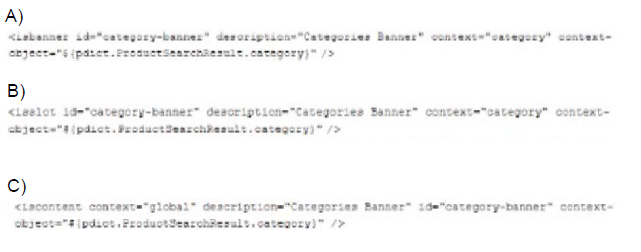
A developer has a requirement to display a banner in two different category pages.
Which snippet of code should the developeraddto a template to allow the merchant to configure each independently?

Show answerHide answer

Correct answer: B Option B

Explanation

Explanation:

In Salesforce B2C Commerce (SFCC), particularly in SFRA (Storefront Reference Architecture), merchants configure content slots (banners, promotions, rich text, etc.) per category or page via Business Manager → Merchant Tools → Online Marketing → Content Slots. The tag is the standard ISML tag used to render a slot in templates, allowing merchants to assign different content assets (e.g., image banners, HTML snippets) to the same slot ID on different context objects — in this case, different categories.

Key attributes of <islot> that make option B correct:
- id="category-banner"
→ Unique identifier for the slot. This is what the merchant sees and configures in Business Manager. The same id can be reused across multiple templates/pages.
- description="Categories Banner"
→ Human-readable label shown in Business Manager when assigning content to the slot.
- context="category"
→ Specifies the context type. When set to "category", the slot becomes category-specific. The merchant can then assign different banners to different categories (e.g., one for "Women’s Clothing", another for "Men’s Shoes").
- context-object="${pdict.ProductSearchResult.category}"
→ Dynamically passes the current category object to the slot renderer.
→ pdict.ProductSearchResult.category is the standard way in SFRA category/search templates to access the current category being viewed.
→ This tells the platform: “Show the content assigned to slot category-banner for this specific category.”

Why this allows independent configuration per category page:
Because the slot is tied to context="category" + a dynamic context-object, the merchant can go to Content Slots in Business Manager, select the slot category-banner, and assign completely different content assets to each category independently (e.g., a summer sale banner for "Dresses", a winter collection banner for "Jackets").
No code changes are needed when adding new categories — the merchant simply assigns content to the new category via the UI.

Why not the other options?
- Option A: <banner id="category-banner" ... context-object="${pdict.ProductSearchResult.category}" />
→ There is no <banner> tag in ISML. This is invalid syntax and will cause a rendering error.
- Option C: <icontent context="global" description="Categories Banner" id="category-banner" context-object="..." />
→ <icontent> is not a valid ISML tag.
→ Even if it were <iscontent> (which does exist), setting context="global" makes the slot global (same content everywhere), not category-specific. Merchants cannot configure it differently per category.

Best Practice Summary:
Use <islot> with context="category" (or "product", "folder", "search", etc.) + context-object for any page where you want merchants to control content per context object. This is the recommended pattern in SFRA for category-specific banners, promotions, hero images, etc.

References:
Salesforce Developer Documentation: ISML <islot> Tag → Explains context, context-object, and category-specific usage.
Salesforce Help: Content Slots → Describes configuring slots per category using context-object.
SFRA GitHub / Documentation: Category Page Template → Real-world examples of <islot> with category context.
Trailhead Module: Merchandising with B2C Commerce – Covers slot configuration for category pages.
Question 4 Choose 1
A developer is is configuring Shipping Methods on a storefront. Which of the following considerations must be keptin mind while configuring shipping methods.
Show answerHide answer

Correct answer: A You can exclude products that can't be shippedwith a particular shipping method

Explanation

Explanation:

Why Option A is Correct:
Salesforce B2C Commerce provides robust tools in Business Manager for configuring shipping methods and defining their eligibility rules. One of the primary functions of this system is managing logistics constraints.
Merchants can easily define rules within a specific shipping method configuration (Administration > Order Management > Shipping Methods > [Select Method] > Exclusions) to exclude certain products based on various criteria. Common criteria include product attributes like weight, size (dimensions), categories, or specific product IDs. This allows a merchant to set up rules like "Ground Shipping only for items under 50 lbs" or "Hazardous materials cannot use Air Shipping." This ensures accurate shipping costs and compliance with logistics provider rules are handled automatically during checkout.

Why Other Options Are Incorrect:
B. You can't exclude addresses that aren't used by a particular shipping method: This is incorrect. Shipping methods are heavily configured based on destination address (country, state/province, postal codes). You absolutely can define which addresses a method applies to (e.g., configuring a "Local Pickup" method to only be available for specific ZIP codes or a "USPS Priority Mail" method to only be available for U.S. addresses).

C. You can't define surcharge shipping costs for specific product groups: This is also incorrect. While basic shipping is often based on order total or weight, B2C Commerce allows for complex shipping cost calculations based on product groups, specific products, or complex rules defined in the shipping cost definitions. Merchants can define surcharges or entirely different rates for specific items (e.g., an oversized item fee).

References:
Configure Shipping Methods for B2C Commerce - Salesforce Help
Shipping Method Exclusions Documentation
Trailhead: Manage Shipping in B2C Commerce
Question 5 Choose 1
A client sells its products in North America, Europe, and Asia, and has a B2C Commerce Site for each of these markets. The client receives threearea-specific snippets of analytics code by a third-party provider to insert in the sites.
How should the developer configure an instance to allow the merchant to independently insert and update these snippets?
Show answerHide answer

Correct answer: A Create a new "HTML" attribute in the SitePreference object type.

Explanation

Explanation:

In Salesforce B2C Commerce, site preferences are ideal for enabling merchants to manage site-specific configurations — especially for values like tracking snippets, third-party integrations, or environment toggles. By creating a custom HTML preference, merchants can insert and edit analytics code for each region-specific site directly from Business Manager without touching the codebase.

✅ Why Option A Is Correct
You create a custom SitePreference attribute (e.g., analyticsSnippet) with type html.
Each site (North America, Europe, Asia) can have its own value stored via Business Manager.
Merchants or content managers can update the snippet without developer involvement.

In templates (ISML), you render it using:
${Site.getCustomPreferenceValue('analyticsSnippet')}

📌 Advantage:
Dynamic, scalable, and localized — aligns with best practices for separating config from code.

❌ Why B & C Are Not Suitable

B. ISML conditional tags
Hard-coded logic that requires deployment for updates. Not merchant-friendly and violates maintainability goals.

C. Service Profile
Service Profiles are used for external integrations, such as SOAP/REST calls, not for rendering or storing HTML snippets.

🔗 Reference:
“Site preferences allow developers to define configurable settings accessible via Business Manager. HTML-type preferences are ideal for storing markup or third-party tracking code.” — Salesforce B2C Commerce | Developer Guide
📖 Site Preference Configuration
Question 6 Choose 1
A client has a requirement to allow users on the Storefront to filter by a newly created attribute.
After creating the search refinement, what else is necessary to achieve this?
Show answerHide answer

Correct answer: A Ensurethe attribute has data and is indexed

Explanation

Explanation:

After creating a search refinement definition (to allow filtering by a new product attribute on the Storefront), you must ensure that:

The attribute contains actual data in the product catalog
The attribute is indexed in the search index
This makes it available to be used for refinements (faceted search) on the storefront

Even if you create the refinement configuration in Business Manager, it won’t work unless the attribute is indexed and populated.

🔧 Steps to Achieve Filtering on a New Attribute:
✅ Create the attribute in the product system object (if not already present).
✅ Populate the attribute with values for the appropriate products.
✅ Configure it as searchable and refinable in Business Manager:
Go to Merchant Tools → Search → Searchable Attributes
Set:
Searchable = true (if you want to search by it)
Use in Search Refinements = true (to enable filter)
✅ Rebuild the search index so the changes take effect.
✅ Verify in storefront: You should see the new refinement appear in the product listing page sidebar.

❌ Why the Other Options Are Incorrect:
B. Set the attribute as Searchable
This is necessary only if you want the attribute to be searchable, but not sufficient alone to make it refinable. Also, indexing is still required.
C. Change productsearchrefinebar.isml
The SFRA template already supports dynamic refinements. You don’t need to change the ISML unless you’re customizing layout or display.

📘 Reference:
Searchable Attributes & Refinements
Indexing Product Attributes for Search
Question 7 Choose 1
A developer wants to configure multiple products that should only be sold as a group. It should not be possible for buyers to buy these products individually. How should the developer configure the products?
Show answerHide answer

Correct answer: A Bundle

Explanation

Explanation

Salesforce B2C Commerce Product Grouping Options
Salesforce B2C Commerce offers three primary ways to group products: Sets, Bundles, and Variation Groups. The choice between them depends entirely on the business requirement regarding inventory and purchasing behavior.

Understanding the Bundle
A Product Bundle is the correct configuration when multiple products must be sold together as a single unit. In a bundle, the parent product has its own unique ID, but it is composed of several child products. For this requirement, a merchant can configure the storefront so that these items are only purchasable through the bundle. While the individual components can exist in the catalog, the bundle allows them to be added to the cart as a single line item with a single price, which can be different from the sum of the individual products.

Inventory and Price Logic
The inventory of a bundle depends on the availability of its components. If one item in the bundle is out of stock, the entire bundle becomes unorderable. This behavior ensures the group remains intact. From a pricing perspective, the bundle can have its own price, enabling bundled or kit discounts that are not available when purchasing items separately.

Why Sets and Variations Don't Fit
A Product Set is a loose collection of products. On a product set page, a shopper can choose to add individual items from the set or add the entire set. It does not restrict customers from purchasing items individually, which does not meet the requirement.

A Variation Group is used to group products that share a common attribute, such as color or size variations under a master product. It is not intended for combining different types of products (for example, a camera, bag, and lens) into a single mandatory purchasable unit.

References
Salesforce B2C Commerce Help: Product Bundles, Sets, and Variations
Trailhead: Explore Product Types in B2C Commerce
Question 8 Choose 1
A developer wants to configure the following products so that same search results ire returned regardless of the search term used. The search term can be bag, purse, pocketbook, and tote. Mow should the developer configure this?
Show answerHide answer

Correct answer: A Synonyms

Explanation

Explanation:

To ensure that different search terms (like "bag," "purse," and "tote") return the same results, a developer must configure Synonym Groups in Business Manager.

How Synonyms Work
A synonym group tells the search engine: "These words mean the same thing in the context of our store." When a merchant creates a group containing bag, purse, pocketbook, tote, the search engine expands the shopper's query behind the scenes. If a shopper searches for "purse," the engine actually searches for "bag OR purse OR pocketbook OR tote." This ensures that products tagged with only "bag" will still appear for a user who used the word "tote."

Maintaining the User Experience
Synonyms are essential for handling regional language differences or common merchant terminology that might differ from how a shopper speaks. It is a "many-to-many" relationship where every word in the group is equal to every other word.

Why Hypernyms and Hyponyms are Different
Hypernyms (Option B): These define a one-to-many hierarchical relationship. For example, "Color" is a hypernym for "Red, Blue, Green." If a user searches for "Color," they get all colors. But if they search for "Red," they only get red. In the bag/purse example, the words are equal, not hierarchical.

Hyponyms (Option C): This is the reverse of a hypernym. "Red" is a hyponym of "Color." This is rarely used as a standalone configuration in B2C Commerce search settings; the system primarily focuses on Synonym and Hypernym groupings.

References
Salesforce B2C Commerce Documentation:Search Synonyms
Trailhead: Optimize Search in B2C Commerce
Question 9 Choose 1
Consider the following information: A merchant has this three-tier category structure setup in the Storefront catalog. New Arrivals > Women > Clothing The category named Clothing has all the clothing items for Women and is merchandised. A Search Refinement named Newness is correctly configured for the Clothing category. When a merchandiser views the Clothing category, the Search Refinement appears and works as expected. However, the merchandiser does not see the Search Refinement when searching for Clothing via the Storefront search. Why does the merchandiser not see the Search Refinement?
Show answerHide answer

Correct answer: B The Search Refinement definition is not set up for the Root category.

Explanation

Explanation

In Salesforce B2C Commerce (SFCC), Search Refinements (also called Search Refinement Definitions) can be configured at different levels of the category hierarchy. There are two distinct contexts in which refinements are displayed:

1. Category browsing — When a shopper navigates to a specific category (e.g., Clothing), SFCC uses the refinement definitions configured on that category (and its applicable hierarchy). This is why the Newness refinement appears correctly when viewing the Clothing category directly.

2. Storefront search — When a shopper performs a search from the storefront search box (a global/site-wide search), the search results are not scoped to a single category. Instead, the refinements displayed for search results are governed by the refinement definitions configured at the Root category level (the top of the catalog hierarchy). This is because a site-wide search can return products from any category, so SFCC falls back to the Root category's refinement configuration to determine which refinements to show.

Since the Newness refinement was only configured on the Clothing category and not on the Root category, it does not appear when the merchandiser performs a Storefront search. To make the refinement appear in search results, the developer/merchandiser must also configure the Newness refinement definition at the Root category level.

Why the Other Options Are Incorrect

A. The Search Refinement definition is not set up for the Women category.
– The Women category is an intermediate parent in the hierarchy (New Arrivals > Women > Clothing). Configuring the refinement on Women would not resolve the storefront search issue, because storefront search refinements are driven by the Root category, not by intermediate parent categories. This option misidentifies the level that governs search refinements.

C. There are conflicting Search Refinement definitions for Clothing and one of its parent categories.
– There is no indication of a conflict in the scenario. The problem is not a conflict between definitions; it is that the refinement was never configured at the Root category level, which is the level required for it to appear in storefront search results. This option invents a problem that the scenario does not describe.

Reference

Salesforce B2C Commerce documentation — Search Refinements (also called Search Refinement Definitions) in Business Manager under Merchant Tools > Search > Search Refinements, and the catalog category hierarchy configuration. The behavior of refinements in category browse vs. site-wide search is a documented distinction in SFCC merchandising.

That's the last free question in Data Management Using Business Manager Usage

You've seen the free 30% (9 of 32 questions). Full access unlocks every question and full-length Salesforce-B2C-Commerce-Developer mock exams, a different mock on every attempt.

Unlock full mock exam
Full mock exam

Sit the Salesforce-B2C-Commerce-Developer exam before exam day

Full-length mocks with the same number of questions and the same time limit as the real Salesforce-B2C-Commerce-Developer exam. Every attempt draws a new set of questions from the full bank, so you can keep going until you pass comfortably.

Get full Salesforce-B2C-Commerce-Developer mock exam
  • —questions per mock
  • —time limit
  • 154questions in the bank
  • Newmock on every attempt