Explanation
Explanation:
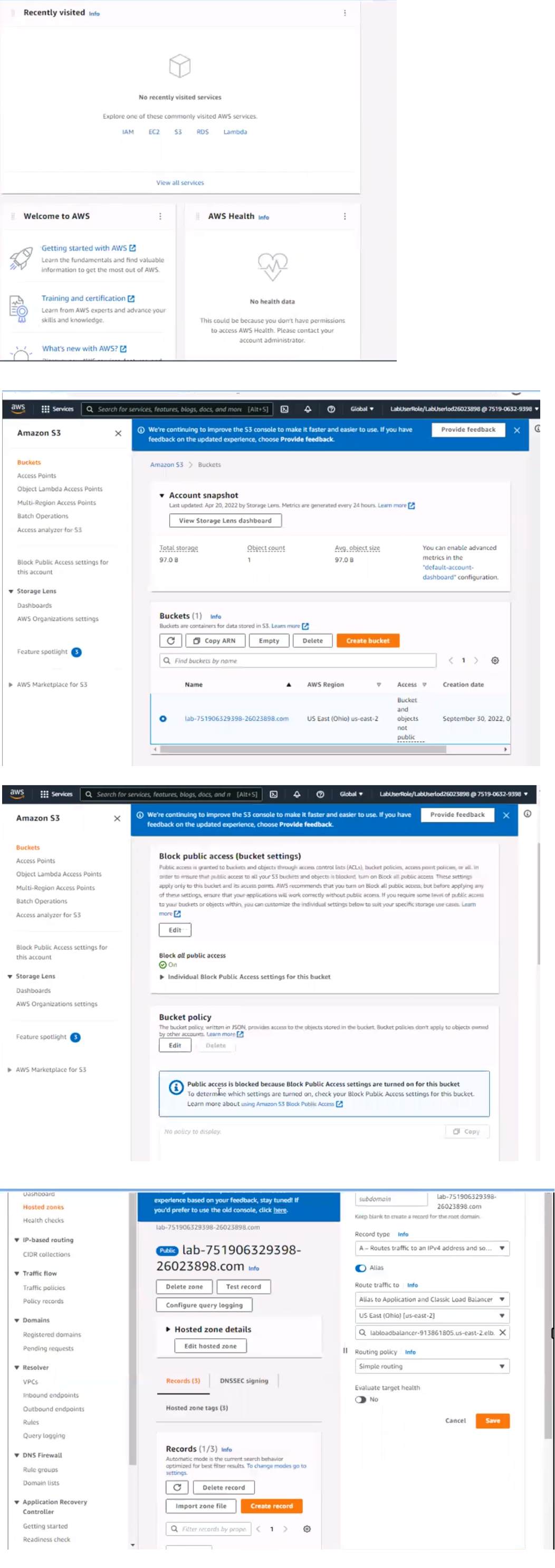
Here are the steps to configure an Amazon S3 bucket to serve a static error page in the
event of a failure at the primary site:
Log in to the AWS Management Console and navigate to the S3 service in the useast-
2 Region.
Find the existing S3 bucket named lab-751906329398-26023898.com and click on
it.
In the "Properties" tab, click on "Static website hosting" and select "Use this bucket
to host a website".
In "Index Document" field, enter the name of the object that you want to use as the
index document, in this case, "index.html"
In the "Permissions" tab, click on "Block Public Access", and make sure that "Block
all public access" is turned OFF.
Click on "Bucket Policy" and add the following policy to allow public read access:
{
"Version": "2012-10-17",
"Statement": [
{
"Sid": "PublicReadGetObject",
"Effect": "Allow",
"Principal": "*",
"Action": "s3:GetObject",
"Resource": "arn:aws:s3:::lab-751906329398-26023898.com/*"
}
]
}
Now navigate to the Amazon Route 53 service, and find the existing hosted zone
named lab-751906329398-26023898.com.
Click on the "A record" and update the routing policy to "Primary - Failover" and
add the existing ALB as the primary record.
Click on "Create Record" button and create a new secondary failover alias record
for the domain lab-751906329398-26023898.com that routes traffic to the existing
S3 bucket.
Now, when the primary site (ALB) goes down, traffic will be automatically routed to
the S3 bucket serving the static error page.
Note:
You can use CloudWatch to monitor the health of your ALB.
You can use Amazon S3 to host a static website.
You can use Amazon Route 53 for routing traffic to different resources based on
health checks.
You can refer to the AWS documentation for more information on how to configure
and use these services: