CompTIA certification · Exam SK0-005

SK0-005 Mock Exam Page 5

CompTIA Server+

Free SK0-005 questions on Topic 1: Exam Set A, each with the answer and an explanation.

20 questions · 20 minutes · free, no sign-up

Topic 1: Exam Set A questions

41–45 of 45 free
Question 41 Choose 2
A server has experienced several component failures. To minimize downtime, the server administrator wants to replace the components while the server is running. Which of the following can MOST likely be swapped out while the server is still running? (Select TWO).
Show answerHide answer

Correct answer: A, C The power supplyThe hard drive

Explanation

Explanation:

Many enterprise-grade servers are designed with hot-swappable components — parts that can be replaced without shutting down the system. The most common hot-swappable components are power supplies and storage drives, as they’re built for redundancy and continuous uptime.

A. The power supply

Enterprise servers often have redundant power supplies.
If one fails, the other continues to provide power, allowing the faulty unit to be replaced while the server is still running — ensuring no downtime.

C. The hard drive

In servers with RAID arrays or hot-swap drive bays, individual hard drives can also be replaced on the fly.
The array continues running using redundancy (like RAID 1, 5, or 6), and the replaced drive is automatically rebuilt after insertion.

Why the Other Options Are Incorrect:

B. The CPU:
Cannot be replaced while the server is powered on — requires full shutdown and reinstallation.

D. The GPU:
Not hot-swappable; removal under power could cause hardware damage.

E. The cache:
Integrated into the CPU or motherboard — not a removable or serviceable part.

F. The RAM:
Typically not hot-swappable unless using specialized systems that support memory hot-add (rare in standard servers).

Reference:
CompTIA Server+ SK0-005 Exam Objectives, Domain 4.2: “Given a scenario, apply server troubleshooting and maintenance procedures.”

Dell PowerEdge / HPE ProLiant Documentation: Hot-plug Power Supply and Hot-swap Drive Support.

NIST SP 800-94: High Availability and Redundancy Concepts.

In summary:
The components that can most likely be replaced while the server is running are the Power Supply (A) and Hard Drive (C).
Question 42 Choose 2
Which of the following are measures that should be taken when a data breach occurs?
(Select TWO).
Show answerHide answer

Correct answer: B, E Disclose the incident.Identify the exploited vulnerability.

Explanation

Explanation

B. Disclose the incident

This is a legal and ethical requirement in most jurisdictions (e.g., GDPR, HIPAA, various state laws). Timely disclosure (or notification) must be made to regulatory bodies and, most importantly, the affected individuals.
It protects the affected individuals by giving them an opportunity to take mitigating steps (like changing passwords or setting up credit monitoring) and helps the organization manage its legal and reputational risk through transparency.

E. Identify the exploited vulnerability

This is a core component of the Eradication and Remediation phases of incident response. You must pinpoint the root cause (the hole the attacker used) to patch it and prevent the attacker from simply coming back the same way.
The system cannot be considered secure or brought back online until the exploited vulnerability is correctly identified and closed.

Analysis of Other Options

A. Restore the data from backup:
This is part of the Recovery phase, which comes after the breach has been contained, the threat has been eradicated, and the root cause (vulnerability) has been fixed. Restoring data before fixing the vulnerability just puts the clean data back onto a compromised system.

C. Disable unnecessary ports:
This is a good proactive security measure to prevent future breaches and can be a part of Containment (isolating the affected system), but it's not the primary, universally required step like Disclosure or identifying the exploit. The specific exploited vector might not have been an open port.

D. Run an antivirus scan:
This is a step in Eradication but is often insufficient, as advanced attacks bypass standard antivirus. The more crucial step is forensic analysis to find the root cause (E), not just surface-level malware.

F. Move the data to a different location:
This is generally ineffective and can hinder the forensic investigation. The focus should be on isolating (Containment) and securing the compromised environment, not just moving the data to another potentially insecure location.

Reference
CompTIA Server+ SK0-005 Exam Objectives
5.4 – Given a scenario, apply appropriate security controls for servers → Includes incident response procedures: identification, containment, disclosure, eradication.
NIST SP 800-61 – Computer Security Incident Handling Guide
Key steps: Detection → Analysis → Containment → Eradication → Recovery → Post-incident (including disclosure and lessons learned)
Question 43
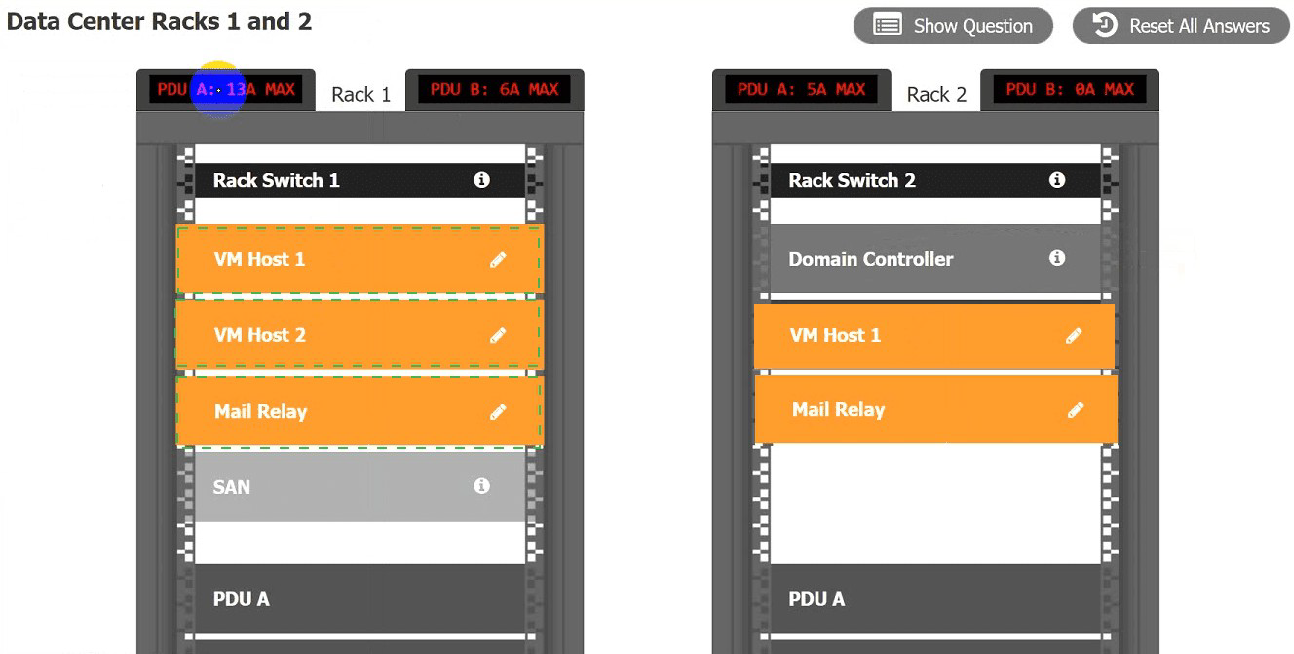
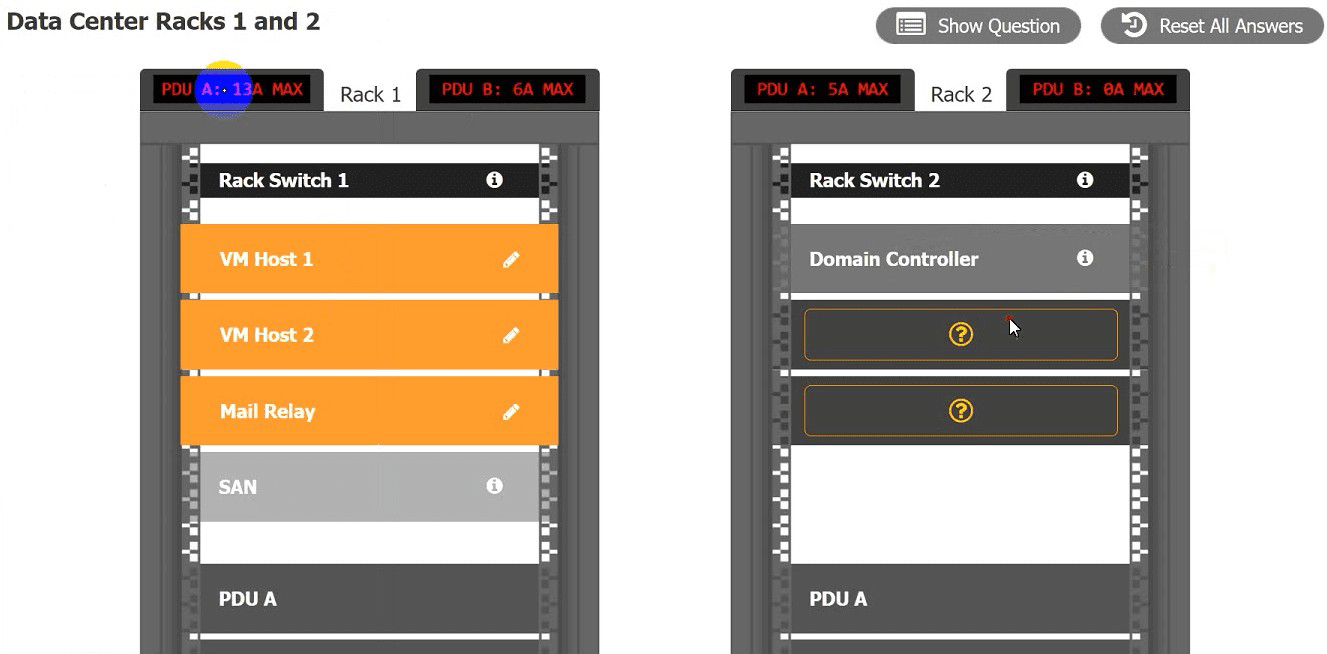
A recent power Outage caused email services to go down. A sever administrator also received alerts from the datacenter’s UPS.
After some investigation, the server administrator learned that each POU was rated at a maximum Of 12A.
INSTRUCTIONS
Ensure power redundancy is implemented throughout each rack and UPS alarms are resolved. Ensure the maximum potential PDU consumption does not exceed 80% or 9.6A).
a. PDU selections must be changed using the pencil icon.
b. VM Hosts 1 and 2 and Mail Relay can be moved between racks.
c. Certain devices contain additional details

Show answerHide answer

Explanation

Question 44 Choose 1
A technician needs to deploy an operating system that would optimize server resources.
Which of the following server installation methods would BEST meet this requirement?
Show answerHide answer

Correct answer: C Core

Question 45 Choose 1
Which of the following can be used to map a network drive to a user profile?
Show answerHide answer

Correct answer: C Login script

Explanation

Explanation:

In enterprise Windows environments, login scripts are the established and supported method for automatically mapping network drives to a user’s profile during logon. These scripts execute in the user’s security context immediately after authentication, allowing administrators to dynamically assign drive letters based on user identity, group membership, departmental OU, or other Active Directory attributes.

Login scripts are typically written in batch (.bat), PowerShell (.ps1), or legacy VBScript (.vbs) and can be deployed via:

Group Policy Objects (GPO):
User Configuration → Policies → Windows Settings → Scripts (Logon/Logoff) → Logon
User Account Properties in Active Directory Users and Computers:
Profile tab → Logon script field

Practical Example (Batch Login Script):

batch@echo off
:: Map departmental shared drive if user is in Sales group
net use S: \\CorpFS01\Sales /persistent:yes

:: Map personal home drive using username variable
net use H: \\CorpFS02\Users\%username% /persistent:yes

:: Conditional mapping using IFMEMBER (legacy tool)
IFMEMBER "Finance Users"
net use F: \\FinanceFS\SecureData /persistent:yes

This ensures consistent, repeatable drive mappings across all domain-joined workstations without manual intervention.

Why the other options are incorrect:

A. System service
System services run under privileged accounts like Local System, Local Service, or Network Service and start at boot time—before any user logs in. They operate outside the interactive user session and cannot access or modify the user’s desktop environment, including drive mappings. Attempting to map a drive via a service would make it available only to the service account, not the logged-on user.

B. Network service
This is a predefined low-privilege service account in Windows, not a tool or mechanism for configuration. It is used by services (e.g., IIS, SQL Server) to access network resources securely. It has no capability to execute user logon actions or map drives to user profiles.

D. Kickstart script
A Kickstart script (.ks file) is part of the Anaconda installer used in Red Hat Enterprise Linux (RHEL), CentOS, and Fedora for automated OS deployment. It defines partitioning, package selection, and post-install tasks during system provisioning—not user logon processes. It is completely unrelated to Windows networking or drive mapping.

Reference:
CompTIA Server+ SK0-005 Objectives – 2.3 “Given a scenario, configure user access to server resources” (login scripts).
Microsoft Docs – “Assign logon scripts to users or groups” (Group Policy > User Configuration > Policies > Windows Settings > Scripts > Logon).

That's the last free question in Topic 1: Exam Set A

You've seen the free 30% (45 of 153 questions). Full access unlocks every question and full-length SK0-005 mock exams (90 questions, 90 minutes), a different mock on every attempt.

Unlock full mock exam
Full mock exam

Sit the SK0-005 exam before exam day

Full-length mocks with the same number of questions and the same time limit as the real SK0-005 exam. Every attempt draws a new set of questions from the full bank, so you can keep going until you pass comfortably.

Get full SK0-005 mock exam
  • 90questions per mock
  • 90 mintime limit
  • 493questions in the bank
  • Newmock on every attempt