Microsoft certification · Exam SC-900

SC-900 Mock Exam

Microsoft Security Compliance and Identity Fundamentals

Find out if you're ready for SC-900. Take the free timed mock exam and get your score in minutes, or study the free SC-900 questions below with answers and explanations.

20 questions · 33 minutes · free, no sign-up

Free SC-900 questions

1–10 of 25 free
Question 1
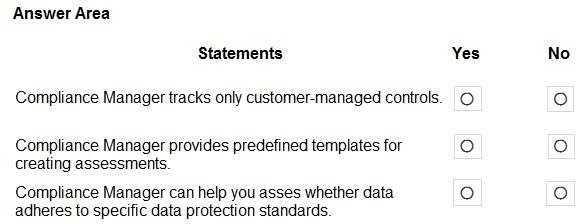
For each of the following statements, select Yes if the statement is true. Otherwise, select No. NOTE: Each correct selection is worth one point
Show answerHide answer

Explanation
Explanations:

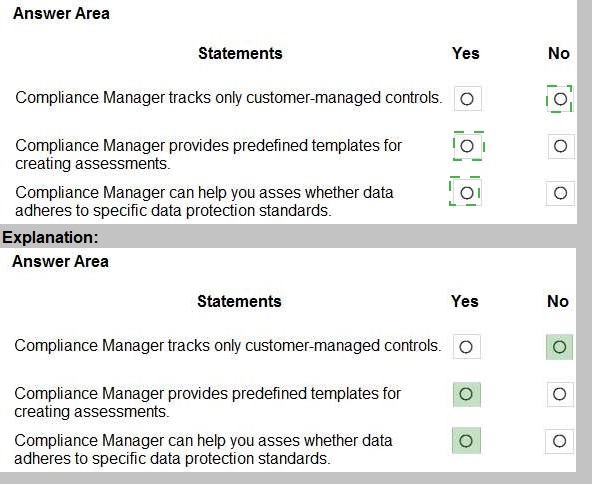
1. Statement: Compliance Manager tracks only customer-managed controls.
Answer: No
Explanation: This statement is false. A key feature of Compliance Manager is that it tracks both Microsoft-managed controls and customer-managed controls. Microsoft is responsible for implementing many controls related to the security of the cloud infrastructure itself. Your organization is responsible for controls related to your data and applications within the cloud. Compliance Manager provides a unified view of this shared responsibility, showing the status of controls managed by both parties.

2. Statement: Compliance Manager provides predefined templates for creating assessments.
Answer: Yes
Explanation: This statement is true. Compliance Manager includes a wide array of predefined assessment templates for common global, regional, and industry-specific regulations and standards (such as NIST, GDPR, ISO 27001, and more). These templates simplify the process of starting a compliance assessment by pre-populating the relevant controls and actions.

3. Statement: Compliance Manager can help you assess whether data adheres to specific data protection standards.
Answer: Yes Explanation: This statement is true. The primary purpose of Compliance Manager is to help you assess and manage your organization's compliance with data protection regulations and standards. It allows you to create assessments, assign controls, implement improvement actions, and track your compliance score against the requirements of standards like GDPR, which are fundamentally about data protection.

Reference:
Microsoft Learn:
What is Compliance Manager? - "Compliance Manager can help you throughout your compliance journey... Provides pre-built assessments based on common regional and industry standards... Calculates a compliance score so you can track your progress and report to management... Manages controls in one place, including controls for Microsoft-managed actions related to its cloud services, and customer-managed actions that your organization takes."
Question 2
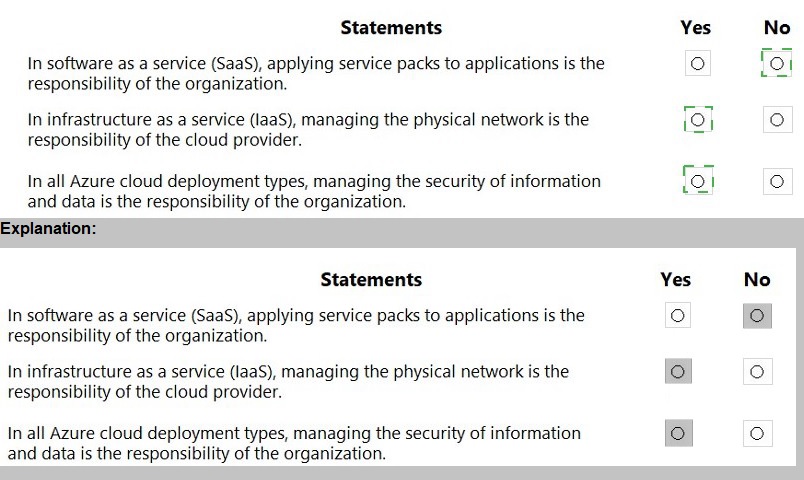
For each of the following statements, select Yes if the statement is true. Otherwise, select No. NOTE: Each correct selection is worth one point
Show answerHide answer

Explanation

Explanation:

1. In software as a service (SaaS), applying service packs to applications is the responsibility of the organization. ❌ No
In SaaS, the cloud provider manages everything from infrastructure to application updates.
The organization only manages data, access, and user configurations — not service packs or patches.
Reference:
Shared responsibility model – Microsoft Learn

2. In infrastructure as a service (IaaS), managing the physical network is the responsibility of the cloud provider. ✅ Yes
In IaaS, the provider handles physical infrastructure: servers, storage, networking hardware.
The customer manages OS, applications, and virtual networking.
Reference:
Azure IaaS responsibilities – Microsoft Learn

3. In all Azure cloud deployment types, managing the security of information and data is the responsibility of the organization. ✅ Yes
Regardless of deployment model (IaaS, PaaS, SaaS), data security is always the organization’s responsibility.
Microsoft secures the platform; customers secure their data and access.
Reference:
Azure security responsibilities – Microsoft Learn
Question 3 Choose 1
Which Azure Active Directory (Azure AD) feature can you use to provide just-in-time (JIT) access to manage Azure resources?
Show answerHide answer

Correct answer: C Azure AD Privileged Identity Management (PIM)

Explanation

Explanation:
Azure AD Privileged Identity Management (PIM) is the service specifically designed to provide Just-In-Time (JIT) administrative access to Azure resources and other privileged roles. Its core principle is to enforce the concept of "least privilege" by ensuring that users are only assigned elevated permissions when they need them, for a limited time, and often with approval requirements.

Key features of PIM that enable JIT access:
Eligible Assignments:
Instead of making a user a permanent Global Administrator, you make them eligible for the role. They must then activate the role when they need to perform a task.
Time-Bound Activation:
When a user activates an eligible role, it is only active for a pre-configured duration (e.g., 2 hours). After this time, the permissions are automatically revoked.
Approval Workflows:
You can require that a designated approver must grant permission before a user can activate their privileged role.

Why the other options are incorrect:
A. Conditional Access Policies:
This is a tool that uses signals (like user, device, location) to enforce access controls on applications. For example, it can block access from an untrusted network or require Multi-Factor Authentication (MFA). While it can complement PIM by adding another layer of security (e.g., requiring MFA upon role activation), it does not, by itself, provide the JIT provisioning and de-provisioning of administrative roles.
B. Azure AD Identity Protection:
This is a tool for detecting and remediating identity-based risks, such as leaked credentials or impossible travel. It helps protect all users from compromise but is not used to grant temporary, privileged access to resources.
D. Authentication Method Policies:
These policies define the methods available for users to authenticate, such as enabling FIDO2 security keys, the Microsoft Authenticator app, or SMS-based verification. They configure how a user signs in, not what privileged access they get or for how long.

Reference:
Microsoft Learn: What is Azure AD Privileged Identity Management? - "Privileged Identity Management (PIM) is a service in Azure Active Directory (Azure AD) that enables you to manage, control, and monitor access to important resources in your organization... Just-in-time privileged access to Azure AD and Azure resources.
Question 4
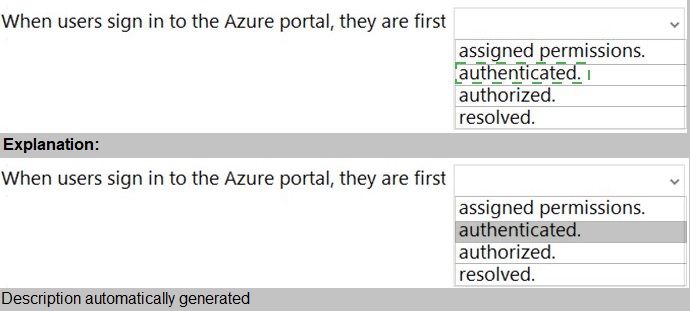
Select the answer that correctly completes the sentence.

Show answerHide answer

Explanation


Explanation:
The process of accessing a system like the Azure portal involves two distinct security stages:

Authentication:
This is the first step. It is the process of verifying who the user is. When a user signs in, they provide their identity (like a username) and a credential (like a password or a response from an MFA app). The system checks these credentials against its records to confirm the user's identity. This is the "proof of identity" step.
Authorization:
This is the second step, which happens after authentication is successful. Once the system knows who the user is, it determines what they are allowed to do. This is where assigned permissions and roles are checked to grant or deny access to specific resources and actions.
Therefore, the very first thing that happens during a sign-in is authentication.

Why the other options are incorrect:
assigned permissions: Permissions are assigned by an administrator in advance, as part of role definitions (e.g., in Azure RBAC). This is not something that happens during the sign-in event itself.

authorized:
Authorization is the crucial step that happens after authentication. You cannot authorize a user until you first know who they are (i.e., until they are authenticated).
resolved:
This term is not standard in the identity and access management process described for Azure AD sign-ins.

Reference:
Microsoft Learn: Authentication vs. Authorization - "Authentication is the process of proving that you're who you say you are. Authorization is the process of proving that you're allowed to do what you're trying to do... Authentication happens first."
Question 5
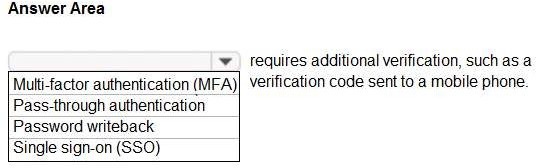
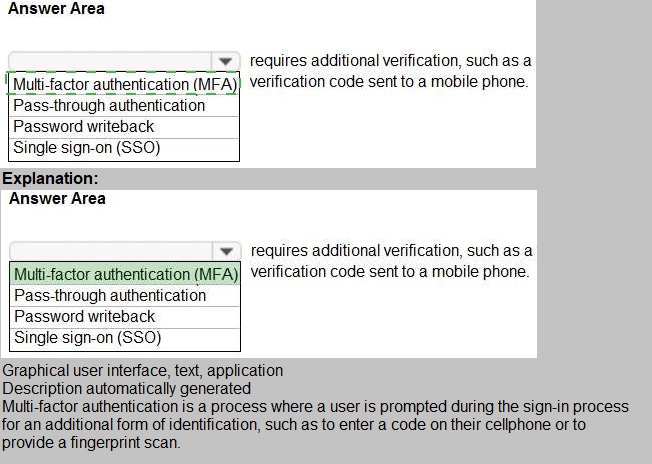
Select the answer that correctly completes the sentence

Show answerHide answer

Explanation


Explanations:
Pass-through authentication (PTA): This is a feature of Azure AD Connect. When a user signs in to Azure AD, this agent validates the user's password directly against the on-premises Active Directory. The core concept is that the authentication is "passed through" to the on-premises system.

Password writeback:
This is a component of Azure AD Connect's password hash synchronization or Pass-through Authentication. It allows password changes initiated in the cloud (for example, via the Azure AD self-service password reset portal) to be written back ("written back") to the on-premises Active Directory, ensuring password consistency.
Single sign-on (SSO):
This is a user authentication process that permits a user to enter one set of credentials (username/password) to access multiple applications or services. For example, after signing in to Windows or the Azure portal, a user can access other integrated SaaS apps like Microsoft 365 or Salesforce without being prompted for credentials again.

Reference:
Pass-through Authentication:
Microsoft Learn - Azure AD Pass-through Authentication - "Users can sign in to both on-premises and cloud-based applications using the same password."
Password Writeback:
Microsoft Learn - What is password writeback? - "Password writeback is an Azure Active Directory feature that allows password changes in the cloud to be written back to an on-premises directory."
Single Sign-On (SSO):
Microsoft Learn - What is Single Sign-On? - "Single sign-on (SSO) is an authentication method that allows a user to sign in once with one set of credentials (such as a username and password) and gain access to multiple applications or services."
Question 6
Select the answer that correctly completes the sentence

Show answerHide answer

Explanation


Explanation:
In Azure AD, the relationship between an application and the security principal that defines its access rights is key.

Application Object:
This is the global representation of an application for use across all tenants. You create this when you register an app in the Azure AD portal.
Service Principal:
This is the local representation of an application in a specific tenant. It defines what the app can actually do and who can access it within that tenant.
When you register an application in your Azure AD tenant, a service principal is automatically created in that same tenant. This service principal is the identity used by the application to authenticate and be authorized for accessing Azure resources. You grant permissions to the service principal, not directly to the application object.

Why the other options are incorrect:
guest account:
A guest account (Azure AD B2B user) represents an external user invited to collaborate within your tenant. It is a type of user principal, not an application identity.
managed identity:
A managed identity is a special type of service principal that is automatically managed by Azure and provides an identity for applications to use when connecting to Azure resources that support Azure AD authentication. While it is a service principal, it is not the default, automatic association for a standard app registration. You must explicitly enable a managed identity for an Azure resource (like a VM or App Service).
user account:
A user account represents a human identity (an employee, for example). Applications are non-human entities and are represented by service principals.

Reference:
Microsoft Learn:
Application and service principal objects in Azure Active Directory - "A service principal is created in each tenant where the application is used... When you register an application using the Azure portal, an application object as well as a service principal object are automatically created in your home tenant."
Question 7

Select the answer that correctly completes the sentence

Show answerHide answer

Explanation

Explanation:
The description provided in the question is the standard definition of a Security Information and Event Management (SIEM) and Security Orchestration, Automation, and Response (SOAR) solution, which is precisely what Azure Sentinel is.
Azure Sentinel is Microsoft's cloud-native SIEM/SOAR solution. It aggregates security data from various sources (across your organization, Microsoft solutions, and other vendors), uses analytics and threat intelligence to detect threats, provides visibility across your environment, and allows for automation of security responses.

Why the other options are incorrect:
Azure Advisor:
This is a personalized cloud consultant that analyzes your Azure resource configuration and usage telemetry to help you follow best practices for optimizing your Azure deployments for reliability, security, performance, and cost. It is not a security event management system.
Azure Bastion:
This is a service that provides secure and seamless Remote Desktop Protocol (RDP) and Secure Shell (SSH) connectivity to your virtual machines directly through the Azure portal. It is a network security and management tool, not a SIEM.
Azure Monitor:
This is a comprehensive platform for collecting, analyzing, and acting on telemetry data from your cloud and on-premises environments. While it is a foundational service that Sentinel uses for data ingestion, Azure Monitor itself is a broad monitoring platform for performance and availability, not a dedicated security (SIEM/SOAR) solution.

Reference:
Microsoft Learn:
What is Azure Sentinel? - "Azure Sentinel is a cloud-native security information and event manager (SIEM) and security orchestration, automation, and response (SOAR) solution... delivering intelligent security analytics and threat intelligence across the enterprise."
Question 8
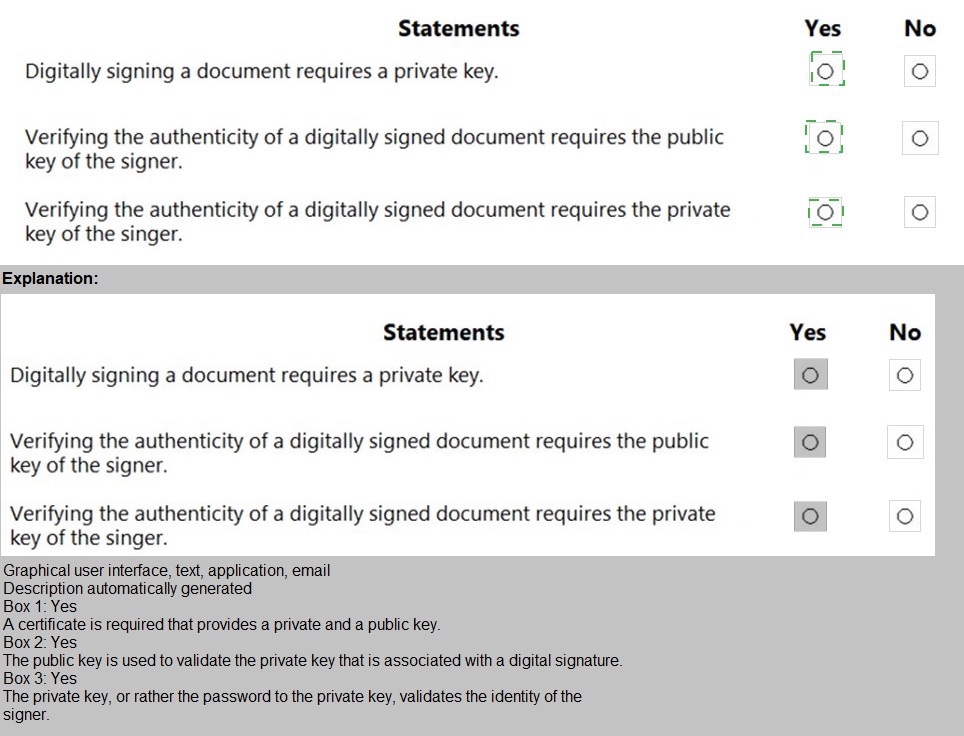
For each of the following statements, select Yes if the statement is true. Otherwise, select No. NOTE: Each correct selection is worth one point.

Show answerHide answer

Explanation


Explanation:
This is the fundamental principle of a digital signature. The act of creating a signature must be something only the signer can do. The private key is kept secret by the owner and is used to create the unique digital signature for a specific piece of data. If a private key is compromised, the security of the signature is broken.

2. Statement: Verifying the authenticity of a digitally signed document requires the public key of the signer.
Answer: Yes
Explanation:
This is the complementary part of the process. To verify a signature, anyone can use the signer's publicly available public key. The verification process confirms that the signature was created by the corresponding private key and that the data has not been tampered with since it was signed. The public key can be widely distributed without compromising security.

3. Statement: Verifying the authenticity of a digitally signed document requires the private key of the signer.
Answer: No
Explanation:
This statement is false and contradicts the entire public key infrastructure (PKI) model. The private key is only for creating the signature. If the verifier needed the signer's private key, it would no longer be secret, and anyone could forge signatures. Verification is intentionally designed to be performed using only the public key.

Reference:
Microsoft Learn:
Digital Signatures - "The digital signature is created by using the sender's private key. The signature is verified by using the sender's public key." This core concept is consistent across all PKI implementations.
Question 9 Choose 1
In the shared responsibility model for an Azure deployment, what is Microsoft solely responsible for managing?
Show answerHide answer

Correct answer: D the management of the physical hardware

Explanation

Explanation:
The shared responsibility model is a core concept in cloud computing. It clarifies that security is a joint effort between the cloud provider (Microsoft) and the customer. Microsoft is always responsible for the security of the cloud, meaning the underlying infrastructure. The customer is always responsible for security in the cloud, which refers to anything they put on that infrastructure.
For any Azure service (IaaS, PaaS, SaaS), Microsoft is solely responsible for:
The physical data centers
The physical network infrastructure
The physical servers and host hardware
This is a non-negotiable, fixed responsibility that does not change based on the type of deployment.

Why the other options are incorrect:
A. the management of mobile devices:
This is a customer responsibility. Managing and securing devices that access corporate data (Mobile Device Management) is handled by the customer, often using services like Microsoft Intune.
B. the permissions for the user data stored in Azure:
This is a customer responsibility. While Microsoft secures the infrastructure where the data resides, the customer is responsible for controlling access to that data through permissions, firewalls, and authentication settings.
C. the creation and management of user accounts:
This is a customer responsibility. Managing identities and user accounts (who has access) is done by the customer within their Azure Active Directory tenant.

Reference:
Microsoft Learn: Shared responsibility in the cloud - "The provider (Microsoft) is always responsible for the following: Physical hosts, Physical network, Physical datacenters. The customer is always responsible for the following: Data and information, Devices (mobile phones and PCs), User accounts and access."
Question 10 Choose 2
Which two tasks can you implement by using data loss prevention (DLP) policies in Microsoft 365? Each correct answer presents a complete solution. NOTE: Each correct selection is worth one point.
Show answerHide answer

Correct answer: A, C Display policy tips to users who are about to violate your organization’s policies. Protect documents in Microsoft OneDrive that contain sensitive information.

Explanation

Explanation:
Microsoft 365 Data Loss Prevention (DLP) is specifically designed to help you discover, monitor, and protect sensitive information across Microsoft 365 services like Exchange Online, SharePoint Online, OneDrive for Business, and Microsoft Teams.

A. Display policy tips to users:
This is a core feature of DLP. When a user performs an action that would violate a DLP policy (like trying to share a document containing credit card numbers externally), a policy tip can appear in apps like Outlook or OneDrive to warn the user and educate them about the policy, potentially blocking the action.
C. Protect documents in Microsoft OneDrive:
A primary function of DLP is to scan and protect data at rest in locations like OneDrive for Business. You can create policies that automatically detect sensitive information in OneDrive documents and take protective actions, such as restricting access, encrypting the content, or blocking external sharing.

Why the other options are incorrect:
B. Enable disk encryption on endpoints:
While Microsoft 365 has tools for endpoint management (like Microsoft Intune), which can enable disk encryption (e.g., BitLocker), this is not a function of a Data Loss Prevention (DLP) policy. DLP focuses on classifying and protecting data based on its content, not on managing device-level security settings.
D. Apply security baselines to devices:
Applying security baselines (pre-configured groups of Windows settings that recommend security configurations) is a function of endpoint security and device management services like Microsoft Intune or the Microsoft 365 security center, not a capability of DLP policies.

Reference:
Microsoft Learn: Learn about data loss prevention - "A data loss prevention (DLP) policy is made up of rules that allow you to identify and monitor sensitive content across... SharePoint Online, OneDrive for Business... so that you can prevent the accidental sharing of sensitive information." The documentation specifically lists actions like "showing policy tips to users" and "blocking access to the document" as outcomes of a DLP policy.
Full mock exam

Sit the SC-900 exam before exam day

Full-length mocks with the same number of questions and the same time limit as the real SC-900 exam. Every attempt draws a new set of questions from the full bank, so you can keep going until you pass comfortably.

Get full SC-900 mock exam
  • 65questions per mock
  • 105 mintime limit
  • 85questions in the bank
  • Newmock on every attempt
These SC-900 practice questions with explanations help learners build a strong foundation in Microsoft security and compliance concepts. Topics include identity management, security solutions, compliance tools, and zero trust principles. Each explanation clearly breaks down the reasoning behind the correct answer, helping candidates understand fundamental concepts. This approach promotes better retention and practical understanding. By practicing regularly, candidates can identify knowledge gaps, strengthen their fundamentals, and confidently prepare for the certification exam.

SC-900 - Microsoft Security, Compliance, and Identity Fundamentals Official Exam Blueprint and Weight:

1. Describe the Concepts of Security, Compliance, and Identity
Official Exam Weight: 10-15%
Subtopics: Describe shared responsibility model, describe defense-in-depth, describe Zero Trust model, describe encryption and hashing, describe Governance Risk and Compliance (GRC) concepts, define identity as primary security perimeter, define authentication, define authorization, describe identity providers, describe concept of directory services and Active Directory, describe concept of federation.

2. Describe the Capabilities of Microsoft Entra
Official Exam Weight: 25-30%
Subtopics: Describe Microsoft Entra ID, describe types of identities, describe hybrid identity, describe authentication methods, describe multifactor authentication (MFA), describe password protection and management capabilities, describe Conditional Access, describe Microsoft Entra roles and role-based access control (RBAC), describe Microsoft Entra ID Governance, describe access reviews, describe capabilities of Microsoft Entra Privileged Identity Management, describe Microsoft Entra ID Protection.

3. Describe the Capabilities of Microsoft Security Solutions
Official Exam Weight: 35-40%
Subtopics: Describe Azure distributed denial-of-service (DDoS) Protection, describe Azure Firewall, describe Web Application Firewall (WAF), describe network segmentation with Azure virtual networks, describe network security groups (NSGs), describe Azure Bastion, describe Azure Key Vault, describe Microsoft Defender for Cloud, describe Cloud Security Posture Management (CSPM), describe how security policies standards and recommendations improve cloud security posture, describe enhanced security features provided by cloud workload protection, define concepts of security information and event management (SIEM) and security orchestration automated response (SOAR), describe threat detection and mitigation capabilities in Microsoft Sentinel, describe Microsoft Defender XDR services, describe Microsoft Defender for Office 365, describe Microsoft Defender for Endpoint, describe Microsoft Defender for Cloud Apps, describe Microsoft Defender for Identity, describe Microsoft Defender Vulnerability Management, describe Microsoft Defender Threat Intelligence (Defender TI), describe Microsoft Defender portal.

4. Describe the Capabilities of Microsoft Compliance Solutions
Official Exam Weight: 20-25%
Subtopics: Describe Service Trust Portal offerings, describe privacy principles of Microsoft, describe Microsoft Priva, describe Microsoft Purview portal, describe Compliance Manager, describe uses and benefits of compliance score, describe data classification capabilities, describe benefits of Content explorer and Activity explorer, describe sensitivity labels and sensitivity label policies, describe data loss prevention (DLP), describe records management, describe retention policies retention labels and retention label policies, describe insider risk management, describe eDiscovery solutions in Microsoft Purview, describe audit solutions in Microsoft Purview.


Domain Title Exam Weight
1 Describe the Concepts of Security, Compliance, and Identity 10-15%
2 Describe the Capabilities of Microsoft Entra 25-30%
3 Describe the Capabilities of Microsoft Security Solutions 35-40%
4 Describe the Capabilities of Microsoft Compliance Solutions 20-25%

SC-900: Your Fast Track to Security & Identity Fundamentals


The SC-900 is the essential starting point for the Microsoft security and identity learning path. This is a fundamentals exam—your goal is to understand core concepts, not deep technical configuration. The path to passing is efficient and concept-focused.

Master the Three Pillars:


Identity & Access (40%): Grasp the core concepts of Microsoft Entra ID (Azure AD), including authentication (MFA, SSPR), authorization (RBAC), and identity protection. Understand the principles of Zero Trust and identity as the new security perimeter.

Security (40%): Learn the purpose and capabilities of the Microsoft Security ecosystem, including Microsoft 365 Defender, Microsoft Defender for Cloud, and Microsoft Sentinel. Know what each tool protects and its primary use case (e.g., Defender for Office 365 secures email and collaboration).

Compliance (20%): Understand how Microsoft Purview helps organizations meet regulatory and privacy standards. Focus on the capabilities of solutions like Compliance Manager, Information Protection, and Insider Risk Management.

Your Efficient 2-Week Strategy:


Week 1: Conceptual Learning. Complete the free Microsoft Learn SC-900 learning path. Watch the associated videos. Focus on building a strong mental map of how the concepts and services relate to each other. This is a theory-heavy exam.

Week 2: Active Recall & Validation. Use a platform like MSMCQ.com to test your understanding. Free Microsoft Security Compliance and Identity Fundamentals exam questions are ideal for reinforcing definitions, comparing service capabilities, and solidifying the "what, why, and when" of each offering. Review all answer explanations, especially for any questions you get wrong.

Key to Success: Think in Categories. The SC-900 tests your ability to categorize and differentiate. For example:

Is this a preventative, detective, or responsive control?
Does this scenario describe a compliance need or a security need?
Which Microsoft cloud service category (Purview, Defender, Entra) addresses this requirement?

Final Tip: You do not need hands-on lab experience for this exam. Your success is based on absorbing the core concepts and practicing with targeted Microsoft Security Compliance and Identity Fundamentals questions to ensure you can apply them to simple scenarios. A focused study of the Learn content, reinforced with SC-900 practice tests, will make passing straightforward.

Our Happy Customers


Foundational security concepts were easy to understand with MSmcqs.com while preparing for Microsoft Certified: Security, Compliance, and Identity Fundamentals (SC-900). The practice questions were clear and beginner-friendly.
Aisha Khan | Dubai