RUCKUS certification · Exam RCNI

RCNI Mock Exam Page 2

RUCKUS Certified Networking Implementer Exam

Free RCNI mock exam questions 11–16, each with the answer and an explanation.

16 questions · 24 minutes · free, no sign-up

Free RCNI questions

11–16 of 16 free
Question 11 Choose 1
Which configuration steps will add untagged ethernet ports 1/1/1 and 1/1/2 and tagged ethernet port 1/2/1 to VLAN 10?
Show answerHide answer

Correct answer: D vlan 10
untagged ethernet 1/1/1 to 1/1/2
tagged ethernet 1/2/1

Explanation

Explanation:
The correct answer is D because it follows the mandatory configuration hierarchy and syntax of the RUCKUS ICX CLI. VLAN port assignment is a two-step process: first, you enter the specific VLAN's configuration context, and then you issue port membership commands within that context.

Analysis of Option D (Correct):

vlan 10: This command moves the CLI from global configuration mode into the configuration context for VLAN 10. All subsequent interface assignments are implicitly applied to this VLAN.

untagged ethernet 1/1/1 to 1/1/2:
Executed within the VLAN 10 context, this correctly assigns the specified ports as untagged (access) members. Frames leaving these ports for VLAN 10 will have their VLAN tags stripped.

tagged ethernet 1/2/1:
Also within the VLAN 10 context, this correctly assigns port 1/2/1 as a tagged (trunk) member. This port is now permitted to carry traffic for VLAN 10, and the frames will retain their 802.1Q tags.
This sequence is the standard and required method for configuring VLAN memberships on ICX switches.

Analysis of Other Options (Incorrect):

Option A is incorrect due to invalid syntax. The CLI does not support appending the vlan 10 keyword to the end of the untagged or tagged commands. These commands are only valid when issued from within a VLAN configuration context, which this option never establishes.

Option B is incorrect because the order of operations is wrong. The untagged and tagged commands are issued at the global configuration level, where they are syntactically invalid and will be rejected by the CLI. The vlan 10 command at the end does not retroactively apply the previous commands to that VLAN.

Option C is incorrect due to flawed logic. While it correctly enters the vlan 10 context, it uses the no tagged ethernet 1/1/1 to 1/1/2 command. This command is used to remove a port from the tagged member list of a VLAN, not to assign it as untagged. A port can have one of three states relative to a VLAN: tagged member, untagged member, or not a member. Using no tagged only changes the port's state from "tagged" to "not a member"; it does not assign the "untagged" state. This command would fail if the ports were not already tagged members and would not achieve the desired outcome.

Reference:
This fundamental operation is documented in the official RUCKUS ICX Switch Family Configuration Guide, specifically in the chapter covering VLAN configuration. The guide explicitly outlines the correct hierarchical CLI structure, mandating that all tagged and untagged port assignments be made from within the VLAN configuration mode accessed via the vlan command. This knowledge is a cornerstone of the RCNI certification, verifying the candidate's ability to perform basic Layer 2 switch configuration.
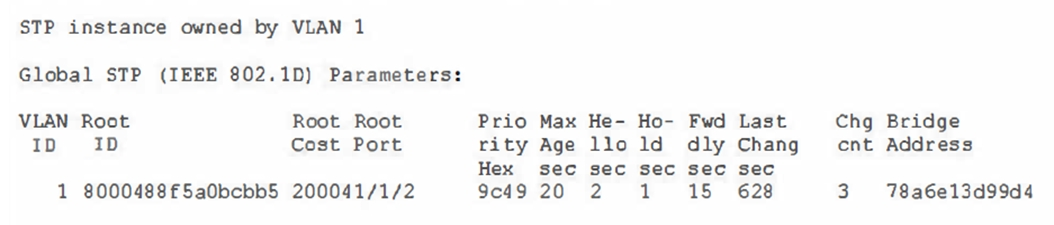
Question 12 Choose 1
In the following output, what is the bridge priority of the root in hex?

Show answerHide answer

Correct answer: A 8000

Explanation

Explanation:
The correct answer is A because the Bridge Priority is directly encoded in the first part of the "Root ID" field.

In Spanning Tree Protocol (STP) output, the Bridge ID (or Root ID, if this switch is the root) is an 8-byte (16-hex-digit) value structured as follows:

First 2 bytes (4 hex digits): Bridge Priority
Last 6 bytes (12 hex digits): MAC Address
Looking at the output for VLAN 1:
Root ID: 8000488f5a0bcbb5
The first 4 hex digits are 8000.
The remaining 12 hex digits (488f5a0bcbb5) are the MAC address of the root bridge.
Therefore, the Bridge Priority for this STP instance is 8000 (hexadecimal).

Analysis of Other Options (Incorrect):

Option B (0):This is incorrect. A priority of 0 is a valid value and would make a switch unbeatable in the root bridge election. However, it is not the value shown in the output.

Option C (9c49):
This value appears to be a fragment from another part of the table (possibly the "Bridge address" MAC, which starts with 9c49...). It is not part of the priority field in the Root ID.

Option D (20009):
This value is a combination of the Root Path Cost (20000) and the port number (1/1/2 or similar). It is unrelated to the Bridge Priority.

Reference:
This question tests the fundamental knowledge of the Bridge ID structure in STP, defined by the IEEE 802.1D standard. This is a core networking concept covered in the RUCKUS ICX switching curriculum. The ability to decode STP parameters from CLI output is essential for network troubleshooting and is a key objective for the RCNI exam. The specific output format is consistent with the show span command on RUCKUS ICX switches.
Question 13 Choose 1
Review the following configuration.

A RADIUS server is connected and working. However, a switch technician has forgotten the RADIUS username/password for the ICX. When RADIUS is not functioning, they expect to be able to plug into the console port and use the local username/password as a backup.
The ICX does not accept the local password.
Why can't the technician log in?
Show answerHide answer

Correct answer: C Based on the AAA login command, local password will only be used if the RADIUS server is unavailable

Explanation

Explanation:
The correct answer is C because the configuration explicitly defines an authentication method list that only uses the local database as a backup, and the primary RADIUS server is still active.

The key line in the configuration is:
login default radius local
This command creates a method list named "default" for login authentication (e.g., console, SSH, Telnet). The syntax dictates the order and condition of use:
radius: This is the primary method. The switch will first attempt to authenticate the user against the configured RADIUS server.
local: This is the secondary, fallback method. The switch will ONLY use the local username database if the primary radius method returns an error (e.g., the server is unreachable, unresponsive, or not configured).
The problem states the "RADIUS server is connected and working." Therefore, when the technician tries to log in, the primary method (radius) is operational. The RADIUS server receives the login attempt but rejects it because the technician has forgotten the correct RADIUS credentials. This rejection is a definitive "authentication failure," not a server "error." Because the primary method did not return an error, the switch never progresses to the fallback local method. The login is denied outright.

Analysis of Other Options (Incorrect):

Option A: The web-server default local command is for HTTP/HTTPS access only and is separate from the console login method. It is irrelevant to this specific problem.

Option B: This is false. The local database can be used for console access if it is configured in the correct method list and the conditions for its use are met (e.g., it is placed first in the list, or the primary method fails).

Option D: While the order is crucial, placing local first (login default local radius) would make local authentication the primary method and RADIUS the backup, which is the opposite of the intended and configured security policy. The current order is correct for a RADIUS-primary setup; the issue is the operational state of the RADIUS server, not the configuration order itself.

Reference:

This scenario is a classic AAA (Authentication, Authorization, and Accounting) troubleshooting use case. The behavior is defined in the RUCKUS ICX Security Configuration Guide. It highlights the critical difference between an "authentication failure" (wrong credentials) and a "method error" (server down). A fallback method is only invoked upon a method error, not a failure. To regain access, the technician would need to physically access the switch, break the boot sequence (if possible), or have the RADIUS server temporarily disabled/unplugged to force the fallback to local authentication.
Question 14 Choose 1
Which ICX model has eight integrated QSFP28 ports?
Show answerHide answer

Correct answer: C ICX7650-48F

Explanation

Explanation:
Why C is correct: The RUCKUS ICX 7650 switch series is specifically designed as a high-density 40GbE/100GbE aggregation switch. A key feature of the ICX 7650-48F model is its eight integrated QSFP28 ports on the front panel. QSFP28 ports are used for both 40GbE (using a breakout cable) and 100GbE connections, making this switch ideal for high-speed uplinks and spine-leaf architecture deployments.

Why the other options are wrong:

A. ICX7550-48F:
The ICX 7550 series is a high-performance access/aggregation switch. While it has models with QSFP+ (40GbE) and QSFP28 (100GbE) ports, the base model -48F does not come with eight integrated QSFP28 ports. Higher port densities on the 7550 are typically achieved through the use of add-on uplink modules.

B. ICX7850-48F:
The ICX 7850 is the flagship core/aggregation switch in the RUCKUS portfolio. It is a modular chassis-based system, not a fixed-configuration switch like the others listed. Therefore, it does not have "integrated" ports in the same way; its port configuration is determined by the line cards installed in the chassis.

D. ICX7750-48F:
The ICX 7750 series is another core/aggregation switch. Similar to the ICX 7850, it is a modular chassis system. Its port count and type are defined by the specific line cards and uplink modules used, not by a fixed set of integrated ports.

Reference:

This question tests your knowledge of the specific hardware capabilities and target use-cases for different RUCKUS ICX switch families. The ICX 7650 is distinguished by its high number of integrated 100GbE ports in a fixed form factor, making it a cost-effective solution for high-speed aggregation without needing a modular chassis. Always consult the specific product datasheets to verify the port configurations for each model.
Question 15 Choose 1
The root bridge is connected to another switch over two independent 10Gbe links. Which link will remain in a forwarding state on both sides?
Show answerHide answer

Correct answer: B the link with the lowest port number on the root switch

Explanation

Explanation:

In a Spanning Tree Protocol (STP) environment, multiple redundant links between two switches cannot remain active at the same time because that would result in broadcast storms, MAC address table instability, and Layer 2 loops. STP ensures a loop-free path by electing one root bridge and then determining which ports remain forwarding or blocking. In this question, the root bridge is already determined, and two 10GbE links are established between the root bridge and another switch. Because STP bases its forwarding decisions on deterministic criteria, only one link is selected to stay active on each side.

STP follows a strict decision-making hierarchy when selecting the forwarding port among multiple parallel connections. This hierarchy is:
Lowest Root Bridge ID
Lowest Path Cost to the Root
Lowest Bridge ID of the upstream switch
Lowest Port ID (Port Priority + Port Number)
In this situation, the first three criteria are identical across both links:
The root bridge is already determined.
Both links are equal cost (10GbE).
Both links connect the same two switches.

Therefore, the fourth criterion — lowest Port ID — becomes the decisive factor. Port ID consists of port priority (default 128) plus the physical port number. Since port priority is equal on both links, the lower physical port number becomes the tie-breaker. STP, therefore, chooses the port with the lowest port number on the root bridge side to remain in forwarding state.

This is because the root bridge determines designated ports on its own segments, and its ports always win ties. The upstream (root) switch maintains control of which port becomes the designated port on a shared segment.

This leads directly to the correct answer:

✅ B. the link with the lowest port number on the root switch
This link will remain forwarding because STP rules prioritize the root bridge and its lowest-numbered port when all other conditions are equal.

Why the Other Options Are Incorrect

A. the link with the lowest port number on the non-root switch
Incorrect because when a switch connects directly to the root bridge, STP assigns Designated Ports on the root bridge. The non-root switch cannot determine which port becomes forwarding when tied directly to the root bridge. The root bridge always wins tie-breaks.

C. the link with the highest port number on the root switch
Incorrect because STP prefers lowest port number, not highest. Port priority values and port numbering convention dictate that the lowest Port ID wins. Thus, choosing the highest port number contradicts standard STP logic.

D. the link with the highest port number on the non-root switch
Incorrect for two reasons:
STP never selects highest port number when deciding a forwarding port.
As in option A, the non-root switch cannot override the root switch’s port selection rules when directly connected.

References
You can verify these behaviors from the following authoritative sources:

1.IEEE 802.1D Standard (Spanning Tree Protocol)
Defines port role selection rules, tie-breakers, and Port ID prioritization.

2.RUCKUS FastIron Layer 2 Switching and Management Guide
Section: Spanning Tree Protocol (STP) Describes RUCKUS implementation of STP and confirms STP elections based on lowest Port ID.

3.Ruckus Campus Fabric and Switching Documentation Portal
Covers STP, RSTP, and MSTP decision hierarchy consistent with IEEE standards.

4.Cisco STP Fundamentals Guide (industry-standard reference)
Explains that when parallel links exist, the designated port is chosen based on lowest Port ID on the designated bridge (root bridge in this case).
Question 16 Choose 1
What is the maximum number of software images that can be stored simultaneously on an ICX switch?
Show answerHide answer

Correct answer: A 3

Explanation

Explanation:
The correct answer is A because RUCKUS ICX switches are designed with a dual-primary image storage system, and this architecture allows for a specific maximum. The flash memory on an ICX switch is partitioned to hold:

1.Primary Image: The currently active, running software image.
2.Backup Image: A second, stable image that can be used for fallback if the primary image fails to boot.
3.Interim/Third Image: A third slot is available to store a newly downloaded image. This allows an administrator to transfer a new software version to the switch without immediately overwriting the stable primary or backup images. This is a crucial feature for safe and staged upgrades.

This design ensures that you always have at least one known stable image (the backup) while being able to test a new one.

Why the other options are incorrect:

B. 2 is incorrect because while the switch always maintains a primary and a backup image, it has the specific capability to store a third, additional image for upgrade purposes. Stating "2" ignores this dedicated third slot for new downloads.

C. 1 is incorrect as it contradicts the fundamental dual-image redundancy feature that is a key selling point of ICX switches, which is designed for high availability.

D. 4 is incorrect because the physical flash memory partition on ICX switches is structured for exactly three software images. Attempting to store a fourth would require deleting one of the existing three.

Reference:
RUCKUS ICX operating system reserves space for a triple-image storage scheme. This is a documented feature in the RUCKUS ICX FastIron Configuration Guide, typically under sections discussing software management and upgrades. The structure (primary, backup, and interim) is a deliberate design for operational resilience and safe upgrade procedures.

That's the last free question

You've seen the free 30% (16 of 54 questions). Full access unlocks every question and full-length RCNI mock exams, a different mock on every attempt.

Unlock full mock exam
Full mock exam

Sit the RCNI exam before exam day

Full-length mocks with the same number of questions and the same time limit as the real RCNI exam. Every attempt draws a new set of questions from the full bank, so you can keep going until you pass comfortably.

Get full RCNI mock exam
  • —questions per mock
  • —time limit
  • 54questions in the bank
  • Newmock on every attempt
