Fortinet certification · Exam NSE7_CDS_AR-7.6

NSE7_CDS_AR-7.6 Mock Exam Page 2

Fortinet NSE 7 Public Cloud Security 7.6.4 Architect

Free NSE7_CDS_AR-7.6 mock exam questions 11–16, each with the answer and an explanation.

16 questions · 30 minutes · free, no sign-up

Free NSE7_CDS_AR-7.6 questions

11–16 of 16 free
Question 11 Choose 1
Refer to the exhibit.
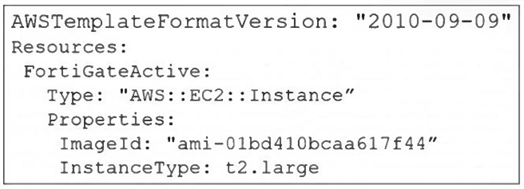
A senior administrator in a multinational organization needs to include a comment in the template shown in the exhibit to ensure that administrators from other regions change the EC2 instance size value to one that meets the requirements in their local deployments. How can the administrator add the comment in that section of the file? (Choose one answer)
Show answerHide answer

Correct answer: D The administrator can add the comment with the # character next to the InstanceType section.

Explanation

Explanation:

✅ Correct Answer:

D. The administrator can add the comment with the # character next to the InstanceType section.
The exhibit shows a CloudFormation template in YAML format. YAML natively supports single-line comments using the # character. The administrator can add a comment on the same line as the InstanceType key or on a separate line above it to document that the value should be changed to meet local deployment requirements. For example: InstanceType: t2.large # CHANGE TO LOCAL REQUIREMENT. This is a standard and effective method for inline documentation within YAML-based templates.

❌ Incorrect Answers:

A. The administrator can run the aws cloudformation update-stack and include the comment.
The update-stack command is used to deploy changes to a stack, not to embed human-readable comments within the template file itself. Comments are for template authors and readers, not a parameter for the deployment command.

B. The administrator must update the AWSTemplateFormatVersion to a more current version.
The version specified ("2010-09-09") is the fundamental template format version and is still current. Changing it does not enable or relate to the ability to add comments; comments are a feature of the YAML/JSON syntax, not the template format version.

C. The administrator must convert the template to JSON format before adding the comment.
This is incorrect and counterproductive. JSON does not support comments as part of its official specification. Converting to JSON would actually remove the ability to add compliant comments. YAML is the preferred format for readable CloudFormation templates precisely because it supports features like comments.

🔧 Key Insight:
For AWS CloudFormation templates written in YAML, inline documentation for other administrators is best achieved using the native comment syntax. Adding a comment prefixed with # next to the InstanceType parameter is the correct, simple, and standards-compliant approach to indicate that the value is region-specific and should be reviewed.

Reference:
AWS CloudFormation User Guide: AWS CloudFormation Template Formats.
Question 12 Choose 1
What is the main advantage of using SD-WAN Transit Gateway Connect over traditional SD-WAN?
Show answerHide answer

Correct answer: D You can use GRE-based tunnel attachments.

Explanation

Explanation:

The transition from traditional SD-WAN attachments to Transit Gateway Connect focuses on performance and simplified orchestration. By utilizing GRE-based tunnels instead of standard IPsec VPNs, organizations can achieve up to four times the bandwidth per tunnel (5 Gbps vs 1.25 Gbps) and simplify dynamic routing via BGP. This makes GRE the defining technical advantage for high-performance FortiGate SD-WAN integrations within AWS environments.

✅ D. You can use GRE-based tunnel attachments.
The primary technical advantage of using AWS Transit Gateway (TGW) Connect over traditional SD-WAN attachments (like standard VPN or VPC attachments) is its native support for GRE-based tunnel attachments. Traditional SD-WAN integrations often rely on IPsec VPNs, which are capped at 1.25 Gbps per tunnel. By using GRE (Generic Routing Encapsulation), TGW Connect allows for much higher throughput—up to 5 Gbps per tunnel—and supports an increased MTU of 8500 bytes, significantly reducing encapsulation overhead and improving performance for cloud-native SD-WAN architectures.

❌ A. You can use BGP over IPsec for maximum throughput.
While BGP over IPsec is a standard method for traditional SD-WAN connectivity to AWS, it is not the main advantage of TGW Connect; in fact, it is the limitation that TGW Connect seeks to overcome. IPsec tunnels have significant performance bottlenecks due to encryption overhead and a strict throughput limit of 1.25 Gbps. TGW Connect moves away from IPsec as the primary transport, favoring GRE to achieve "maximum throughput" that IPsec cannot provide natively.

❌ B. You can combine it with IPsec to achieve higher bandwidth.
This is technically incorrect because TGW Connect is designed to replace or bypass the need for multiple managed IPsec VPN tunnels to achieve high bandwidth. While GRE can technically be wrapped in IPsec, the "Connect" attachment itself uses a VPC attachment as an underlay, allowing GRE to run over a high-bandwidth private backbone (up to 20 Gbps total per attachment) without the specific CPU-intensive overhead associated with scaling traditional IPsec tunnels.

❌ C. It eliminates the use of ECMP.
TGW Connect does not eliminate Equal-Cost Multi-Path (ECMP); rather, it leverages it. ECMP is a critical component of the TGW Connect architecture, allowing traffic to be load-balanced across multiple GRE tunnels (Connect peers) to reach the aggregated 20 Gbps bandwidth limit. Eliminating ECMP would actually hinder the scalability and high-availability benefits that TGW Connect provides to SD-WAN deployments.

Reference:
FortiGate Public Cloud 7.6.0 - SD-WAN Transit Gateway Connect FortiOS 6.4.3 New Features - Support AWS transit gateway connect attachment
Question 13 Choose 1
Refer to the exhibit.

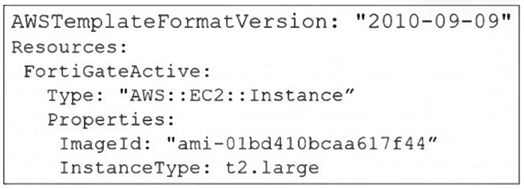
A senior administrator in a multinational organization needs to include a comment in the template shown in the exhibit to ensure that administrators from other regions change the Amazon Machine Image (AMI) ID to one that is valid in their location. How can the administrator add the required comment in that section of the file?
Show answerHide answer

Correct answer: B The administrator must convert the template file to YAML format to add a comment.

Explanation

Explanation:

The core issue is JSON's lack of comment support, which is a fundamental limitation of the format specification. When building CloudFormation templates for teams that need inline documentation, especially in multi-region or multinational environments, YAML is the better choice. Converting from JSON to YAML is straightforward, and both formats are fully supported by CloudFormation with identical functionality. The ability to add comments directly improves template maintainability and helps prevent configuration errors across distributed teams.

✅ Correct Answer: B
JSON format, which is currently used in this CloudFormation template, does not support comments. JSON is a strict data interchange format that has no specification for comment syntax. To add comments directly within a CloudFormation template file, the administrator must convert it to YAML format. YAML natively supports comments using the # character, allowing administrators to add inline documentation like "# Change this AMI ID to match your region" next to the ImageId property. This makes YAML the preferred format when template documentation and readability are priorities for multi-region teams.

❌ Incorrect Answer: A
The aws cloudformation update-stack command is used to apply changes to an existing stack, not to add comments within the template file itself. While you can include a --description parameter with the command to describe what the update does, this description is stored as stack metadata, not as a comment inside the template file. Other administrators downloading or viewing the template file wouldn't see this command-line description. The requirement is to add a comment within the template file itself so it's visible to anyone reviewing or modifying the template.

❌ Incorrect Answer: C
This answer incorrectly assumes JSON supports comments with the # character. If you add # comment text anywhere in a JSON file, the JSON parser will throw a syntax error because # is not valid JSON syntax. CloudFormation would reject the template as malformed. While the # character is the correct comment syntax in YAML, it cannot be used in JSON format. Any attempt to add comments using # in the current JSON template will cause validation failures when you try to create or update the stack.

❌ Incorrect Answer: D
Updating the AWSTemplateFormatVersion doesn't enable comment support in JSON. The template format version (like "2010-09-09") indicates which CloudFormation capabilities are available, not which file format features are supported. The version number relates to CloudFormation service features, not JSON or YAML syntax capabilities. Changing this version string won't magically allow JSON to support comments. The fundamental limitation is the JSON format itself, which requires conversion to YAML regardless of the template format version specified.

Reference:
CloudFormation template format
About FortiGate-VM for AWS
Question 14 Choose 1
Refer to the exhibit.

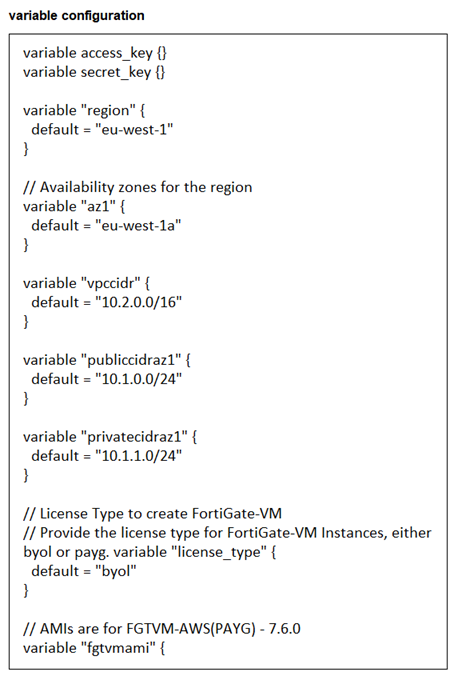
You are tasked to deploy a FortiGate VM with private and public subnets in Amazon Web Services (AWS). You examined the variables.tf file. Assume that all the other terraform files are in place. What will be the final result after running the terraform init and terraform apply commands? (Choose one answer)
Show answerHide answer

Correct answer: A Terraform will not deploy a FortiGate VM.

Explanation

Explanation:

The absence of required variable values—particularly AWS access keys and the FortiGate AMI ID—renders the Terraform configuration incomplete. Even though regional and subnet variables have defaults, they cannot compensate for missing authentication or image specifications. Thus, no resources will be created, and the deployment will fail before provisioning begins.

✅ Correct Answer:

A. Terraform will not deploy a FortiGate VM.
The variables.tf file defines required variables such as access_key, secret_key, and fgvmami (FortiGate AMI), but none are assigned values—only defaults for region, AZ, and CIDR blocks are set. Without valid AWS credentials or a specified AMI ID, Terraform cannot proceed with resource creation. The absence of actual values for critical variables results in deployment failure during apply.

❌ Incorrect answer

B. Terraform will deploy a FortiGate VM in the eu-West-1a availability zone without any subnets.
This is incorrect because even if the region and AZ were usable, missing credentials and AMI would prevent deployment entirely. Subnet definitions alone don’t enable deployment without core authentication and image references.

C & D are invalid for the same reason—the configuration lacks mandatory inputs, making any successful deployment impossible regardless of subnet or license type settings.
Question 15 Choose 1
You need a solution to safeguard public cloud-hosted web applications from the OWASP Top 10 vulnerabilities. The solution must support the same region in which your applications reside, with minimum traffic cost. Which solution meets the requirements?
Show answerHide answer

Correct answer: C Use FortiWeb

Explanation

Explanation:

✅ Correct Answer: C - Use FortiWeb
FortiWeb serves as Fortinet's dedicated Web Application Firewall (WAF) solution, specifically engineered to protect public cloud-hosted web applications against OWASP Top 10 vulnerabilities such as SQL injection, XSS, and broken access control. Deployable as FortiWeb Cloud WAF-as-a-Service in major cloud providers like AWS, Azure, and Google Cloud, it operates within the same region as applications to minimize latency and traffic costs through regional scrubbing. Machine learning-based anomaly detection and FortiGuard threat intelligence ensure comprehensive, low-overhead protection with rapid deployment. ​

❌ Incorrect answer: A - Use FortiGate
FortiGate functions primarily as a next-generation firewall (NGFW) focused on network-level security, perimeter defense, VPN, and SD-WAN capabilities rather than specialized web application layer protection. While it offers some web filtering and application control, it lacks the deep OWASP Top 10 mitigation features like signature-based attack blocking and behavioral analysis required for web apps. Regional cloud deployment exists but incurs higher traffic costs compared to purpose-built WAFs, making it suboptimal for this specific use case. ​

❌ Incorrect answer: B - Use FortiCNP
FortiCNP (Fortinet Cloud Native Protection) provides cloud security posture management (CSPM) and broader cloud workload protection, focusing on misconfigurations, compliance, and runtime threat detection across multi-cloud environments. It does not deliver dedicated WAF functionality for OWASP Top 10 web vulnerabilities at the application layer. While regionally aware, its scope emphasizes governance over real-time traffic inspection, failing to meet the low-cost, same-region web app safeguarding requirements. ​

❌ Incorrect answer: D - Use FortiADC
FortiADC is an application delivery controller (ADC) optimized for load balancing, traffic management, global server load balancing (GSLB), and application acceleration. It includes basic security like SSL offloading but lacks comprehensive OWASP Top 10 defenses such as advanced input validation or bot mitigation. Primarily hardware/virtual appliance-based, it does not natively support cloud-native, same-region WAF-as-a-Service deployment with minimal traffic costs. ​

🔧 Conclusion:
FortiWeb best aligns with safeguarding cloud web apps from OWASP Top 10 by providing a cloud-native WAF with regional deployment for optimal performance and cost efficiency. Other options fall short: FortiGate is network-focused, FortiCNP is posture-oriented, and FortiADC prioritizes delivery over security. This selection ensures robust, scalable protection without re-architecting environments, leveraging Fortinet's integrated Security Fabric for holistic defense.

Reference:
Web Application Firewall
Question 16 Choose 1
Refer to the exhibit.

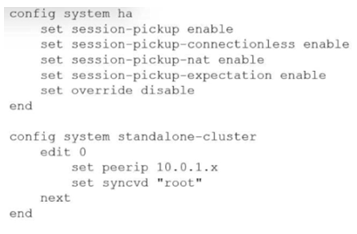
You deployed an HA active-active load balance sandwich with two FortiGate VMs in Microsoft Azure.
After the deployment, you prefer to use FGSP to synchronize sessions, and allow asymmetric return traffic. In the environment, FortiGate port 1 and port 2 are facing external and internal load balancers respectively.
What IP address must you use in the peerip configuration?
Show answerHide answer

Correct answer: D The opposite FortiGate port 1 IP address.

Explanation

Explanation:

In an active-active load balancer sandwich deployment in Azure with two FortiGate VMs, external traffic arrives via the public (external) load balancer to port 1 of each FortiGate, and internal traffic exits via port 2 to the internal load balancer. FGSP (FortiGate Session Pickup) synchronizes sessions between the two standalone FortiGates to support asymmetric return traffic, where a session may ingress on one FortiGate and return via the other.

✔️Correct Option:

D. The opposite FortiGate port 1 IP address.
The peerip in config system standalone-cluster (or config system cluster-sync in some versions) specifies the IP address of the other FortiGate that is reachable for FGSP session synchronization traffic. In Azure sandwich designs, port 1 faces the external load balancer and typically uses IPs in the public-facing subnet that allow direct communication between the two FortiGates for session sync, enabling reliable FGSP peering while supporting asymmetric flows.

❌Incorrect options:

A. The opposite FortiGate port 2 IP address.
Port 2 faces the internal load balancer and is in the backend/subnet facing protected resources. While reachable in some setups, official recommendations and templates use the external-facing (port 1) IPs for FGSP peering to ensure reliable synchronization paths that align with ingress traffic distribution and avoid dependency on internal routing changes.

B. The public load balancer port 2 IP address.
The public load balancer fronts the external side (corresponding to FortiGate port 1) and uses a frontend IP, not port 2. FGSP requires a direct peer IP of the opposite FortiGate instance itself, not the load balancer frontend IP, as synchronization occurs directly between the FortiGates over TCP port 8000 (or configured port).

C. The internal load balancer port 1 IP address.
The internal load balancer is on the egress side (corresponding to FortiGate port 2), and its frontend IP is not used for FGSP. Peer synchronization must use the actual IP of the remote FortiGate's interface that is reachable and dedicated for session sync, typically the external-facing port 1 IP, not an Azure load balancer IP.

Reference:
→ Technical Tip: Active-Active load balance sandwich scenario in Microsoft Azure
Confirms active-active sandwich design in Azure and considerations for session handling, aligning with FGSP usage for asymmetric traffic.

→ FGSP | FortiGate / FortiOS 7.6.6
Describes FGSP for session synchronization in load-balanced active-active setups without FGCP, with peerip set to the reachable IP of the peer FortiGate.

That's the last free question

You've seen the free 30% (16 of 54 questions). Full access unlocks every question and full-length NSE7_CDS_AR-7.6 mock exams (40 questions, 75 minutes), a different mock on every attempt.

Unlock full mock exam
Full mock exam

Sit the NSE7_CDS_AR-7.6 exam before exam day

Full-length mocks with the same number of questions and the same time limit as the real NSE7_CDS_AR-7.6 exam. Every attempt draws a new set of questions from the full bank, so you can keep going until you pass comfortably.

Get full NSE7_CDS_AR-7.6 mock exam
  • 40questions per mock
  • 75 mintime limit
  • 54questions in the bank
  • Newmock on every attempt