Fortinet certification · Exam NSE5_SSE_AD-7.6

NSE5_SSE_AD-7.6 Mock Exam Page 2

Fortinet NSE 5 - FortiSASE and SD-WAN 7.6 Core Administrator

Free NSE5_SSE_AD-7.6 mock exam questions 11–15, each with the answer and an explanation.

15 questions · 28 minutes · free, no sign-up

Free NSE5_SSE_AD-7.6 questions

11–15 of 15 free
Question 11 Choose 3
Which three factors about SLA targets and SD-WAN rules should you consider when configuring SD-WAN rules? (Choose three answers)
Show answerHide answer

Correct answer: A, C, D When configuring an SD-WAN rule, you can select multiple SLA targets from different performance SLAs. SD-WAN rules can use SLA targets to check whether the preferred members meet the SLA requirements. When configuring an SD-WAN rule, you can select multiple SLA targets if they are from the same performance SLA.

Explanation

Explanation:

This question focuses on the relationship between SLA Targets and SD-WAN Rule strategies. It tests your knowledge of how health check results influence member selection for steering traffic based on performance requirements.

✅ Correct Options:

Option A:
FortiOS provides the flexibility to reference multiple SLA targets within a single rule. These can originate from different Performance SLAs to ensure a link meets various quality standards (e.g., one for latency and another for jitter).

Option C:
The primary function of an SLA target is to serve as a threshold. SD-WAN rules use these to verify if a preferred member link is "in-SLA"; if the member fails this check, the rule will avoid using it.

Option D:
Within the SD-WAN rule configuration, you can select multiple SLA targets derived from the same Performance SLA. This allows for granular steering based on different performance tiers or specific application requirements.

❌ Why the Other Options Are Wrong:

Option B:
Performance SLA targets are utilized by several strategies, including Best Quality and Maximize Bandwidth, not just Lowest Cost. Additionally, member metrics are continuously measured by the Performance SLA regardless of whether a rule currently references that specific target.

(General Note):
In a "Choose three" scenario, the options must reflect the architectural capability of the FortiGate to aggregate multiple health checks to determine the optimal path for business-critical applications.

Reference:
🔧 Fortinet SD-WAN Rule Documentation
⇒ Confirms how rules utilize SLA targets to determine member eligibility and explains the flexibility of selecting targets across different performance probes.
Question 12 Choose 1
A FortiGate device is in production. To optimize WAN link use and improve redundancy, you enable and configure SD-WAN.
What must you do as part of this configuration update process? (Choose one answer)
Show answerHide answer

Correct answer: A Replace references to interfaces used as SD-WAN members in the firewall policies.

Explanation

Explanation:

➡️ Question Summary:
This question evaluates your understanding of the practical steps required when introducing SD-WAN on an existing production FortiGate. It tests knowledge of interface membership constraints in FortiOS, the impact of SD-WAN zones on policy configuration, and the sequence of safe configuration changes to avoid traffic disruption. Core concepts include SD-WAN zone usage, firewall policy referencing, and production change management in Fortinet environments.

✅ A. Replace references to interfaces used as SD-WAN members in the firewall policies.
This is mandatory because FortiGate prevents adding an interface to an SD-WAN zone if that interface is still referenced directly in any active firewall policy. You must first update all relevant policies to reference the SD-WAN zone (virtual-wan-link or a custom zone) instead of the physical WAN interface. This behavior is enforced by the system to maintain policy integrity and prevent unintended traffic blackholing during the transition.

❌ B. Replace references to interfaces used as SD-WAN members in the routing configuration.
While it is good practice to update static routes, route-maps, or BGP neighbors to use the SD-WAN zone after configuration, FortiGate does not block the addition of interfaces to SD-WAN based on routing table references. Routing changes are typically performed after SD-WAN membership is established and are not a prerequisite step during the initial interface assignment process.

❌ C. Disable the interface that you want to use as an SD-WAN member.
Disabling the interface is unnecessary and counterproductive. FortiGate requires the interface to remain administratively up and passing traffic for health-check probes and SD-WAN monitoring to function correctly. Disabling it would interrupt existing connectivity before SD-WAN can take over, violating production safety principles.

❌ D. Purchase and install the SD-WAN license, and reboot the FortiGate device.
Starting with FortiOS 6.2 and continuing through 7.6, SD-WAN is included in the base FortiGate firmware without requiring a separate license. No reboot is needed to enable or configure SD-WAN features. This option reflects outdated information from very early SD-WAN implementations and does not apply to current versions.

🔧 Conclusion:
The correct answer confirms that replacing references to physical interfaces in firewall policies is a mandatory prerequisite when configuring SD-WAN on a production FortiGate. This requirement protects existing security posture and ensures a controlled transition to SD-WAN steering. Candidates should always remember to audit and update firewall policy references first when adding interfaces to any SD-WAN zone.

Reference:
Fortinet Document Library, FortiOS 7.4.0 Administration Guide, SD-WAN section: "Adding interfaces to an SD-WAN zone"
Fortinet Document Library, FortiOS 7.6.0 Cookbook, "Configuring SD-WAN on a production device"
Question 13 Choose 2
Which two statements about configuring a steering bypass destination in FortiSASE are correct? (Choose two.)
Show answerHide answer

Correct answer: B, C Apply condition allows split tunneling destinations to ae applied to On-net. off-net. or both types of endpoints You can select from four destination types: Infrastructure, FQDN, Local Application, or Subnet

Explanation

Explanation:

This question assesses knowledge about configuring steering bypass destinations within FortiSASE, specifically focusing on the types of destinations available and how the "Apply condition" for split tunneling functions.

✅ Correct Option B:
The "Apply condition" in FortiSASE steering bypass configuration is designed to specify whether a particular split tunneling destination should apply to endpoints that are "On-net" (connected directly to the corporate network), "Off-net" (connected remotely via VPN), or both. This flexibility is crucial for granular traffic management.

✅ Correct Option C:
FortiSASE offers a variety of destination types for steering bypass to accommodate different network environments and application needs. These include Infrastructure (for internal network services), FQDN (for specific domain names), Local Application (for applications on the endpoint itself), and Subnet (for IP address ranges).

❌ Why the Other Options Are Wrong:

Option A:
Subnet is not the only destination type that supports the "Apply condition." All destination types, including FQDN, Infrastructure, and Local Application, can utilize the "Apply condition" to specify when the bypass rule should be active.

Option D:
The "Apply condition" can indeed be set to both "On-net" and "Off-net" simultaneously, providing comprehensive coverage for different endpoint connection states. Therefore, the statement that it cannot be set to both is incorrect.

Reference:
⇒ Fortinet. "On/off-net Settings"
This document provides a detailed explanation of on/off-net settings in FortiSASE, including how steering bypass destinations and their "Apply conditions" function in relation to endpoint network status.
Question 14 Choose 1
How is the Geofencing feature used in FortiSASE? (Choose one answer)
Show answerHide answer

Correct answer: A To allow or block remote user connections to FortiSASE POPs from specific countries.

Explanation

Explanation:

This question tests knowledge of the Geofencing feature in FortiSASE, which provides location-based access control for remote connectivity. It is configured under the Restrictions or Geofencing section in the FortiSASE portal and applies to incoming connections from remote users (via FortiClient) and edge devices to FortiSASE Points of Presence (PoPs).

✅ Correct Option:

✅ A. To allow or block remote user connections to FortiSASE POPs from specific countries.
Geofencing in FortiSASE enables administrators to define allow or deny lists based on countries/regions or infrastructures. By default, it enforces no restrictions (Deny mode with no locations selected). When configured, it controls whether remote users or edge devices can establish connections (e.g., IPsec VPN or agent-based) to the nearest or specified FortiSASE PoPs, preventing connections from untrusted or restricted geographies for enhanced security and compliance.

❌ Why the Other Options Are Wrong:

❌ B. To restrict access to applications based on the time of day in specific countries.
Geofencing focuses solely on geographic origin for connection establishment to PoPs, not on time-based restrictions or per-application access. Time-of-day controls, if needed, would use scheduling in policies or other FortiSASE features like SWG policies or ZTNA, but not Geofencing.

❌ C. To encrypt data at rest on mobile devices in specific countries.
Encryption of data at rest on endpoints is handled by FortiClient features (e.g., endpoint protection, disk encryption) or device management tools, independent of FortiSASE. Geofencing does not manage encryption settings or apply them based on country; it only governs connectivity to the service.

❌ D. To monitor user behavior on websites and block non-work-related content from specific countries.
Monitoring and blocking web content (e.g., non-work-related sites) is performed by Secure Web Gateway (SWG) policies, Web Filter profiles, or Application Control in FortiSASE. Geofencing operates at the connection level to PoPs and does not inspect or filter post-connection web behavior or content based on geography.

Reference:
⇒ https://community.fortinet.com/t5/FortiSASE/Troubleshooting-Tip-FortiClient-stuck-in-Connecting-status-due/ta-p/356572
Confirms the FortiSASE Geofencing feature controls access by allowing or blocking remote user connections and edge device connectivity to FortiSASE PoPs from specific countries.
Question 15 Choose 2
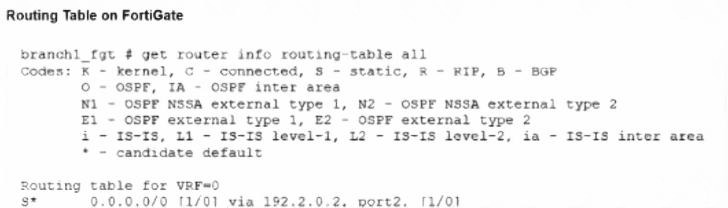
Refer to the exhibits.


The administrator increases the member priority on port2 to 20. Upon configuration changes and the receipt of new packets, which two actions does FortiGate perform on existing sessions established over port2? (Choose two.)
Show answerHide answer

Correct answer: A, E FortiGate updates the gateway information of the sessions with SNAT so that they use port1 instead of port2. FortiGate flags the sessions as dirty.

Explanation

Explanation:

📋 Question Summary
This question assesses an administrator's understanding of how FortiGate handles session persistence and routing table changes within the context of a Standalone or SD-WAN environment. It specifically focuses on the "dirty" session mechanism and the behavior of Source Network Address Translation (SNAT) when a routing path becomes less preferred due to a priority adjustment. Candidates must understand the internal processes FortiGate initiates to re-evaluate existing traffic flows after a configuration update.

✅ Correct Answer

Option A: When a routing change occurs, FortiGate must ensure traffic continuity for NATed sessions. By updating the gateway information, the device re-maps the session to the newly preferred interface, such as port1. This ensures that the SNATed traffic correctly reflects the new path in the session table. This behavior is essential for maintaining stateful inspection and ensuring that returning packets are correctly processed through the revised egress interface after a routing recalculation.

Option E: FortiGate utilizes a specific flag known as "dirty" to mark sessions affected by configuration or routing alterations. When the administrator increases the priority of port2, the routing table is modified, triggering the system to flag all active sessions associated with that path as dirty. This state mandates that the FortiGate re-evaluates the session against the updated policy and routing table upon the arrival of the next packet, ensuring alignment with the current configuration.

❌ Incorrect Answer

Option B: The assertion that a session is flagged as dirty only if an IP pool is assigned is technically inaccurate. FortiGate triggers the dirty flag mechanism regardless of whether the NAT configuration utilizes a specific IP pool or the outgoing interface address. The re-evaluation process is a fundamental architectural function of the FortiOS session management system, designed to maintain security and routing integrity whenever any significant change to the underlying network topology is detected.

Option C: This option is incorrect because FortiGate does not limit its actions to new sessions alone. While new sessions will naturally follow the new routing priority toward port1, the "dirty" flag mechanism explicitly targets existing sessions to determine if they can or should be redirected. Ignoring established flows would lead to inconsistencies between the session table and the routing table, potentially causing security gaps or suboptimal traffic paths until those existing connections naturally expire.

Option D: FortiGate does not simply continue routing all existing sessions over port2 without intervention. Because the routing change makes port1 a more desirable path, the system initiates a re-evaluation process via the dirty flag. Depending on the snat-route-change setting and the nature of the routing update, the device will attempt to move or terminate sessions rather than blindly maintaining the status quo on a now lower-priority interface.

🏁 Conclusion
Options A and E are correct because they accurately describe the stateful processing of a FortiGate unit during a routing transition. The system first marks existing flows as dirty to signal that the current session information is potentially stale. Subsequently, for SNATed traffic, the gateway information is updated to reflect the new egress path. These mechanisms ensure that the firewall remains synchronized with the administrator's intent and maintains optimal traffic distribution across available ports.

📚 Reference
FortiOS Administration Guide: Session Table and Routing Changes
Fortinet Docs Library: Routing Priority and Session Management
FortiGate Knowledge Base: How FortiGate handles existing sessions after a routing change

That's the last free question

You've seen the free 30% (15 of 50 questions). Full access unlocks every question and full-length NSE5_SSE_AD-7.6 mock exams (35 questions, 65 minutes), a different mock on every attempt.

Unlock full mock exam
Full mock exam

Sit the NSE5_SSE_AD-7.6 exam before exam day

Full-length mocks with the same number of questions and the same time limit as the real NSE5_SSE_AD-7.6 exam. Every attempt draws a new set of questions from the full bank, so you can keep going until you pass comfortably.

Get full NSE5_SSE_AD-7.6 mock exam
  • 35questions per mock
  • 65 mintime limit
  • 50questions in the bank
  • Newmock on every attempt