Juniper certification · Exam JN0-481

JN0-481 Mock Exam Page 2

Data Center - Specialist (JNCIS-DC)

Free JN0-481 mock exam questions 11–19, each with the answer and an explanation.

19 questions · 27 minutes · free, no sign-up

Free JN0-481 questions

11–19 of 19 free
Question 11 Choose 2
Which two statements are correct about a Juniper Apstra server? (Choose two.)
Show answerHide answer

Correct answer: C, D The Juniper Apstra server uses Layer 3 to communicate with managed devices.The Juniper Apstra server requires a single network adapter.

Explanation

Explanation:

Why C is correct:
The Juniper Apstra server communicates with managed devices using IP-based (Layer 3) connectivity. The official documentation states that "TCP connectivity is the only requirement between nodes" and that "there is no strict latency requirement or a requirement for Layer 2 (L2) connectivity between the server and the devices you are going to manage – it will be all IP-routed packets from the Juniper Apstra server to the management ports of the devices" . This design allows Apstra to manage devices across routed management networks without needing direct Layer 2 adjacency.

Why D is correct:
The Juniper Apstra server requires only a single network adapter for operation. Official Juniper documentation lists the network requirement as "1 network adapter, initially configured with DHCP" . Apstra does not need multiple network interfaces to communicate with managed devices, as all management traffic uses the single adapter.

Why other options are incorrect:

A. The Juniper Apstra server uses Layer 2 to communicate with managed devices.
This is incorrect. Apstra explicitly does not require Layer 2 connectivity; it uses IP routing (Layer 3) between the server and device management ports .

B. The Juniper Apstra server requires one network adapter connection for each managed device.
This is incorrect. A single network adapter is sufficient regardless of how many devices Apstra manages. The server communicates with all managed devices through the same network interface .

Reference:

Juniper Networks TechLibrary:"TCP connectivity is the only requirement between nodes" and "Apstra server and all the Apstra agents act as a distributed operating system"
Question 12 Choose 1
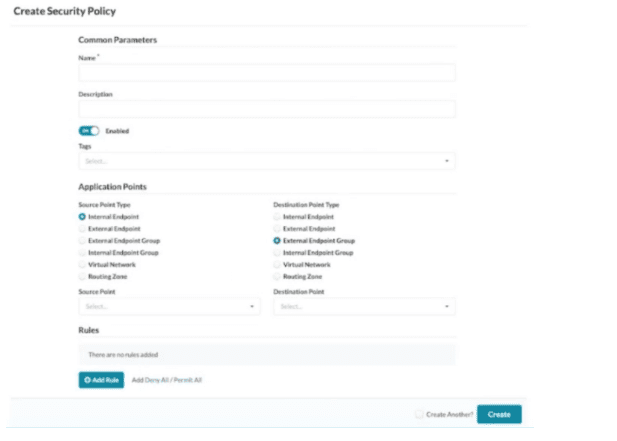
You are creating a new security policy using Juniper Apstra.

Referring to the exhibit, which application point should you select to allow or deny traffic to or from a particular VRF?
Show answerHide answer

Correct answer: A Routing Zone

Explanation

Explanation:

In Juniper Apstra, a Routing Zone (RZ) directly aligns with a Virtual Routing and Forwarding (VRF) instance . VRFs provide isolation at the routing table level, separating tenants so they cannot reach each other at Layer 3. If you want to allow or deny traffic to or from an entire VRF, you must select the Routing Zone as the application point in your security policy.

The Juniper Apstra documentation explicitly states: "Routing Zones (RZ) are the highest-level objects. RZ is directly aligned with a Virtual Routing and Forwarding instance (VRF)" . When creating security policies, the source or destination object can be selected from Routing Zones (all Virtual Networks within an SZ) . This means selecting a Routing Zone applies the policy to all Virtual Networks contained within that VRF, effectively controlling traffic to or from a particular VRF as a whole.

Why other options are incorrect:

B. External Endpoint
— External endpoints represent IP ranges or subnets outside the Apstra blueprint . These are used for traffic flowing between the fabric and external networks (e.g., WAN gateways, firewalls), not for applying policy to an entire VRF.

C. Internal Endpoint
— Internal endpoints are specific IP addresses (typically /32) associated with Virtual Networks inside the blueprint . These are granular objects for host-level policies, not for controlling all traffic within an entire VRF.

D. Virtual Network
— A Virtual Network represents a single L2/L3 segment (VXLAN or VLAN). Selecting a Virtual Network applies policy only to that specific network, not to all networks within the VRF . To cover an entire VRF (multiple Virtual Networks), you must select the Routing Zone instead.

Reference:

Juniper Networks TechLibrary — "Security Policies: Routing Zones (RZ) are the highest-level objects. RZ is directly aligned with a Virtual Routing and Forwarding instance (VRF)."

Juniper Networks TechLibrary — "Security policies allow or block traffic between endpoints based on their IP addresses, port numbers, and protocols... Routing Zone (RZ) which are rendered as Virtual Routing and Forwarding (VRF) instances on physical devices."
Question 13 Choose 1
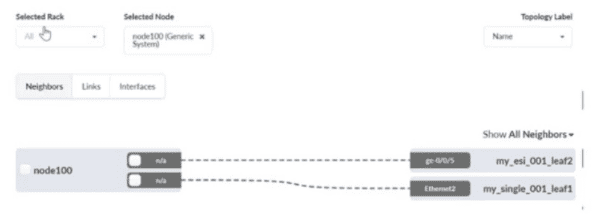
What is correct about the selected device shown in the exhibit?
Show answerHide answer

Correct answer: C It is an internal generic system.

Explanation

Explanation:

In Juniper Apstra, a Generic System represents a device that is not managed by Apstra but is connected to the managed fabric . The distinction between internal and external generic systems is determined by the device's physical location and connectivity scope .

Why other options are incorrect:

A. It is a peer switch
A peer switch would be a managed network device (leaf or spine). The label "Generic System" indicates it is unmanaged by Apstra .

B. It is an external generic system
External generic systems are used for middleware devices (firewalls, load balancers, external routers) that may connect to multiple racks for redundancy . They appear outside rack structures . The device here is within a selected rack, making it internal.

D. It is an access switch
Access switches are managed network devices, not generic systems. The labeling and UI representation clearly show this as a "Generic System," not a switch .

Reference:

Juniper Networks TechLibrary: "Systems that are not managed by Apstra and that are part of a rack topology are called (internal) generic systems"

Juniper Networks TechLibrary: "Generic System — For attaching compute/storage, Can only be connected to a single rack, Appears in the topology as part of a rack"
Question 14 Choose 1
An operator is working on a capacity-planning exercise. The operator needs to examine the pre-built time-series information regarding link utilization. In the Juniper Apstra UI, which top-level tab would the operator have to access to find this information?
Show answerHide answer

Correct answer: C Analytics

Explanation

Explanation:

In Juniper Apstra, the Analytics tab is the dedicated location for accessing all telemetry data, including pre-built time-series information regarding link utilization. This section houses the Intent-Based Analytics (IBA) functionality, which continuously collects and processes data from the network fabric.

Why other options are incorrect:

A. Active
— The Active tab displays the currently deployed and operational state of the blueprint (what is actually running on the devices). It shows configuration status, anomalies, and node states, but it does not contain historical time-series link utilization data for capacity planning.

B. Staged
— The Staged tab is where operators make changes to the blueprint before committing them to the live network. This area is for designing and staging modifications (e.g., cabling changes, connectivity templates), not for viewing historical telemetry or utilization trends.

D. Dashboard
— The Dashboard (the blueprint's main landing page) provides a high-level summary of the blueprint's health, including deployment status, anomalies, and node status. While Analytics dashboards can be displayed on the main Dashboard for convenience, they originate from and are fully managed within the Analytics tab. The operator would first access Analytics to locate the pre-built link utilization information before optionally pinning it to the Dashboard.

Reference:

Juniper Networks TechLibrary: "From the blueprint, navigate to Analytics > Dashboards to go to the analytics dashboard"

Juniper Networks TechLibrary: "Analytics dashboards monitor the network and raise alerts. Widgets are used within each dashboard to monitor different aspects of the network"
Question 15 Choose 1
What is the purpose of an interface map in Juniper Apstra?
Show answerHide answer

Correct answer: B An interface map specifies a connection between the interfaces of two devices.

Explanation

Explanation:

In Juniper Apstra, an Interface Map serves as the critical "glue" that connects abstract design elements to physical hardware. It maps the abstract ports defined in a Logical Device to the actual physical interfaces on a specific hardware device, as represented by a Device Profile .

Apstra separates device capabilities from device models, allowing you to design your network based on functional requirements before selecting specific vendors . Interface maps bridge this abstraction by defining how the port groups and roles from your logical design translate to real-world interfaces like ge-0/0/0 on a physical switch . When you assign an interface map to a managed device within a blueprint, Apstra understands precisely which physical ports correspond to uplinks, downlinks, or other roles defined in the template .

Why other options are incorrect:

B. An interface map specifies a connection between the interfaces of two devices.
This describes a physical link or cable map, not an interface map. Connections between specific devices are defined in the Physical > Links section of the blueprint or via Connectivity Templates .

C. An interface map specifies the number of ports and the port speeds of a logical device.
This describes the function of a Logical Device itself. Logical devices define port counts, speeds, port roles, and port groups. Interface maps take that logical definition and map it to a physical device profile .

D. An interface map specifies the connections between racks in a template.
This describes the function of a Rack Template or Pod Template. Templates define the interconnectivity of racks, spines, and superspines in the fabric architecture, not port-level interface mappings .

Reference:

Juniper Networks TechLibrary: "Interface maps bring the two together by mapping interfaces in logical devices to interfaces in device profiles"

Juniper Networks TechLibrary: "Assign interface maps to your managed devices. Interface maps associate the interfaces between logical devices and device profiles"
Question 16 Choose 2
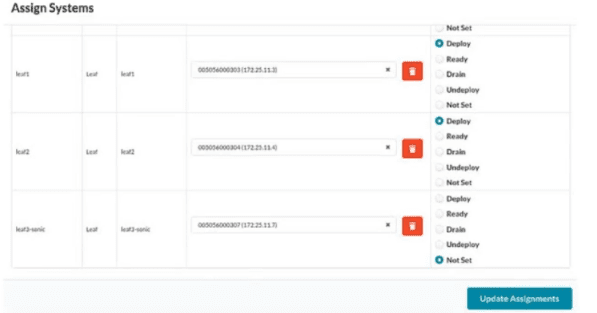
You have created a blueprint and are in the process of assigning systems. You require the leaf3-sonic device in the blueprint but do not want it to actively participate in the routing of the IP fabric.

In the Juniper Apstra UI, which two modes satisfy this requirement? (Choose two.)
Show answerHide answer

Correct answer: A, D DrainUndeploy

Explanation

Explanation:

In Juniper Apstra, the requirement is to have the leaf3-sonic device included in the blueprint but prevent it from actively participating in IP fabric routing. Both Drain and Undeploy modes satisfy this requirement, though they achieve it at different stages of the device lifecycle.

A. Drain Mode
gracefully removes a device from service for maintenance while keeping it assigned to the blueprint. When a device is set to Drain mode, Apstra applies changes to BGP policies and disables/shuts down all L2 ports, effectively taking the device out of service without disrupting existing TCP flows. The device remains in the blueprint but does not route traffic or participate in control plane operations. This is explicitly designed for taking a device out of service for maintenance or decommissioning.

D. Undeploy Mode
completely removes Apstra-rendered configuration from the device. Documentation states that if a device is carrying traffic, it is best to first put the device into Drain mode (and commit the change) before proceeding to Undeploy. Like Drain, Undeploy keeps the device assigned to the blueprint but ensures it does not actively participate in IP fabric routing. Undeploy is the appropriate mode for a device you want in the blueprint but fully inactive.

Why other options are incorrect:

B. Ready Mode
— This mode places the device in a Discovery-2 state where it receives complete configuration (hostname, interface descriptions, port speeds) but no BGP configuration. Interfaces are brought up and LLDP is enabled, allowing Apstra to validate cabling and telemetry. However, this does not prevent the device from participating in fabric operations. The device remains ready for service deployment and is not removed from routing participation.

C. Deploy Mode
— This mode adds full service configuration including BGP, puts the device fully in service, and actively participates in IP fabric routing. This is the opposite of what the requirement asks for.

Reference:

Juniper Networks TechLibrary — "Drain — Takes a device out of service for maintenance" and "Undeploy — Removes Apstra-rendered configuration"

Juniper Networks TechLibrary — *"Set deploy mode to Drain ... applies changes to BGP policies and disables/shuts down all L2 ports"*
Question 17 Choose 1
Off-box agents are consuming too much CPU and memory on your Juniper Apstra controller. In this scenario, how would you solve this problem?
Show answerHide answer

Correct answer: B Create a worker VM to offload off-box agents from the Apstra controller VM.

Explanation

Explanation:

Off-box agents run as containers directly on the Apstra server VM. When these agents consume excessive CPU and memory, it indicates the single VM deployment model has reached its resource limits. The supported solution is to scale out using Apstra VM clusters.

Why other options are incorrect:

A. Add more CPU and memory to the controller VM
While increasing resources might help temporarily, the documented scaling mechanism is horizontal (adding worker nodes), not vertical. The official guidance states: "If one VM is insufficient for your needs, you can increase capacity by adding worker nodes with Apstra VM Clusters".

C. Use on-box agents instead of off-box agents
On-box agents run directly on managed devices (switches), not on the Apstra server. This architectural change is not a solution for controller CPU/memory consumption; it requires different device capabilities and fundamentally changes the management model.

D. Modify the agent profile to consume less resources
There is no agent profile setting to reduce resource consumption. The minimum memory allocation for Juniper off-box agents is fixed at 500 MB. You can increase it (from 250 MB default), but you cannot decrease it below required minimums.

Reference:

Juniper TechLibrary: "If one VM is insufficient for your needs, you can increase capacity by adding worker nodes with Apstra VM Clusters"

Juniper TechLibrary: "Offbox Agent runs as a container directly on the Apstra server"
Question 18 Choose 3
What are three phases of the Juniper Apstra data center life cycle? (Choose three.)
Show answerHide answer

Correct answer: B, D, E DesignOperational phaseDeployment

Explanation

Explanation|:

The Juniper Apstra data center network lifecycle is organized into three core phases that cover the entire journey from initial planning to ongoing management. These phases align with the industry-standard "Day 0," "Day 1," and "Day 2+" terminology .

Design Phase (Day 0):
During this phase, you model your entire data center in software before any physical hardware is deployed . This includes creating logical devices, interface maps, and device profiles to define hardware capabilities abstractly. You build rack types to model physical infrastructure, create templates to define network architecture (3-stage, 5-stage, or collapsed fabrics), and design blueprints that capture your intent .

Deployment Phase (Day 1):
In this phase, you instantiate your design into an actual physical network . System agents are deployed, managed devices are assigned to blueprints, and network resources are allocated . Apstra then pushes the vendor-specific configuration to devices (supporting multiple vendors including Juniper, Cisco, Arista, Dell) . Once committed, the blueprint becomes the active representation of your live network.

Operational Phase (Day 2+):
This ongoing phase focuses on continuous validation and management of the live network. Apstra receives telemetry from devices to analyze and validate that the current device state matches the blueprint, maintaining a single source of truth . Key Day 2 activities include intent-based analytics for monitoring, capacity planning, change management via Time Voyager rollback, security policy assurance, and anomaly detection .

Why other options are incorrect:

A. Configuration:
This is not a distinct lifecycle phase in Juniper Apstra. Configuration generation occurs automatically during the deployment phase, where Apstra translates your intent into vendor-specific device configurations . The term "configuration" describes an action within phases, not a separate phase itself.

C. Installation:
This refers to the physical process of racking and cabling hardware, which precedes Apstra's involvement. Apstra's lifecycle begins with digital design (Day 0) and assumes physical infrastructure is in place for deployment . Installation is not enumerated as one of Apstra's formal lifecycle phases.

Reference:

Juniper Networks Documentation: "Juniper Apstra automates all aspects of the data center network design, build, deploy, and operation phases"

WWT Article: "Throughout the design, deployment and operational phases of a network, Apstra maintains its user's blueprint"
Question 19 Choose 2
You have an EVPN-VXLAN data center IP fabric, with all single-homed hosts/servers. Which two EVPN route types are present in this scenario? (Choose two.)
Show answerHide answer

Correct answer: A, C Type 3Type 2

Explanation

Explanation:

In an EVPN-VXLAN fabric with single-homed hosts/servers, only certain route types are required for proper operation. Multi-homing introduces additional complexity and route types, but single-homing simplifies the control plane.

C. Type 2 routes (MAC/IP Advertisement routes):
These routes are used to advertise the MAC addresses (and optionally IP addresses) of hosts attached to VTEPs. When a VTEP learns a new host MAC address locally, it generates a Type 2 route and advertises it to all other VTEPs in the EVPN instance. This enables remote host learning via the control plane, which is a key benefit of EVPN .

A. Type 3 routes (Inclusive Multicast routes):
These routes are used for automatic discovery of VTEPs and for dynamically establishing VXLAN tunnels. They also carry information about how to deliver BUM (Broadcast, Unknown unicast, Multicast) traffic, typically using ingress replication. Each VTEP advertises a Type 3 route to signal its presence and its BUM handling capabilities

Why other options are incorrect:

B. Type 7
— Type 7 is not a standard EVPN route type. The defined EVPN route types are Type 1 through Type 5. Type 7 does not exist in the EVPN specification .

D. Type 4
— Type 4 routes (Ethernet Segment routes) are specifically used for multi-homing scenarios. They are required for Designated Forwarder (DF) election when a host or device is connected to multiple VTEPs. In single-homed deployments (ESI = 0), Type 4 routes are not generated or needed .

Reference:

Juniper Networks TechLibrary:EVPN route types documentation

EVPN NLRI specifications showing Type 2 (MAC/IP advertisement) and Type 3 (Inclusive Multicast) as core route types

That's the last free question

You've seen the free 30% (19 of 64 questions). Full access unlocks every question and full-length JN0-481 mock exams (65 questions, 90 minutes), a different mock on every attempt.

Unlock full mock exam
Full mock exam

Sit the JN0-481 exam before exam day

Full-length mocks with the same number of questions and the same time limit as the real JN0-481 exam. Every attempt draws a new set of questions from the full bank, so you can keep going until you pass comfortably.

Get full JN0-481 mock exam
  • 65questions per mock
  • 90 mintime limit
  • 64questions in the bank
  • Newmock on every attempt