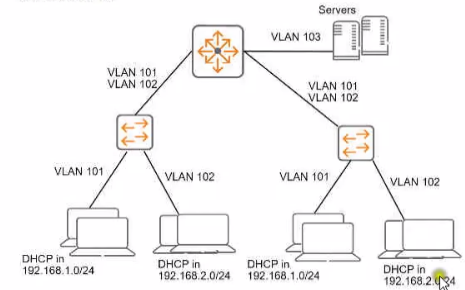
You have a network with ArubaOS-Switches for which Aruba ClearPass Policy Manager
(CPPM) is acting as a TACACS+ server to authenticate managers. CPPM assigns the
admins a TACACS+ privilege level, either manager or operator. You are now adding
ArubaOS-CX switches to the network. ClearPass admins want to use the same CPPM
service and policies to authenticate managers on the new switches.
What should you explain?
Show answerHide answer
Correct answer: DThis approach will work to assign admins to the default "administrators" group, but not to
the default "operators" group.
Explanation
Explanation: With ArubaOS-CX switches, the use of ClearPass Policy Manager (CPPM)
as a TACACS+ server for authentication is supported. The privilege levels assigned by
CPPM will translate onto the switches, where the "manager" privilege level typically maps
to administrative capabilities and the "operator" privilege level maps to more limited
capabilities. ArubaOS-CX does support standard TACACS+ privilege levels, so
administrators can be assigned appropriately. If the ClearPass policies are correctly
configured, they will work for both ArubaOS-Switches and ArubaOS-CX switches. The
distinction between the "administrators" and "operators" groups is inherent in the ArubaOSCX
role-based access control, and these default groups need to be appropriately mapped
to the TACACS+ privilege levels assigned by CPPM.
Question 32Choose 1
You are troubleshooting an authentication issue for Aruba switches that enforce 802 IX10 a
cluster of Aruba ClearPass Policy Manager (CPPMs) You know that CPPM Is receiving
and processing the authentication requests because the Aruba switches are showing
Access-Rejects in their statistics However, you cannot find the record tor the Access-
Rejects in CPPM Access Tracker
What is something you can do to look for the records?
Show answerHide answer
Correct answer: AMake sure that CPPM cluster settings are configured to show Access-Rejects
Explanation
Explanation: If Access-Reject records are not showing up in the CPPM Access Tracker,
one action you can take is to ensure that the CPPM cluster settings are configured to
display Access-Rejects. Cluster-wide settings in CPPM can affect which records are visible
in Access Tracker. Ensuring that these settings are correctly configured will allow you to
view all relevant authentication records, including Access-Rejects.
Question 33Choose 1
Refer to the exhibit.
How can you use the thumbprint?
Show answerHide answer
Correct answer: CWhen you first connect to the switch with SSH from a management station, make sure
that the thumbprint matches to ensure that a man-in-t he-mid die (MITM) attack is not
occurring
Explanation
Explanation: The thumbprint (also known as a fingerprint) of a certificate or SSH key is a
hash that uniquely represents the public key contained within. When you first connect to
the switch with SSH from a management station, you should ensure that the thumbprint
matches what you expect. This is a security measure to confirm the identity of the device
you are connecting to and to ensure that a man-in-the-middle (MITM) attack is not
occurring. If the thumbprint matches the known good thumbprint of the switch, it is safe to
proceed with the connection.
Question 34Choose 1
How can hackers implement a man-in-the-middle (MITM) attack against a wireless client?
Show answerHide answer
Correct answer: CThe hacker connects a device to the same wireless network as the client and responds
to the client’s ARP requests with the hacker device’s MAC address.
Explanation
Explanation: A common method for hackers to perform a man-in-the-middle (MITM) attack
on a wireless network is by ARP poisoning. The attacker connects to the same network as
the victim and sends false ARP messages over the network. This causes the victim's
device to send traffic to the attacker's machine instead of the legitimate destination,
allowing the attacker to intercept the traffic.
Reference: ARP spoofing is documented as a common MITM technique in various security
publications and resources like the IEEE 802.11 standard and security textbooks.
Please note that the answers provided are based on general networking and security
principles and best practices. If you require verification against specific Aruba product
documentation or technical manuals, those documents should be consulted directly.
Question 35Choose 1
Refer to the exhibit.
You need to ensure that only management stations in subnet 192.168.1.0/24 can access
the ArubaOS-Switches' CLI. Web Ul. and REST interfaces The company also wants to let
managers use these stations to access other parts of the network What should you do?
Show answerHide answer
Correct answer: BSpecify 192.168.1.0.255.255.255.0 as authorized IP manager address
Explanation
Explanation: To ensure that only management stations in the subnet 192.168.1.0/24 can
access the ArubaOS-Switches' Command Line Interface (CLI), Web UI, and REST
interfaces, while also allowing managers to access other parts of the network, you should
specify 192.168.1.0 255.255.255.0 as the authorized manager IP address on the switches.
This configuration will restrict access to the switch management interfaces to devices within
the specified IP address range, effectively creating a management access list.
Question 36Choose 1
What is one benefit of enabling Enhanced Secure mode on an ArubaOS-Switch?
Show answerHide answer
Correct answer: CInsecure algorithms for protocol such as SSH are automatically disabled.
Explanation
Explanation: In the context of ArubaOS-Switches, enabling Enhanced Secure mode has
several benefits, one of which includes disabling insecure algorithms for protocols such as
SSH. This is in line with security best practices, as older, less secure algorithms are known
to be vulnerable to various types of cryptographic attacks. When Enhanced Secure mode is
enabled, the switch automatically restricts the use of such algorithms, thereby enhancing
the security of management access.
Question 37Choose 1
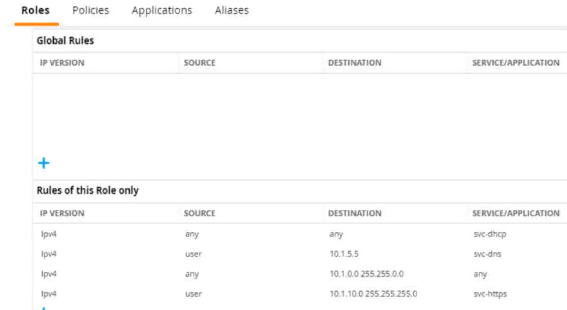
Refer to the exhibit.
A diem is connected to an ArubaOS Mobility Controller. The exhibit snows all Tour firewall rules that apply to this diem
What correctly describes how the controller treats HTTPS packets to these two IP
addresses, both of which are on the other side of the firewall
10.1 10.10
203.0.13.5
Show answerHide answer
Correct answer: BIt permits the packet to 10.1.10.10 and drops the packet to 203 0.13.5
Explanation
Explanation: Referring to the exhibit, the ArubaOS Mobility Controller treats HTTPS
packets based on the firewall rules applied to the client. The rule that allows svc-https
service for destination IP range 10.1.0.0 255.255.0.0 would permit an HTTPS packet to
10.1.10.10 since this IP address falls within the specified range. There are no rules shown
that would allow traffic to the IP address 203.0.13.5; hence, the packet to this address
would be dropped.
Question 38Choose 1
What is one difference between EAP-Tunneled Layer security (EAP-TLS) and Protected
EAP (PEAP)?
Show answerHide answer
Correct answer: BEAP-TLS requires the supplicant to authenticate with a certificate, hut PEAP allows the
supplicant to use a username and password.
Question 39Choose 1
Which is a correct description of a stage in the Lockheed Martin kill chain?
Show answerHide answer
Correct answer: DIn the exploitation and installation phases, malware creates a backdoor into the infected
system for the hacker.
Explanation
Explanation: The Lockheed Martin Cyber Kill Chain model describes the stages of a cyber
attack. In the exploitation phase, the attacker uses vulnerabilities to gain access to the
system. Following this, in the installation phase, the attacker installs a backdoor or other
malicious software to ensure persistent access to the compromised system. This backdoor
can then be used to control the system, steal data, or execute additional attacks.
Question 40Choose 1
Your Aruba Mobility Master-based solution has detected a suspected rogue AP. Among
other information, the ArubaOS Detected Radios page lists this information for the AP:
SSID = PublicWiFi
BSSID = a8:bd:27:12:34:56
Match method = Plus one
Match method = Eth-Wired-Mac-Table
The security team asks you to explain why this AP is classified as a rogue. What should
you explain?
Show answerHide answer
Correct answer: BThe AP is probably connected to your LAN because it has a BSSID that is close to a
MAC address that has been detected in your LAN. Because it does not belong to the
company, it is a suspected rogue.
Explanation
Explanation: The Match method 'Eth-Wired-Mac-Table' suggests that the BSSID of the
rogue AP has been found in the Ethernet (wired) MAC address table of the network
infrastructure. This means the AP is physically connected to the LAN. If the BSSID does
not match the company's authorized APs, it implies the AP is unauthorized and hence
classified as a rogue.
Full mock exam
Sit the HPE6-A78 exam before exam day
Full-length mocks with the same number of questions and the same time limit as the real HPE6-A78 exam. Every attempt draws a new set of questions from the full bank, so you can keep going until you pass comfortably.