Microsoft certification · Exam DP-600

DP-600 Mock Exam Page 2

Implementing Analytics Solutions Using Microsoft Fabric

Free DP-600 mock exam questions 11–13, each with the answer and an explanation.

13 questions · 21 minutes · free, no sign-up

Free DP-600 questions

11–13 of 13 free
Question 11 Choose 1
You have a Fabric tenant that contains a semantic model. The model contains 15 tables.

You need to programmatically change each column that ends in the word Key to meet the following requirements:

• Hide the column.

• Set Nullable to False.

• Set Summarize By to None

• Set Available in MDX to False.

• Mark the column as a key column.

What should you use?
Show answerHide answer

Correct answer: B Tabular Editor

Explanation

Explanation:
The key requirement is to programmatically change multiple advanced metadata properties across a large number of columns (15 tables, likely dozens of columns ending in "Key") based on a specific naming convention (ends in the word Key).

Programmatic Bulk Changes: Tabular Editor (an external tool that connects to the semantic model via the XMLA endpoint) supports C# Advanced Scripting. This scripting feature is specifically designed to iterate through all tables and columns in a model, identify objects that match a condition (e.g., column.Name.EndsWith("Key")), and apply bulk changes to their properties in a single, automated operation.

Advanced Properties: Tabular Editor provides direct access to the full Tabular Object Model (TOM), allowing modification of advanced properties like IsHidden, SummarizeBy, IsAvailableInMdx, and marking the column as a key column, which is essential for this task.

Correct Option:

B. Tabular Editor
Automation via Scripting: Tabular Editor allows the use of C# scripts to automate model metadata changes. This is the only way among the options to iterate over columns based on a naming convention and apply multiple, specific property changes in bulk.

Direct Model Access: It connects to the semantic model (dataset) via the XMLA endpoint, enabling precise, high-speed, and programmatic modifications to the model's metadata (IsHidden = true, SummarizeBy = None, etc.).

Incorrect Option:

A. Microsoft Power BI Desktop
Manual Changes: While Power BI Desktop is the primary tool for developing models, it does not offer built-in functionality for running C# or equivalent scripts to automate bulk changes based on name patterns. You would have to manually select and change properties for each column individually, which is inefficient for 15 tables.

C. ALM Toolkit
Comparison/Deployment: ALM Toolkit is designed for Application Lifecycle Management (ALM) tasks. Its primary use cases are comparing two semantic models, merging changes, and deploying models between development, test, and production environments. It is not designed for authoring or programmatically editing the internal structure of a single model's metadata.

D. DAX Studio
Querying and Tuning: DAX Studio is a client tool focused on executing DAX queries, viewing metadata, and performing performance tuning (tracing and query analysis). It is purely a read/query tool and has no capability to modify the underlying structure or properties of the semantic model.

Reference:
Microsoft Learn: Programming Power BI semantic models with the Tabular Object Model (TOM); DP-600 Exam Discussions: Tabular Editor is the correct tool for programmatic, bulk changes to model properties using C# scripting.
Question 12 Choose 1
You are creating a semantic model in Microsoft Power Bl Desktop.

You plan to make bulk changes to the model by using the Tabular Model Definition Language (TMDL) extension for Microsoft Visual Studio Code.

You need to save the semantic model to a file.

Which file format should you use?
Show answerHide answer

Correct answer: A PBIP

Explanation

Explanation:
The scenario involves using the TMDL (Tabular Model Definition Language) extension to edit a semantic model's structure. TMDL is a text-based format for defining the model's schema. To use it with the extension, you must first save the Power BI Desktop semantic model in a format that exposes the underlying model files for external editing. The .pbip format is specifically designed for this development workflow.

Correct Option:

A. PBIP (Power BI Project):
This is the correct format. The PBIP format saves the semantic model as a folder containing separate text files (like definition.model.tmdl), which can be directly opened, edited, and version-controlled using Visual Studio Code with the TMDL extension. It is built for collaborative, file-based development.

Incorrect Option:

B. PBIX:
This is the standard, single-file package format for Power BI Desktop reports and models. Its contents are binary and compressed, not directly editable as text files with the TMDL extension. It is not suitable for the described TMDL editing workflow.

C. PBIT (Power BI Template):
This is a template file used to distribute pre-configured reports and datasets. Like PBIX, it is a packaged format not intended for direct, text-based model editing.

D. PBIDS (Power BI Data Source):
This is a simple file that defines a data source connection for use in Power BI Desktop. It contains only connection information, not the full semantic model definition required for bulk changes via TMDL.

Reference:
Microsoft Learn - "Tabular Model Definition Language (TMDL)" documentation explicitly states that to edit a model using TMDL, you work with a Power BI Project (.pbip) file, which structures the model as a folder of TMDL text files.
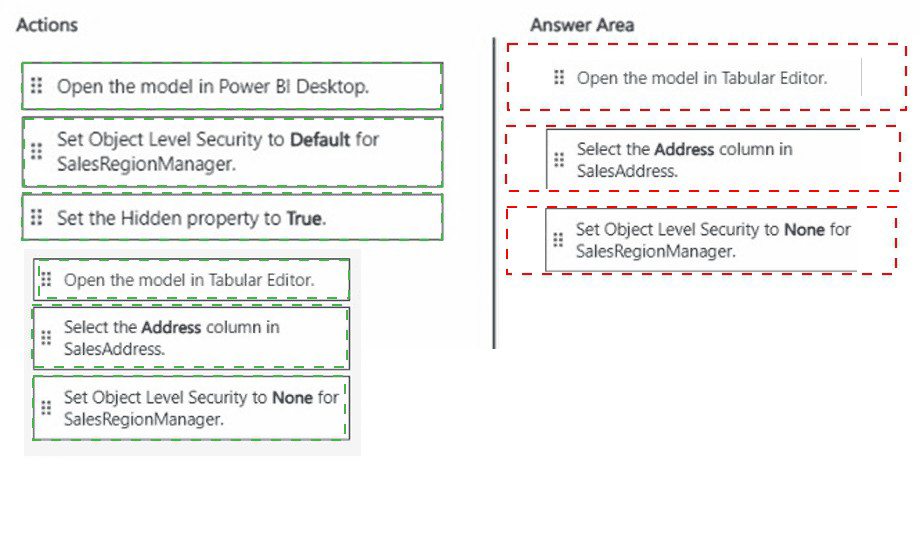
Question 13
You create a semantic model by using Microsoft Power Bl Desktop. The model contains one security role named SalesRegionManager and the following tables:

• Sales

• SalesRegion

• Sales Ad dress

You need to modify the model to ensure that users assigned the SalesRegionManager role cannot see a column named Address in Sales Address.

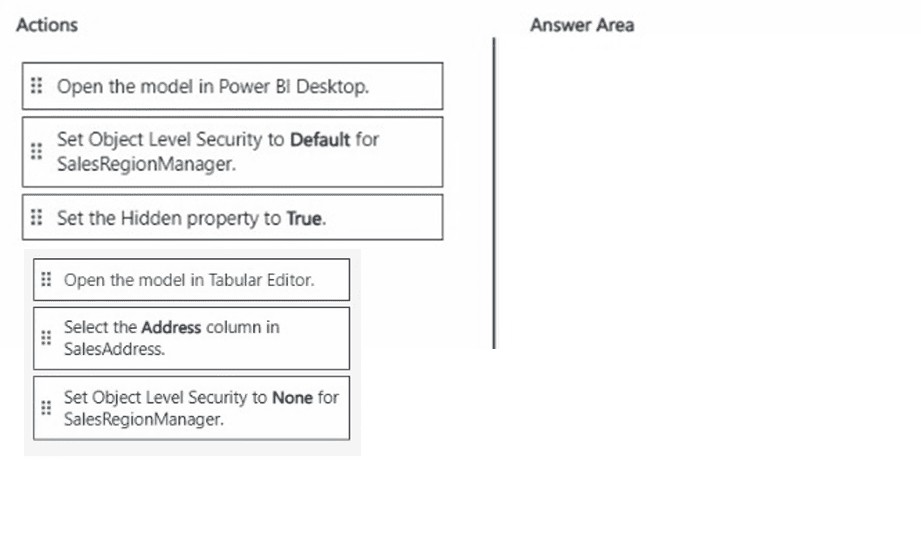
Which three actions should you perform in sequence? To answer, move the appropriate actions from the list of actions to the answer area and arrange them in the correct order.

Show answerHide answer

Explanation


Explanation:
Implementing Object-Level Security (OLS) is the process of hiding specific tables or columns from users belonging to a defined security role.

Open the model in Tabular Editor: OLS settings are part of the advanced metadata of the semantic model. While you can define Row-Level Security (RLS) in Power BI Desktop, Object-Level Security (OLS) must be configured using an external tool like Tabular Editor because Power BI Desktop does not provide a native interface for OLS configuration. 2. Select the Address column in SalesAddress: You must first locate and select the specific column you intend to hide. The column is named Address and resides in the SalesAddress table.

Set Object Level Security to None for SalesRegionManager: After selecting the column, you apply the OLS rule. Setting the security permission to None for a specific role (here, SalesRegionManager) on a column ensures that the column is completely hidden from users belonging to that role.

Incorrect Option Explanations:

Open the model in Power BI Desktop: Power BI Desktop does not have a user interface to configure Object-Level Security (OLS). It is incorrect for the first step.

Set the Hidden property to True: Setting the Hidden property simply hides the column from all report authors in the field list. It does not prevent users assigned to the role from accessing the data through DAX queries or visuals that explicitly use the column. It is not an OLS control.

Set Object Level Security to Default for SalesRegionManager: The Default setting is typically the same as allowing access. To explicitly hide the column, the permission must be set to None.

Reference:
Microsoft Learn: Object-level security; Tabular Editor documentation on Object-Level Security.

That's the last free question

You've seen the free 30% (13 of 50 questions). Full access unlocks every question and full-length DP-600 mock exams (65 questions, 105 minutes), a different mock on every attempt.

Unlock full mock exam
Full mock exam

Sit the DP-600 exam before exam day

Full-length mocks with the same number of questions and the same time limit as the real DP-600 exam. Every attempt draws a new set of questions from the full bank, so you can keep going until you pass comfortably.

Get full DP-600 mock exam
  • 65questions per mock
  • 105 mintime limit
  • 50questions in the bank
  • Newmock on every attempt