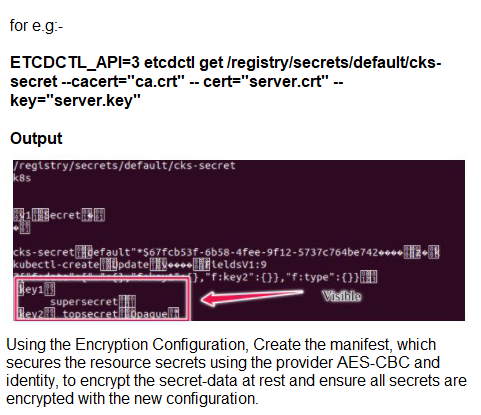
Secrets stored in the etcd is not secure at rest, you can use the etcdctl command utility to
find the secret value
Show answerHide answer
Explanation
Explanation:
ETCD secret encryption can be verified with the help of etcdctl command line utility.
ETCD secrets are stored at the path /registry/secrets/$namespace/$secret on the master node.
The below command can be used to verify if the particular ETCD secret is encrypted or not.
# ETCDCTL_API=3 etcdctl get /registry/secrets/default/secret1 [...] | hexdump -C
Question 12
Create a new NetworkPolicy named deny-all in the namespace testing which denies all
traffic of type ingress and egress traffic
Show answerHide answer
Explanation
Explanation:
You can create a "default" isolation policy for a namespace by creating a NetworkPolicy that selects all pods but does not allow any ingress traffic to those pods.
---
apiVersion: networking.k8s.io/v1
kind: NetworkPolicy
metadata:
name: default-deny-ingress
spec:
podSelector: {}
policyTypes:
- Ingress
You can create a "default" egress isolation policy for a namespace by creating a NetworkPolicy that selects all pods but does not allow any egress traffic from those pods.
---
apiVersion: networking.k8s.io/v1
kind: NetworkPolicy
metadata:
name: allow-all-egress
spec:
podSelector: {}
egress:
- {}
policyTypes:
- Egress
Default deny all ingress and all egress trafficYou can create a "default" policy for a namespace which prevents all ingress AND egress traffic by creating the following NetworkPolicy in that namespace.
---
apiVersion: networking.k8s.io/v1
kind: NetworkPolicy
metadata:
name: default-deny-all
spec:
podSelector: {}
policyTypes:
- Ingress
- Egress
This ensures that even pods that aren't selected by any other NetworkPolicy will not be allowed ingress or egress traffic.
Question 13
Show answerHide answer
Explanation
Question 14
Context:
Cluster: prod
Master node: master1
Worker node: worker1
You can switch the cluster/configuration context using the following command:
[desk@cli] $ kubectl config use-context prod
Task:
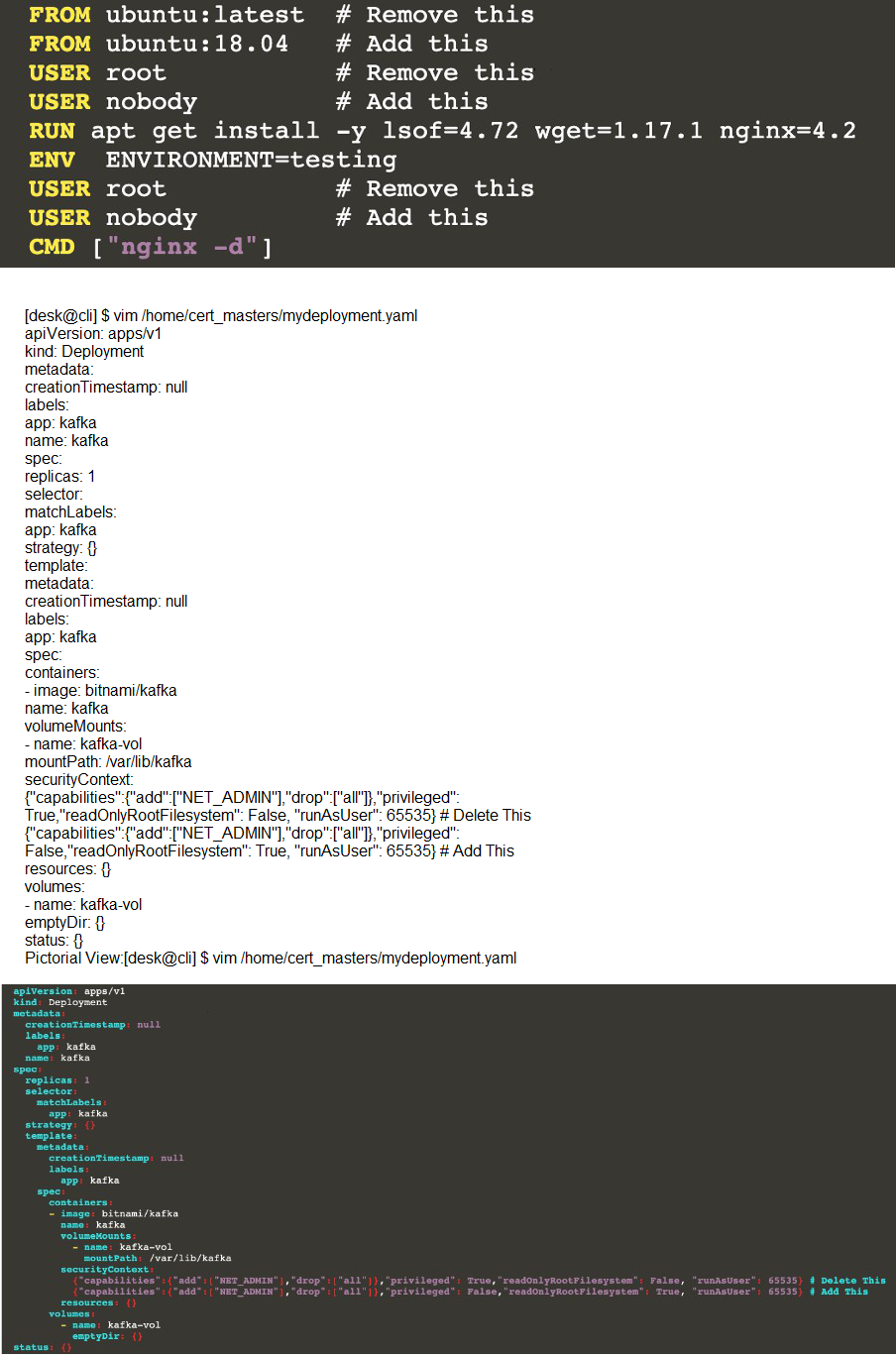
Analyse and edit the given Dockerfile (based on the ubuntu:18:04 image)
/home/cert_masters/Dockerfile fixing two instructions present in the file being prominent security/best-practice issues.
Analyse and edit the given manifest file
/home/cert_masters/mydeployment.yaml fixing two fields present in the file being prominent security/best-practice issues.
Note: Don't add or remove configuration settings; only modify the existing configuration settings, so that two configuration settings each are no longer security/best-practice concerns.
Should you need an unprivileged user for any of the tasks, use user nobody with user id 65535
Show answerHide answer
Explanation
Explanation:
1. For Dockerfile: Fix the image version & user name in Dockerfile2. For mydeployment.yaml : Fix security contexts
Explanation[desk@cli] $ vim /home/cert_masters/Dockerfile
FROM ubuntu:latest # Remove this
FROM ubuntu:18.04 # Add this
USER root # Remove this
USER nobody # Add this
RUN apt get install -y lsof=4.72 wget=1.17.1 nginx=4.2
ENV ENVIRONMENT=testing
USER root # Remove this
USER nobody # Add this
CMD ["nginx -d"]
That's the last free question
You've seen the free 30% (14 of 48 questions). Full access unlocks every question and full-length CKS mock exams (65 questions, 105 minutes), a different mock on every attempt.
Full-length mocks with the same number of questions and the same time limit as the real CKS exam. Every attempt draws a new set of questions from the full bank, so you can keep going until you pass comfortably.