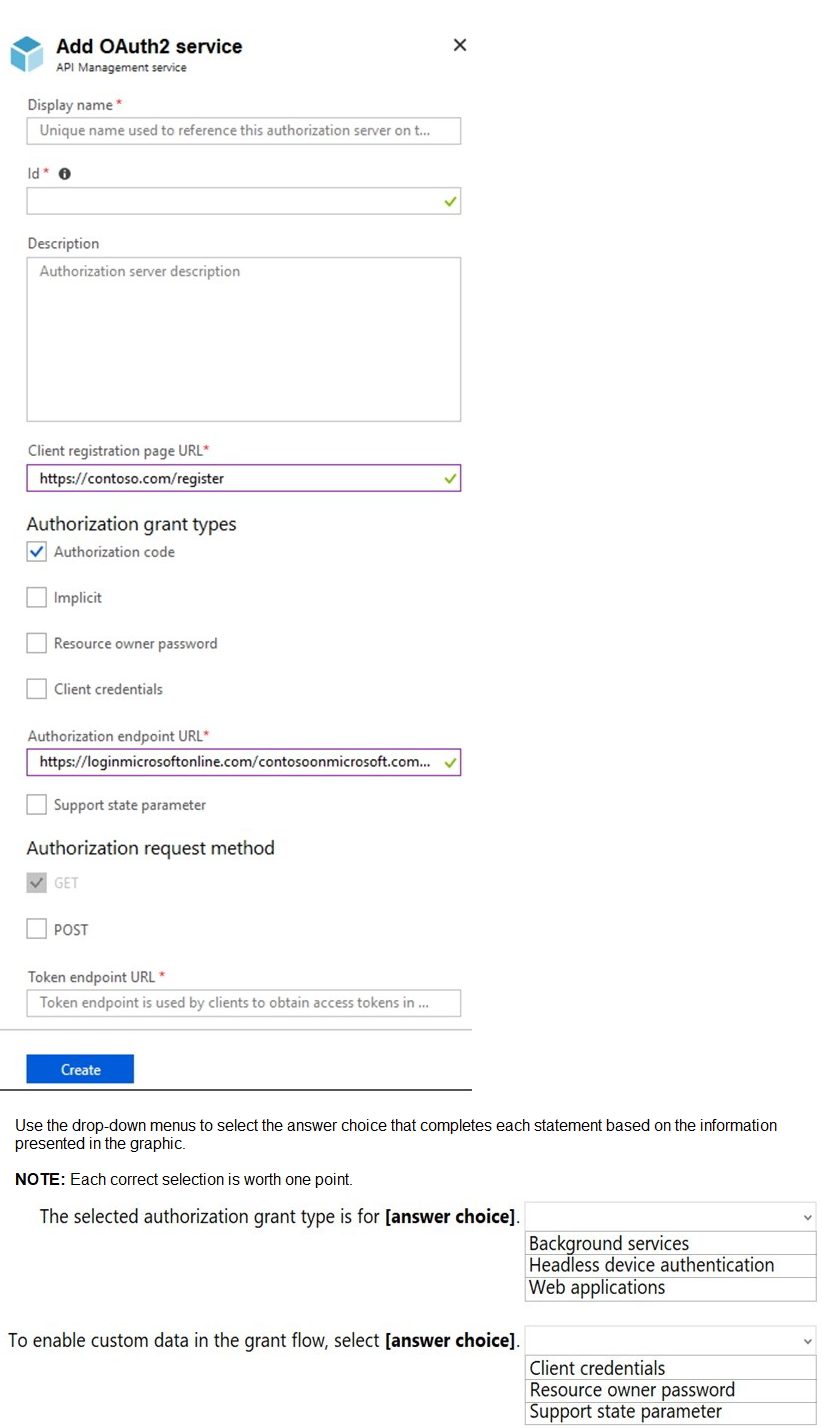
You configure OAuth2 authorization in API Management as shown in the following exhibit.
Show answerHide answer
Explanation
Summary
The configuration shows an OAuth2 authorization server in API Management. The critical details are that the Authorization code grant type is selected, and the Support state parameter checkbox is available but not selected. The Authorization Code grant type is the standard, most secure flow for web applications that have a server-side component to securely store a client secret. The "state" parameter is a security feature used to maintain state between the request and callback, helping to mitigate cross-site request forgery (CSRF) attacks.
Answers:
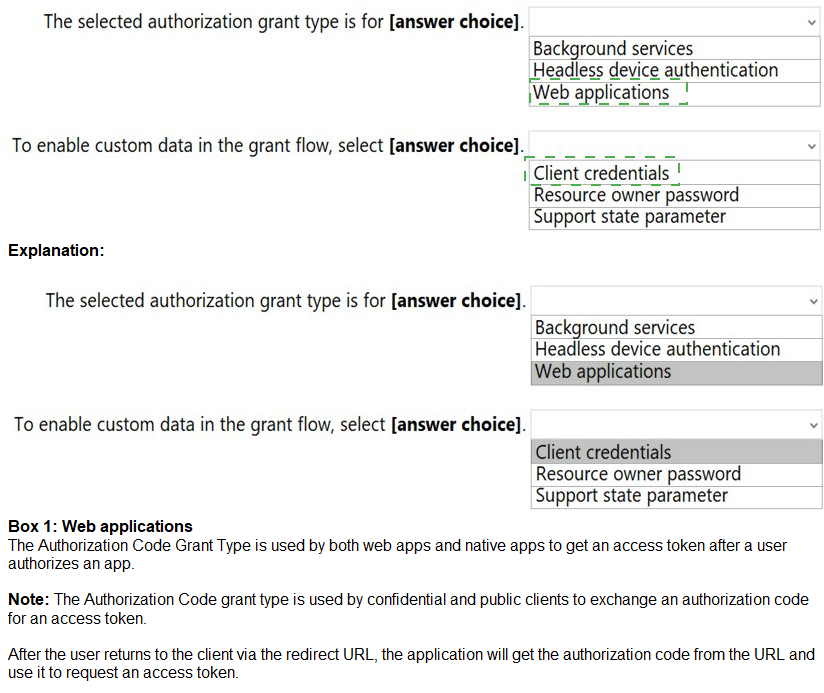
The selected authorization grant type is for: Web applications
To enable custom data in the grant flow, select: Support state parameter
Correct Option Justification:
Web applications:
The Authorization code grant type is specifically designed for web applications that run on a server. In this flow, the user's browser is redirected to the authorization server to log in. After authentication, the authorization server redirects back to the web application with a short-lived authorization code. The web application's server then exchanges this code for an access token, without exposing the token to the user's browser. This is the correct and most common flow for server-side web applications.
Support state parameter:
The state parameter is an opaque value used by the client (the web application) to maintain state between the authorization request and the callback (redirect). It is a critical security feature used to prevent CSRF attacks. Furthermore, it is the standard mechanism for including any custom data (like a session ID or a return URL) in the authorization grant flow. When the "Support state parameter" box is checked, API Management will expect and validate this parameter.
Incorrect Option Explanations
For the grant type:
Background services:
This describes the Client credentials grant type, which is used for machine-to-machine (M2M) authentication where a specific user is not involved. The application authenticates with its own credentials (client ID and secret) to get an access token.
Headless device authentication:
This typically describes the Device authorization grant (a variation of the device flow), which is not shown in the exhibit. The Resource owner password grant (which is also not selected) is sometimes used for legacy or headless scenarios, but it is highly discouraged for modern applications due to security risks.
For enabling custom data:
Client credentials:
This is an entirely different grant type, not a parameter. It is used for non-interactive authentication and does not relate to adding custom data to the authorization flow.
Resource owner password:
This is another grant type where the application collects the user's password and sends it directly to the authorization server. It is also not a parameter and is considered an insecure, legacy flow.
Reference:
Microsoft Learn, "OAuth 2.0 authorization code flow in Azure Active Directory B2C": https://learn.microsoft.com/en-us/azure/active-directory-b2c/authorization-code-flow
Microsoft Identity Platform documentation, "State parameter": https://learn.microsoft.com/en-us/azure/active-directory/develop/v2-oauth2-auth-code-flow#request-an-authorization-code (Note: This link points to the general concept as documented for the Microsoft Identity Platform, which aligns with the OAuth2 standard implemented in API Management).
 Summary