Microsoft certification · Exam AB-730

AB-730 Mock Exam Page 2

AI Business Professional

Free AB-730 mock exam questions 11–20, each with the answer and an explanation.

20 questions · 30 minutes · free, no sign-up

Free AB-730 questions

11–20 of 26 free
Question 11
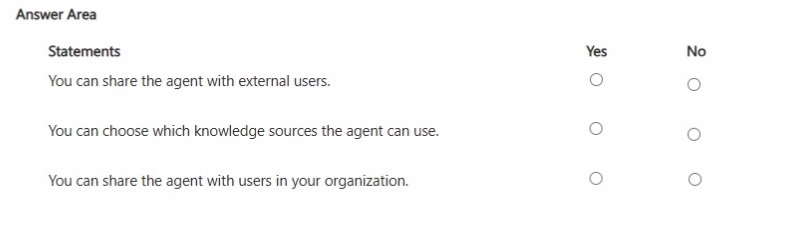
You create an agent in the Microsoft 365 Copilot app by using a template. For each of the following statements, select Yes if the statement is true. Otherwise, select No. NOTE: Each correct selection is worth one point.
Show answerHide answer

Explanation

Explanation:

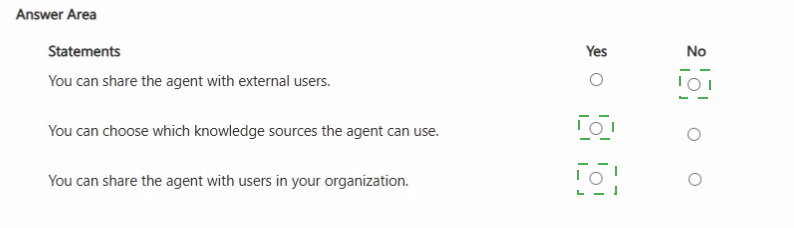
This question evaluates knowledge of the capabilities and sharing limits of agents created in the Microsoft 365 Copilot app (Agent Builder) from a template. Templates provide a starting scaffold (name, description, instructions, and suggested prompts). After creation you can configure knowledge sources and share the agent, but sharing is restricted to internal organizational users.

âś… Correct Options (Yes):

You can choose which knowledge sources the agent can use.
On the Configure tab you can add or remove knowledge sources such as SharePoint sites/files, OneDrive files, public websites, Teams chats/meetings, Outlook email, embedded files, and Copilot connectors. This selection grounds the agent’s responses.

You can share the agent with users in your organization.
After creation, the Share dialog lets you grant access to specific users or groups inside your tenant, or to anyone in the organization. Shared agents respect each user’s existing permissions to the underlying knowledge sources.

❌ Incorrect Option (No):

You can share the agent with external users.
Agents built with Agent Builder (including those started from a template) can be shared only with users inside your Microsoft 365 organization. External or guest users cannot be granted access through the standard Share dialog.

đź”§ Reference:
→ Share and manage agents built in Agent Builder (Microsoft Learn) — Confirms internal-only sharing options and knowledge-source selection.

→ Agent Builder templates (Microsoft Learn) — Confirms that templates allow configuration of knowledge sources before and after creation.
Question 12
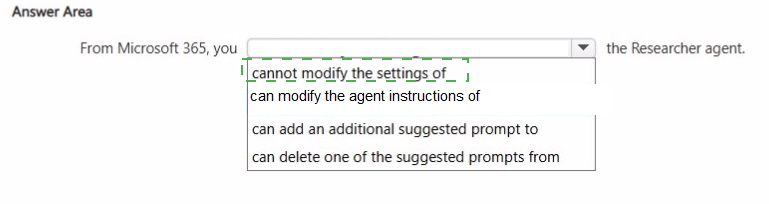
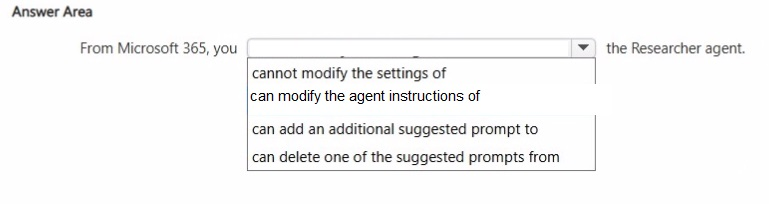
Select the answer that correctly completes the sentence.

Show answerHide answer

Explanation


Explanation:

This question tests your understanding of built-in Microsoft 365 Copilot system agents versus user-created custom agents. Built-in agents, such as the Researcher agent and Analyst agent, are pre-configured system features provided out-of-the-box by Microsoft. Because they are core system capabilities, individual users cannot modify their underlying instructions, customize their system settings, or add and delete their default suggested prompts.

âś… Correct Option:

cannot modify the settings of
The Researcher agent is a built-in standard agent provided directly within Microsoft 365 Copilot. End users do not have administrative or authoring permissions to customize built-in system agents. Therefore, users cannot modify settings, alter core instructions, or edit the default starter prompts associated with the Researcher agent.

❌ Incorrect options:

can modify the agent instructions of
Custom instructions and agent behaviors can only be edited on custom-built agents created via Copilot Studio or Copilot builder. System-provided agents like the Researcher agent have locked configurations that end users cannot modify.

can add an additional suggested prompt to
Users can only add or customize suggested prompts when creating or editing custom agents that they own or manage. Built-in agents maintain a fixed set of prompt starters managed directly by Microsoft.

can delete one of the suggested prompts from
Deleting suggested prompts requires authoring access to the agent configuration. Since the Researcher agent is a built-in Microsoft agent, individual users lack permission to remove or edit any of its default prompt options.

đź”§ Reference:
⇒ Microsoft 365 Copilot Agents Guidance confirms that built-in system agents have pre-configured settings and prompts that cannot be edited by end users.
Question 13
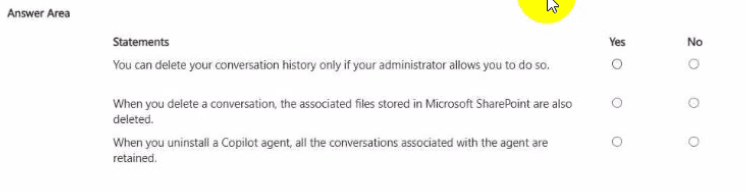
You use Microsoft 365 Copilot. For each of the following statements, select Yes if the statement is true. Otherwise, select No. NOTE: Each correct selection is worth one point.

Show answerHide answer

Explanation


Explanation:

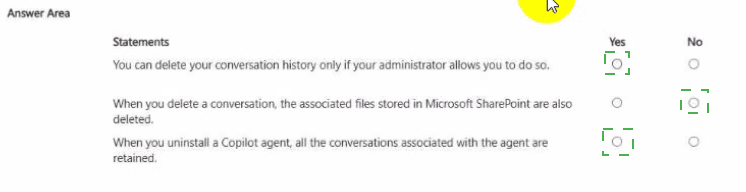
This question tests your understanding of how Microsoft 365 Copilot manages conversation history and data deletion. The key concepts involved are administrator control over deletion settings, the separation between chat history and saved files, and how agent-related conversations are handled when an agent is uninstalled.

✔️ Correct Options:

✔️ Statement 1: You can delete your conversation history only if your administrator allows you to do so. — Yes
This statement is true. Microsoft 365 Copilot allows administrators to manage and delete the interaction history of users through the Microsoft 365 admin center . Administrators control the data privacy and security settings, ensuring sensitive information is not retained longer than necessary. The deletion process requires administrative credentials, confirming that user-level deletion depends on administrator permissions .

✔️ Statement 3: When you uninstall a Copilot agent, all the conversations associated with the agent are retained. — Yes
This statement is true. When a Copilot agent is uninstalled, any conversations associated with that agent remain in the user's Copilot activity history. Microsoft documentation states that saved content helped by Copilot is not removed when deletion is selected . The agent's conversation history persists as part of the broader Copilot interaction history until explicitly deleted through the admin process .

❌ Incorrect options:

❌ Statement 2: When you delete a conversation, the associated files stored in Microsoft SharePoint are also deleted. — No
This statement is false. Deleting a Copilot conversation does not remove the files it helped create or modify. Microsoft explicitly states that any content Copilot helped you with and that you saved in your file won’t be removed when you delete your interaction history . The deletion applies only to the conversation record, not to separate stored files in SharePoint.

đź”§ Reference:
→ Learn Microsoft | Delete your Microsoft 365 Copilot interaction history — Confirms administrators manage and delete Copilot interaction history, and that saved files are not removed.
Question 14
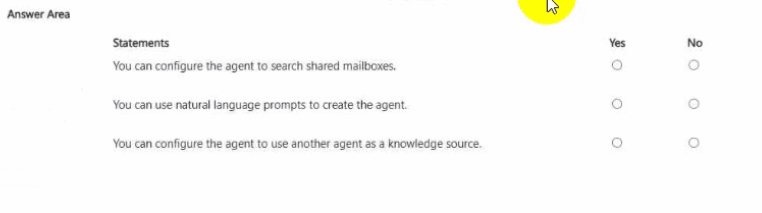
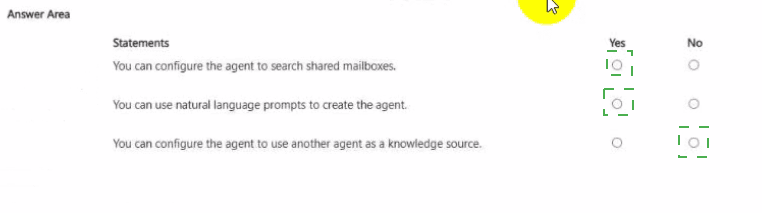
You are creating an agent in the Microsoft 365 Copilot app. For each of the following statements, select Yes if the statement is true. Otherwise, select No. NOTE: Each correct selection is worth one point.

Show answerHide answer

Explanation


Explanation

This question tests what you can do when building an agent with Agent Builder in the Microsoft 365 Copilot app. The three statements cover grounding an agent in Outlook email, creating an agent by describing it in plain language, and the range of knowledge sources the builder supports. The answers are Yes, Yes, No.

✅ Statement 1: You can configure the agent to search shared mailboxes. → Yes
Agent Builder can ground an agent in Outlook email as a knowledge source. The agent searches the email the signed-in user can access, which includes shared mailboxes they have permission to open. This lets you build agents such as a shared support inbox assistant. Email knowledge cannot be scoped to specific folders, so the agent uses all permitted mail.

✅ Statement 2: You can use natural language prompts to create the agent. → Yes
Agent Builder has a Describe tab where you explain in plain language what the agent should do. The builder then generates the name, instructions, and suggested knowledge sources for you, and you can refine the agent through conversation. If you prefer manual control, the Configure tab lets you edit the same settings directly. No coding is required.

❌ Statement 3: You can configure the agent to use another agent as a knowledge source. → No
Agent Builder knowledge sources are content sources such as SharePoint sites and files, web content, Teams chats and meetings, Outlook email, and Copilot connectors. Another agent is not a supported knowledge source. Connecting agents together is an advanced scenario handled in the full Copilot Studio, not in the simple Agent Builder.

đź”§ Reference
🔗 Add knowledge sources to an agent in Agent Builder – Microsoft Learn → confirms that Agent Builder adds knowledge sources from a natural language description, and lists supported sources including Outlook email, Teams data, and Copilot connectors.

🔗 Build agents in Agent Builder – Microsoft Learn → confirms that you can build declarative agents using natural language or manual configuration in Agent Builder.
Question 15
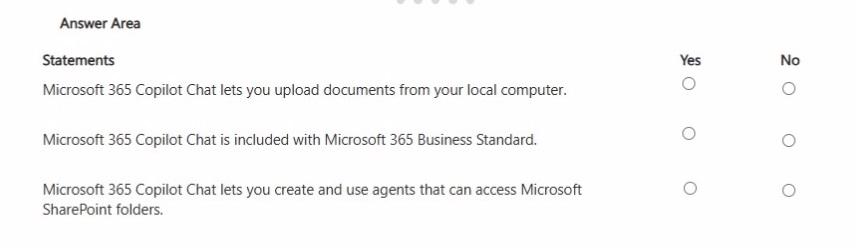
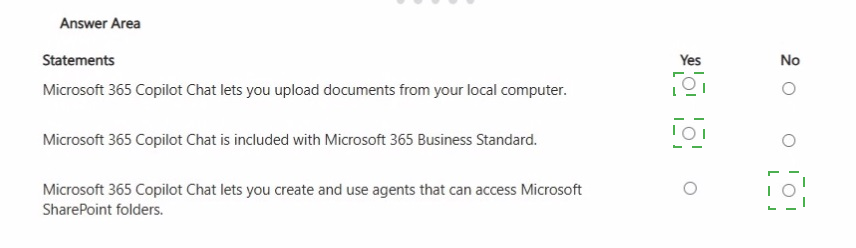
You have a Microsoft 365 subscription. You do NOT have a Microsoft 365 Copilot license. For each of the following statements, select Yes if the statement is true. Otherwise, select No. NOTE: Each correct selection is worth one point.

Show answerHide answer

Explanation


Explanation:

This question tests your knowledge of the capabilities and licensing requirements of Microsoft 365 Copilot Chat, which is the entry-level AI chat experience included with eligible Microsoft 365 subscriptions. The key concepts involve distinguishing between what is available with a base subscription versus what requires an add-on Microsoft 365 Copilot license, and understanding how agent creation and data grounding work without that license.

✔️ Correct Options:

✔️ Statement 1: Microsoft 365 Copilot Chat lets you upload documents from your local computer. — Yes
This statement is true. Microsoft 365 Copilot Chat includes file upload functionality, allowing users to attach and analyze documents directly from their local device. Supported file types include Word documents, Excel files, PDFs, and others . This capability is enabled by default and does not require a separate Microsoft 365 Copilot license.

✔️ Statement 2: Microsoft 365 Copilot Chat is included with Microsoft 365 Business Standard. — Yes
This statement is true. Microsoft 365 Copilot Chat is included with eligible Microsoft 365 subscriptions, and Business Standard is explicitly listed as one of the qualifying plans . Users with Business Standard can access Copilot Chat through the Microsoft 365 Copilot app, Outlook, Teams, and other integrated experiences without purchasing an additional Copilot license .

❌ Incorrect options:

❌ Statement 3: Microsoft 365 Copilot Chat lets you create and use agents that can access Microsoft SharePoint folders. — No
This statement is false. Without a Microsoft 365 Copilot license, Copilot Chat users cannot access enterprise data through Microsoft Graph, which is required to ground agents in SharePoint content . Agents that access SharePoint folders require metered billing through Copilot Studio, which must be configured by an administrator. By default, these agents are turned off and not available to users without the appropriate licensing and tenant configuration .

đź”§ Reference:
→ Learn Microsoft | Microsoft Copilot requirements — Confirms Copilot Chat is included with Microsoft 365 Business Standard and other eligible subscriptions without requiring a Copilot license .

→ Learn Microsoft | Controls to manage file uploads in Microsoft 365 Copilot and Copilot Chat — Confirms file upload is enabled by default in Copilot Chat, allowing users to upload local documents for analysis .
Question 16 Choose 1
You are comparing the difference between Microsoft 365 Copilot and Microsoft 365 Copilot Chat. What is available in both versions?
Show answerHide answer

Correct answer: B Copilot Pages

Explanation

Explanation:

The question tests which capability is available across both Microsoft 365 Copilot and Microsoft 365 Copilot Chat.
Copilot Pages provides a persistent, editable workspace for turning Copilot responses into collaborative content.
It is available in both experiences, allowing users to work with AI generated content and refine it.
Researcher is a specialized agent associated with Microsoft 365 Copilot capabilities rather than both versions.
Copilot Notebooks is also a distinct capability with specific licensing and experience requirements.
Therefore, Copilot Pages is the correct choice.

🟢 Correct Option: B. Copilot Pages
Copilot Pages is available in both Microsoft 365 Copilot and Microsoft 365 Copilot Chat. It provides a persistent workspace where users can turn Copilot responses into editable, reusable content and collaborate with others. This makes Pages different from specialized capabilities that may depend on a particular Copilot license or experience. Therefore, among the listed choices, Copilot Pages is the capability available in both versions.

đź”´ Incorrect Option: A. the Researcher agent
Researcher is a specialized agent designed for conducting deeper research and producing detailed findings. Its availability depends on the Microsoft 365 Copilot experience and licensing rather than being a capability shared by both versions in this comparison. Therefore, it does not represent the common functionality asked for here.

đź”´ Incorrect Option: C. Copilot Notebooks
Copilot Notebooks is a more specialized workspace designed to organize references and work with Copilot around a particular project or topic. Its availability and functionality are tied to specific Microsoft 365 Copilot capabilities and licensing. Therefore, it is not the common feature represented by both versions in this question.

Reference:
⇒ Copilot Pages — Microsoft explains how Copilot Pages provides a persistent, editable workspace for working with Copilot content.

⇒ Microsoft 365 Copilot Chat — Microsoft describes Copilot Chat capabilities and how they differ from the broader Microsoft 365 Copilot experience.
Question 17 Choose 1
You are creating a prompt in Microsoft 365 Copilot to get information about a proposal. You need to ensure that the response is grounded in the proposal's information. What is the best approach to achieve the goal? More than one answer choice may achieve the goal. Select the BEST answer.
Show answerHide answer

Correct answer: C Reference the proposal content in the prompt.

Explanation

Explanation:

The question tests the concept of grounding a Copilot response in a specific source. To ensure that Copilot uses the proposal’s actual information instead of relying on general knowledge or assumptions, you must identify or attach the proposal as the source in the prompt.

✔️ Correct Option: C. Reference the proposal content in the prompt.
Referencing the proposal gives Copilot a specific source from which to retrieve facts, figures, terms, and other relevant details. You can attach the proposal or mention it directly, for example: “Review the attached proposal and identify its objectives, costs, risks, and key deliverables.” This grounds the response in the proposal’s content and reduces the likelihood of unsupported or invented information.

❌ Incorrect Option: A. Instruct Copilot to rely on its training data to infer proposal details.
This approach does not ground the response in the actual proposal. Copilot’s general training knowledge may help explain concepts, but it cannot provide reliable details about a specific proposal unless that proposal is supplied or referenced. Asking Copilot to infer details increases the risk of inaccurate or unsupported content.

❌ Incorrect Option: B. Add a specific goal that you want Copilot to accomplish.
A specific goal improves the clarity of the task, such as asking Copilot to summarize risks or compare pricing options. However, a goal alone does not provide the proposal’s source information. The prompt must reference the proposal to ensure that the response is based on its actual content.

❌ Incorrect Option: D. Add context about the intended audience.
Identifying the audience can help Copilot select an appropriate tone, level of detail, and format. For example, a manager may need an executive summary. However, audience context does not supply the proposal’s facts. The proposal itself must be referenced to ground the response.

đź”§ Reference:
→ Write an effective prompt — Confirms that specifying a source, such as an uploaded or referenced file, helps Copilot ground its response in that information.

→ Use effective prompts — Confirms that providing a specific data source grounds the response within the requested scope of information.
Question 18
Select the answer that correctly completes the sentence

Show answerHide answer

Explanation


Explanation:

This question tests your understanding of security, privacy, and data governance guarantees in Microsoft 365 Copilot. Enterprise data protection (EDP) refers to the comprehensive security and compliance boundary enforced across Microsoft 365. Under EDP, organizational data used in prompts and responses remains securely within the Microsoft 365 service boundary, adheres to existing tenant encryption and access permissions, and is strictly isolated—ensuring customer data is never used to train public or foundational Large Language Models (LLMs).

âś… Correct Option:

Enterprise data protection (EDP)
Enterprise data protection (EDP) guarantees that tenant data, prompts, and generated responses remain strictly within the customer's Microsoft 365 compliance boundary. It ensures strict isolation and explicitly prevents customer data from being used to train or refine public AI models.

❌ Incorrect options:

The Common Data Model
The Common Data Model (CDM) is a standardized, modular schema of business entities (such as Account, Contact, and Lead) used across Microsoft Power Platform and Dynamics 365 to simplify data integration. It is not a security or AI data isolation framework.

Sensitivity labels
Sensitivity labels (configured via Microsoft Purview) are used to classify and protect specific documents and emails by applying encryption, watermarks, or access restrictions. While Copilot respects sensitivity labels, the overall guarantee that data stays within the tenant boundary and is not used for model training is provided by Enterprise Data Protection.

Zero Trust
Zero Trust is an overarching architectural security philosophy based on explicit verification, least privilege access, and assuming breach. While Microsoft's infrastructure implements Zero Trust principles, the specific policy framework governing tenant data isolation and preventing AI model training is Enterprise Data Protection.

đź”§ Reference:
⇒ Microsoft 365 Copilot Enterprise Data Protection Guidance confirms that Enterprise Data Protection ensures business data remains within the M365 tenant and is never used to train foundational AI models.
Question 19 Choose 1
A colleague from another company shares a link to a prompt. When you select the link, you receive the following response: "Prompt not found. Sorry, it looks like the prompt is no longer available." What is a possible cause of the response?
Show answerHide answer

Correct answer: E The prompt is outside of your organization.

Explanation

Explanation:

This question tests your knowledge of prompt sharing limitations and tenant boundaries in Microsoft 365 Copilot. The error "Prompt not found" when opening a shared link typically indicates the prompt is inaccessible to your account. Since Copilot prompts are designed for enterprise use and are governed by organizational policies, they generally cannot be shared or accessed across different Microsoft 365 tenants.

✔️ Correct Option:

✔️ E. The prompt is outside of your organization.
Microsoft 365 Copilot agents and prompts are designed for enterprise use and are shared within the same organization by default. External sharing with users in other tenants or with personal Microsoft accounts is not supported due to security, data protection, and compliance requirements . When a colleague from another company shares a prompt link, your account is outside the boundary where that prompt was created. Access is restricted because prompts are tied to the originating tenant's organizational setup, permissions, and security policies .

❌ Incorrect options:

❌ A. The prompt is a scheduled prompt.
Scheduled prompts are a feature available with a Microsoft 365 Copilot license that allows automatic execution of prompts . The "Prompt not found" error is unrelated to scheduling. A scheduled prompt would still be accessible to authorized users within the same organization.

❌ B. The prompt contains a reference to a file that you do NOT have access to.
Sharing a prompt does not grant access to the files or data referenced within it. Permissions remain unchanged and Copilot respects existing file permissions . The recipient can still open the shared prompt link, but Copilot will not surface content from files they cannot access. The error is about the prompt itself not being found, not about data access.

❌ C. The prompt is outdated.
Prompt links do not expire based on time. While prompts can be updated or deleted by their creators, there is no concept of a prompt becoming "outdated" that would trigger a "not found" error. The issue is about access boundaries, not temporal validity.

❌ D. The prompt contains a file that has a sensitivity label applied.
Sensitivity labels protect content but do not affect the ability to open a shared prompt link. Copilot sharing respects existing Microsoft 365 permissions, and prompts can still be shared even if they reference labeled content . The error indicates the prompt itself is inaccessible, not that its referenced content is protected.

đź”§ Reference:
→ Microsoft Learn | Discover, share, and save prompts with Prompt Lab — Confirms prompt sharing is intended for colleagues within your organization through links, email, or Teams teams, with no support for external sharing.

→ Microsoft Learn | Frequently asked questions about Copilot Chat — Confirms Copilot agents are designed for enterprise use and shared within the organization unless administrators configure broader sharing capabilities, as external sharing is not supported by default.
Question 20
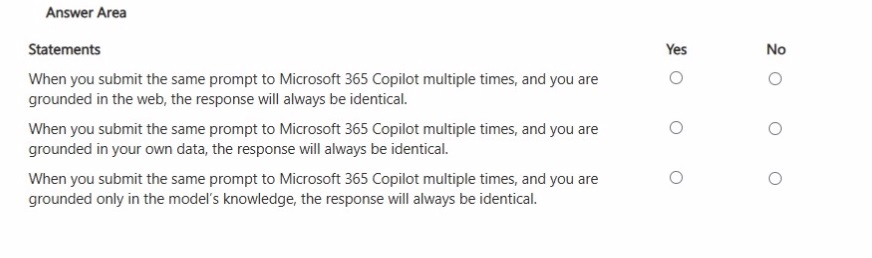
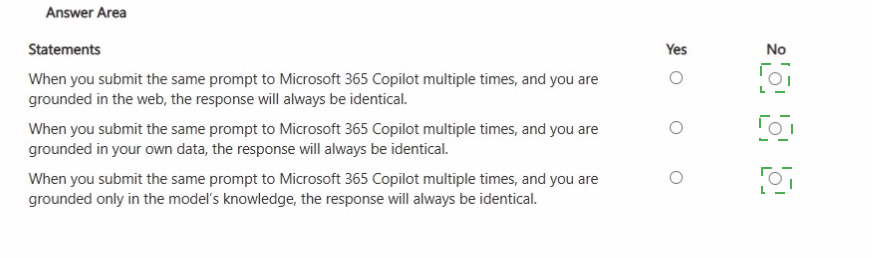
For each of the following statements, select Yes if the statement is true. Otherwise, select No. NOTE: Each correct selection is worth one point.

Show answerHide answer

Explanation


Explanation

This question tests how generative AI responses behave in Microsoft 365 Copilot. Copilot is built on a large language model that predicts the most likely next words, so output is non-deterministic. Submitting the same prompt repeatedly can give different wording, structure, or details, whatever source the answer is grounded in. All three statements are false, so each answer is No.

Statement 1: Grounded in the web, the response will always be identical. → No
Web-grounded answers vary for two reasons. The model generates text probabilistically, so phrasing changes between runs. Web search results can also differ, with different sources ranked or retrieved each time, and the content of the web itself changes. Both factors make an identical response every time unlikely.

Statement 2: Grounded in your own data, the response will always be identical. → No
Grounding in your own data, such as files, emails, and chats, gives the model context, but the response is still generated by the model. Wording and emphasis can change between runs. The data may also change in the meantime, for example when new emails arrive or documents are edited, which can alter the retrieved content and the answer.

Statement 3: Grounded only in the model's knowledge, the response will always be identical. → No
Even with no external grounding, the model builds each response by predicting likely text, which introduces randomness. The same question can produce differently worded answers, examples, or ordering. Sameness is never guaranteed, because variation comes from the generation process itself and not only from the data source.

đź”§ Reference
🔗 Prompt-based generative AI model – Microsoft Learn → confirms that a prompt-based model responds with the most likely continuation of the input rather than following a fixed Q&A path.
Full mock exam

Sit the AB-730 exam before exam day

Full-length mocks with the same number of questions and the same time limit as the real AB-730 exam. Every attempt draws a new set of questions from the full bank, so you can keep going until you pass comfortably.

Get full AB-730 mock exam
  • —questions per mock
  • —time limit
  • 87questions in the bank
  • Newmock on every attempt