VMware certification · Exam 2V0-41.24

2V0-41.24 Mock Exam Page 2

VMware NSX 4.X Professional V2

Free 2V0-41.24 mock exam questions 11–20, each with the answer and an explanation.

20 questions · 33 minutes · free, no sign-up

Free 2V0-41.24 questions

11–20 of 34 free
Question 11 Choose 2
What are two supported host switch modes? (Choose two.)
Show answerHide answer

Correct answer: C, D Standard DatapathEnhanced Datapath

Explanation

Explanation:

In VMware NSX, the host switch (the virtual switch on an ESXi transport node that handles NSX networking) can operate in different modes. The two supported host switch modes in NSX 4.x are Standard Datapath and Enhanced Datapath.

C. Standard Datapath – Correct.
This is the default operational mode for all transport nodes . It applies to all hypervisors and provides broad hardware compatibility, making it suitable for general-purpose computing environments. While it ensures maximum compatibility, it does not offer the performance optimizations available in Enhanced Datapath mode . In the NSX API, this mode is represented as STANDARD (or LEGACY in later versions, which was formerly called STANDARD) .

D. Enhanced Datapath – Correct.
Enhanced Datapath (also known as Enhanced Networking Stack or ENS) provides accelerated networking performance for supported environments . This mode is available in two variants:

ENS – The full Enhanced Datapath mode, providing accelerated networking performance. Workloads must be compiled with DPDK and use VMXNET3 for their vNIC. This mode is only available on ESX hypervisor 6.7 and above (recommended 6.7 U2 and above) .

ENS_INTERRUPT – An interrupt-driven variant of Enhanced Datapath mode, available on ESX hypervisor 7.0 and above .

Enhanced Datapath provides improved packet forwarding and dynamic, efficient CPU allocation . However, it requires a higher tier of NSX licenses (NSX Advanced or higher for classic NICs, NSX Enterprise Plus or higher for SmartNICs) .

Why other options are incorrect:

A. Overlay Datapath – Incorrect.
"Overlay Datapath" is not a host switch mode. Overlay refers to the encapsulation technology (Geneve) used for logical networking, not an operational mode of the host switch itself.

B. Secure Datapath – Incorrect.
This is not a valid host switch mode in NSX. While security features like Distributed Firewall operate on the data path, there is no dedicated "Secure Datapath" mode.

E. DPDK Datapath – Incorrect.
DPDK (Data Plane Development Kit) is a technology used within Enhanced Datapath mode to accelerate packet processing, but it is not a host switch mode itself . The mode is called Enhanced Datapath (or ENS), not DPDK Datapath.

Reference

VMware NSX API Reference– StandardHostSwitch.host_switch_mode enum values: STANDARD, ENS, ENS_INTERRUPT (and LEGACY in later versions)

VMware NSX 4.2 Administration Guide – "Enhanced Datapath" documentation covers EDP Standard (Enhanced Datapath Standard) as the recommended mode for general computing, distinguished from Standard mode
Question 12 Choose 1
An administrator needs to download the support bundle for NSX Manager.
Where does the administrator download the log bundle from?
Show answerHide answer

Correct answer: A System > Support Bundle

Explanation

Explanation

To download a support bundle for NSX Manager, the administrator navigates to the System tab and selects Support Bundle directly from the primary navigation menu. This option is available in the left-hand navigation pane after selecting "System" from the top-level menu, where administrators can generate and download log bundles for troubleshooting.

The official VMware documentation consistently describes the path as System → Support Bundle across multiple NSX versions. After generating the bundle, administrators can click the Download button to save it to their local system.

Why other options are incorrect:

B. System > Settings – Incorrect.
The "Settings" section under the System tab contains configuration options such as user management, authentication, and system configuration. The Support Bundle option is not located within the Settings submenu.

C. System > Utilities > Tools – Incorrect.
There is no "Utilities > Tools" navigation path in NSX Manager for downloading support bundles. This appears to be a distractor option.

D. System > Settings > Support Bundle – Incorrect.
While some exam discussion sources note that Support Bundle appears as an option under the Settings section visually, the correct navigation path documented by VMware is System > Support Bundle. The Support Bundle option is accessible directly from the System page's left navigation pane, not by expanding Settings first.

Reference

VMware NSX 4.2 Administration Guide – "Collect Support Bundles": The documented navigation path is System → Support Bundle

VMware NSX 4.0 Administration Guide – The same navigation path is confirmed
Question 13 Choose 1
How does the Traceflow tool identify issues in a network?
Show answerHide answer

Correct answer: D Injects synthetic traffic into the data plane and observes the results in the control plane.

Explanation

Explanation:

Traceflow is an NSX observability tool that helps administrators verify network connectivity and troubleshoot packet drops. It works by injecting synthetic traffic — artificially generated packets that mimic real application traffic — directly into the data plane of the NSX environment. Traceflow then monitors and reports the path that these synthetic packets take, including any drops or policy enforcement points, by correlating observations from the control plane.

Why other options are incorrect:

A. Compares intended network state in the control plane with Tunnel End Point (TEP) keepalives in the data plane. – Incorrect. This describes a different mechanism (possibly related to BFD or health checking), not Traceflow. Traceflow does not compare control plane state with TEP keepalives.

B. Compares the management plane configuration states containing control plane traffic and error reporting from transport node agents. – Incorrect. Traceflow does not perform comparison of management plane configuration states. While transport node agents do report observations, Traceflow's methodology is specifically synthetic packet injection, not state comparison.

C. Injects ICMP traffic into the data plane and observes the results in the control plane. – Incorrect. Traceflow is not limited to ICMP traffic. It supports TCP, UDP, ICMP, and other protocols. The description "injects ICMP traffic" is too restrictive and inaccurate as a general definition of how Traceflow works.

Reference

VMware NSX 4.x Administration Guide – "Traceflow": Traceflow injects synthetic packets into the data plane and uses control plane observations to report the path taken, including any drops or firewall rule hits.

VMware NSX Troubleshooting Guide – Traceflow is described as a "synthetic traffic injection tool" that helps identify network issues without impacting production traffic.
Question 14 Choose 2
Which two statements are true for IPSec VPN? (Choose two.)
Show answerHide answer

Correct answer: A, C IPSec VPN services can be configured at Tier-0 and Tier-1 gateways.IPSec VPNs use the DPDK accelerated performance library.

Explanation

Explanation:

IPSec VPN in NSX provides site-to-site secure connectivity. Two statements are true regarding its capabilities and architecture:

A. IPSec VPN services can be configured at Tier-0 and Tier-1 gateways. – Correct.
NSX allows IPSec VPN services to be configured on both Tier-0 and Tier-1 gateways. The official VMware documentation confirms that when adding an IPSec VPN service, you can select an existing Tier-0 or Tier-1 gateway . Both policy-based and route-based IPSec VPNs can be configured on either gateway type.

C. IPSec VPNs use the DPDK accelerated performance library. – Correct.
NSX IPSec VPN tunnels utilize the DPDK (Data Plane Development Kit) accelerated performance library for enhanced packet processing and throughput. The DPDK acceleration improves VPN performance by optimizing how data packets are handled by the NSX Edge nodes . This is a key architectural feature of NSX IPSec VPN implementation.

Why other options are incorrect:

B. Dynamic routing is supported for any IPSec mode in NSX. – Incorrect.
Dynamic routing for IPSec VPN has specific limitations. According to official documentation:

OSPF dynamic routing is not supported for routing through IPSec VPN tunnels
Dynamic routing for Virtual Tunnel Interface (VTI) is not supported on VPNs based on Tier-1 gateways
Dynamic routing using BGP is only supported for route-based IPSec VPN sessions, not for policy-based IPSec VPN. Therefore, dynamic routing is NOT supported for "any IPSec mode"

D. VPNs can be configured on the command line interface on the NSX manager. – Incorrect.
While NSX Manager does provide CLI commands for viewing IPSec VPN status (such as get ipsecvpn ikesa to display IKE security associations), the official documentation indicates that VPN configuration is performed through the NSX Manager UI or API . The CLI provides monitoring and troubleshooting capabilities, not full VPN configuration capabilities.
Question 15 Choose 1
Which statement is true about an alarm in a Suppressed state?
Show answerHide answer

Correct answer: A An alarm can be suppressed for a specific duration in hours.

Explanation

Explanation:

In VMware NSX, when an administrator suppresses an alarm, they must specify the duration for which the alarm should remain in the Suppressed state. The time unit for this duration is hours, not seconds, minutes, or days. This is a technical requirement enforced by the NSX API.

Why other options are incorrect:

B. An alarm can be suppressed for a specific duration in seconds. – Incorrect.
The NSX API requires the suppress_duration parameter to be specified in hours. Seconds are not a supported unit for alarm suppression duration.

C. An alarm can be suppressed for a specific duration in minutes. – Incorrect.
While minutes might seem like a logical unit, the API documentation explicitly defines the suppress_duration as an integer representing hours. Minutes are not used.

D. An alarm can be suppressed for a specific duration in days. – Incorrect.
Although a suppression period could span multiple hours that total several days, the actual unit of measurement specified in the API is hours, not days. For example, suppressing an alarm for 3 days would require specifying 72 hours.

Reference:

VMware NSX API Reference – suppress_duration: "Duration in hours for which Alarm should be suppressed. Specify duration in hours for which Alarm should be suppressed. This value must be specified if the new_status is SUPPRESSED."
Question 16 Choose 1
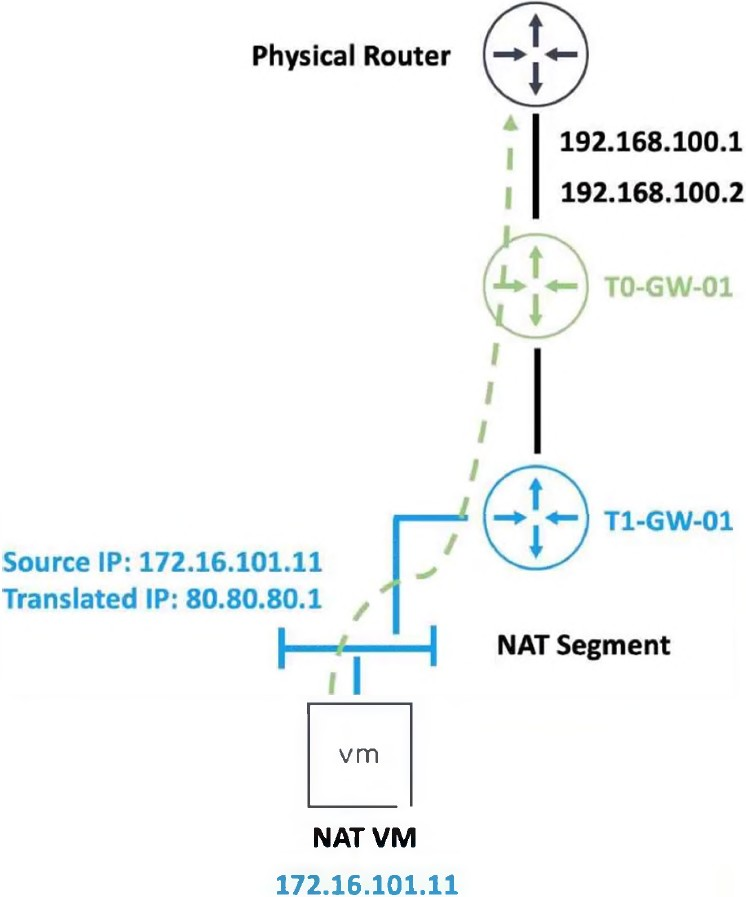
Refer to the exhibit.

An administrator would like to change the private IP address of the NAT VM 172.16.101.11 to a public address of 80.80.80.1 as the packets leave the NAT-Segment network.
Which type of NAT solution should be implemented to achieve this?
Show answerHide answer

Correct answer: D SNAT

Explanation

Explanation:

The exhibit shows a NAT VM with a private source IP address 172.16.101.11. The administrator wants to change this private IP address to a public address 80.80.80.1 as the packets leave the NAT-Segment network. This describes a Source NAT (SNAT) operation.

Why other options are incorrect:

A. NAT64 – Incorrect.
NAT64 is used for translating between IPv6 and IPv4 addresses, allowing IPv6-only clients to communicate with IPv4-only servers. This scenario involves only IPv4 addresses (172.16.101.11 → 80.80.80.1), so NAT64 is not applicable.

B. Reflexive NAT – Incorrect.
Reflexive NAT (also known as NAT with port mapping or hairpin NAT) allows a VM to access itself via its public IP address from inside the network. This is not what the exhibit describes. Reflexive NAT is bidirectional in a specific hairpin scenario, whereas this is a standard outbound source translation.

C. DNAT – Incorrect.
Destination NAT (DNAT) changes the destination IP address of incoming packets. For example, DNAT would translate 80.80.80.1 to 172.16.101.11 for traffic arriving from the physical router to the NAT VM. The requirement explicitly states changing the private IP to a public address as packets leave the NAT-Segment network, which is SNAT behavior, not DNAT.

Reference

VMware NSX 4.x Administration Guide
– "Source NAT (SNAT)": SNAT changes the source IP of packets leaving a network segment, enabling private IP addresses to communicate with external networks using a public IP.

VMware NSX Network Virtualization Design Guide
– SNAT is used for outbound internet access from private VMs.
Question 17 Choose 4
What are the four types of role-based access control (RBAC) permissions? (Choose four.)
Show answerHide answer

Correct answer: A, B, D, F AuditorFull accessNoneRead

Explanation

Explanation:

In VMware NSX, Role-Based Access Control (RBAC) is built upon four fundamental permission types that define the level of access a user or role has to NSX objects and operations. These four permission types are the building blocks for all built-in and custom roles.

A. Auditor – Correct. In NSX RBAC, "Auditor" is the built-in role that corresponds to Read (R) permission. The question lists "Auditor" as one of the four permission types (treating the role name as equivalent to the permission level for exam purposes).

B. Full access – Correct. This is one of the four permission types, granting complete CRUD privileges.

D. None – Correct. This is one of the four permission types, indicating no access to an object.

E. Execute – Correct. This is one of the four permission types, granting Read and Update capabilities.

Why other options are incorrect:

C. Enterprise Admin – Incorrect.
"Enterprise Admin" (EA) is a built-in role, not a fundamental permission type. It is assigned to users who are super administrators with Full Access permissions across all objects.

F. Read – Incorrect in this specific selection.
While "Read" is indeed one of the four fundamental permission types, the exam expects "Auditor" (the role associated with Read permission) to be selected instead of "Read" itself. This is a known exam quirk — the four correct answers according to the 2V0-41.24 answer key are Auditor, Full access, None, and Execute.

G. Network Admin – Incorrect.
"Network Admin" (NA) is a built-in role with Full Access permissions for networking objects, not a fundamental permission type.

Reference

VMware NSX 4.x Administration Guide – "Role-Based Access Control": The documentation explicitly lists the four types of permissions as Full Access (FA), Execute (E), Read (R), and None. However, exam question banks often substitute "Auditor" for "Read" as a selectable option.
Question 18 Choose 1
An administrator has a requirement to have consistent policy configuration and enforcement across NSX instances.
What feature of NSX fulfills this requirement?
Show answerHide answer

Correct answer: B Federation

Explanation

Explanation:

The administrator requires consistent policy configuration and enforcement across multiple NSX instances (e.g., separate NSX deployments in different data centers, regions, or cloud environments). This is a primary use case for NSX Federation, which introduces a Global Manager that centrally manages networking and security policies and pushes them to multiple Local Managers for local enforcement.

Why other options are incorrect:

A. Multi-hypervisor support – Incorrect.
Multi-hypervisor support refers to NSX's ability to manage networking and security across different hypervisor types (e.g., ESXi, KVM). This feature does not address consistent policy configuration across separate NSX instances or locations.

C. Load balancer – Incorrect.
NSX Load Balancer distributes traffic across backend servers within a single NSX deployment. It does not provide centralized policy management or consistency across multiple NSX instances.

D. Policy-driven configuration – Incorrect.
While NSX uses a policy-driven model for configuration (declarative approach), this term refers to the overall management paradigm of NSX, not a specific feature that synchronizes policies across multiple NSX instances. Policy-driven configuration alone does not enable cross-site consistency without Federation.

Reference

VMware NSX 4.x Administration Guide – "NSX Federation Overview": Federation provides centralized management of networking and security policies across multiple NSX deployments using a Global Manager and Local Managers
Question 19
Refer to the exhibit.

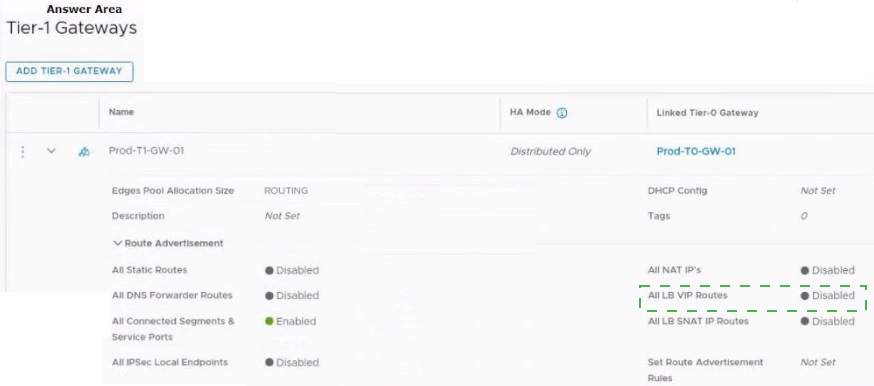
An administrator configured NSX Advanced Load Balancer to load balance the production web server traffic, but the end users are unable to access the production website by using the VIP address.

Which of the following Tier-1 gateway route advertisement settings needs to be enabled to resolve the problem? Mark the correct answer by clicking on the image.
Show answerHide answer

Explanation


Explanation:

Why This Is Correct In a multi-tier NSX routing topology (Tier-0 and Tier-1), a Tier-1 gateway handles local segment routing and service connections (like load balancing). When an NSX Advanced Load Balancer (Avi Vantage) is deployed, its Virtual IP (VIP) addresses reside on or are connected via the Tier-1 gateway.

For upstream users and routers to reach this VIP address:
The Tier-1 gateway must advertise the VIP network up to the Tier-0 gateway.
The Tier-0 gateway can then redistribute that route into the physical network via dynamic routing protocols like BGP.

As shown in the exhibit, All LB VIP Routes is currently set to Disabled. Enabling this toggle instructs the Tier-1 gateway (Prod-T1-GW-01) to advertise the Load Balancer VIP networks to the linked Tier-0 gateway (Prod-TO-GW-01), immediately restoring external connectivity to the production website.

Why the Other Options Are Incorrect

All Connected Segments & Service Ports:
This is already Enabled in the exhibit. While it advertises standard connected logical segments, it does not implicitly include the separate, dedicated logical constructs of Load Balancer VIPs.

All LB SNAT IP Routes:
Source Network Address Translation (SNAT) IP routes are used when the load balancer translates client source IPs to its own pool IPs before forwarding traffic to the backend servers. While useful for return traffic configuration, enabling this alone will not advertise the client-facing listening VIP address.

All Static Routes / All NAT IP's:
The Load Balancer VIP is managed dynamically by the system's service mappings, so standard static routing or traditional NAT advertisement settings will not advertise the native VIP.

References

VMware NSX 4.x Documentation: NSX Advanced Load Balancing Guide -> Integrating NSX ALB with NSX-T Cloud -> Tier-1 Gateway Route Advertisement.
Question 20 Choose 2
Which two statements are correct about East-West Malware Prevention? (Choose two.)
Show answerHide answer

Correct answer: A, B A SVM is deployed on every ESXi host.NSX Application Platform must have Internet access.

Explanation

Explanation:

East-West Malware Prevention in VMware NSX is a distributed security feature designed to detect and prevent malware traffic moving laterally between workloads within a data center. It leverages the NSX Guest Introspection (GI) platform and requires specific architectural components to function correctly.

A. A SVM is deployed on every ESXi host. ✅ Correct.
This is a mandatory architectural requirement. When you deploy the Distributed Malware Prevention service onto an NSX-prepared host cluster, a dedicated Service Virtual Machine (SVM) is automatically installed on each and every ESXi host within that cluster. This SVM runs as a lightweight appliance (requiring resources such as 4 vCPUs, 6 GB of RAM, and 80 GB of disk space) and acts as the local inspection point for all east-west traffic originating from or destined to VMs on that host.

B. NSX Application Platform must have Internet access. ✅ Correct.
The NSX Application Platform acts as the central management and analysis engine for Malware Prevention. The platform requires direct outbound Internet access (HTTPS) for two critical functions:

Signature Updates: The platform must connect to VMware's Advanced Threat Prevention cloud service to continuously download the latest malware signature definitions. Without an active internet connection, these signatures cannot be manually uploaded or updated, rendering the feature ineffective.

Cloud Analysis: The platform sends suspicious files to the cloud service for detailed, sandbox-based analysis to identify new and unknown malware.

Why other options are incorrect:

C. An agent must be installed on every ESXi host. ❌ Incorrect.
This statement confuses the SVM with a traditional agent. While an SVM is deployed on each ESXi host, this is a pre-packaged virtual appliance, not a software "agent" that requires manual installation. The administrator triggers the deployment via NSX Manager, and the SVM is automatically provisioned.

D. An agent must be installed on every NSX Edge node. ❌ Incorrect.
East-West Malware Prevention operates within the distributed firewall framework on ESXi hosts, not on the NSX Edge nodes. A different feature called Gateway Malware Prevention exists for north-south traffic, which operates on Tier-1 Gateways and requires large or extra-large Edge VM form factors. However, the question specifies "East-West," which relies solely on the ESXi-hosted SVMs.

E. NSX Edge nodes must have Internet access. ❌ Incorrect.
While the NSX Application Platform requires internet access, the NSX Edge nodes themselves do not require direct internet access for East-West Malware Prevention to function. Their role is typically limited to routing and gateway services for north-south traffic and are not part of the east-west inspection path for malware.

Reference

VMware NSX 4.x Administration Guide (Broadcom TechDocs) – "System Requirements for NSX IDS/IPS and NSX Malware Prevention": Explicitly states that internet access is required and an SVM is deployed on each vSphere host.

Broadcom TechDocs – "Workflow for Distributed Malware Prevention": Confirms the SVM is installed on every host in the selected cluster.
Full mock exam

Sit the 2V0-41.24 exam before exam day

Full-length mocks with the same number of questions and the same time limit as the real 2V0-41.24 exam. Every attempt draws a new set of questions from the full bank, so you can keep going until you pass comfortably.

Get full 2V0-41.24 mock exam
  • 65questions per mock
  • 105 mintime limit
  • 114questions in the bank
  • Newmock on every attempt