Fortinet certification · Exam NSE6_EDR_AD-7.0

NSE6_EDR_AD-7.0 Mock Exam

Fortinet NSE 6 FortiEDR 7.0 Administrator

Find out if you're ready for NSE6_EDR_AD-7.0. Take the free timed mock exam and get your score in minutes, or study the free NSE6_EDR_AD-7.0 questions below with answers and explanations.

9 questions · 18 minutes · free, no sign-up

Free NSE6_EDR_AD-7.0 questions

1–9 of 9 free
Question 1 Choose 1
A collector triggers a suspicious security incident that is initially flagged as potentially malicious. The environment is connected to the FortiEDR Cloud Service (FCS) for classification. How does FCS process the event for accurate classification? (Choose one answer)
Show answerHide answer

Correct answer: A By data processing, comprehensive automated analysis, and comprehensive manual analysis

Explanation

Explanation:
Fortinet Cloud Services (FCS) processes suspicious events through a multi-layered approach: initial automated data processing, comprehensive automated analysis (static/dynamic, sandboxing, reputation), and when needed, manual analysis by Fortinet security experts. This ensures accurate classification when local detection is uncertain.

Correct Option:

A. By data processing, comprehensive automated analysis, and comprehensive manual analysis
FCS uses a tiered classification process. First, data processing normalizes and enriches the event. Then comprehensive automated analysis applies sandboxing, reputation lookups, and behavioral rules. If inconclusive, Fortinet security experts perform manual analysis to determine final classification (malicious, suspicious, or safe).

Incorrect Options:

B. By relying solely on the FortiGate firewall policies
FortiGate firewall policies are unrelated to FCS file/event classification. FCS analyzes file behavior and characteristics, not network firewall rules. This option confuses network security with endpoint threat classification.

C. By comparing the event against only local signatures
FCS is a cloud service with extensive global threat intelligence, not limited to local signatures. It uses behavioral analysis, machine learning, and sandboxing beyond signature matching. Local-only signature comparison defeats the purpose of cloud-based classification.

D. By correlating collector logs only
While collector logs are part of input, FCS does not rely exclusively on them. It incorporates global threat intelligence, file reputation databases, and behavioral analytics. Correlation alone is insufficient for accurate classification.

Reference:
Fortinet NSE6_EDR_AD-7.0 Study Guide, "Fortinet Cloud Services (FCS) Classification Process"; FortiEDR Administration Guide, "Cloud Analysis and Verdict Determination."
Question 2 Choose 1
Refer to the Exhibit:


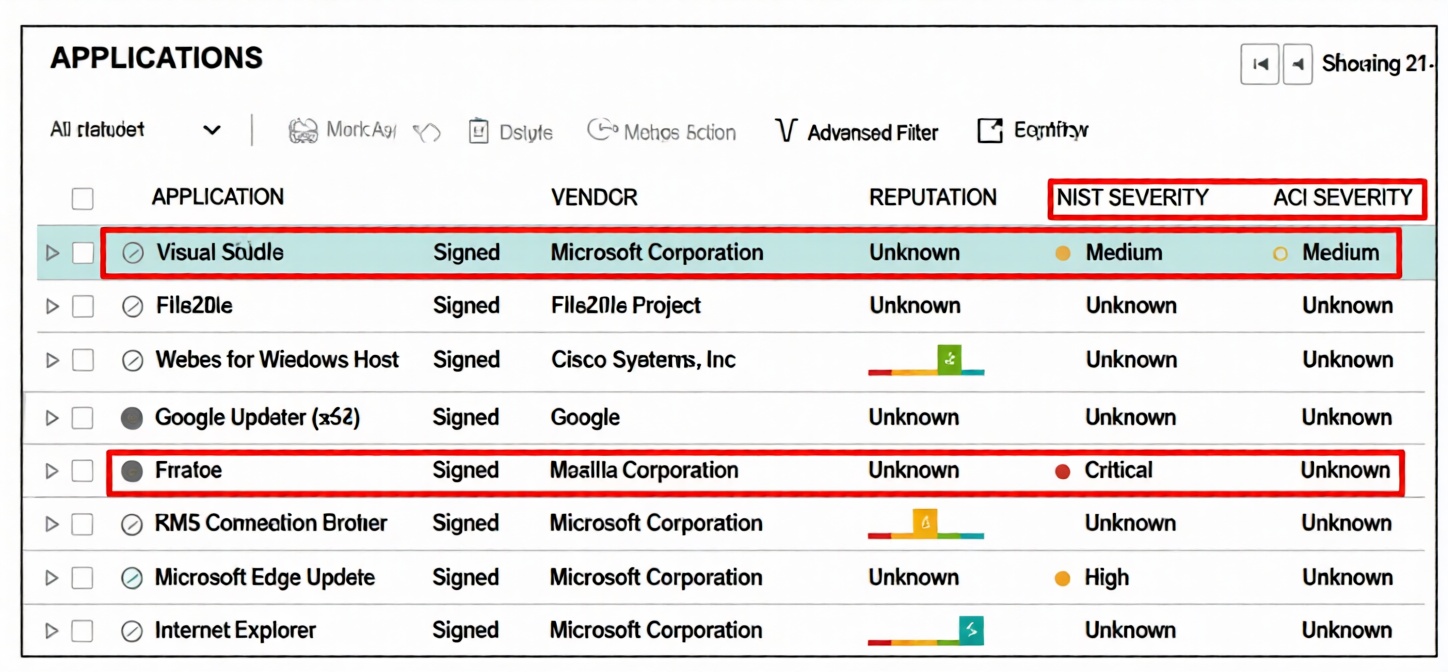
A FortiEDR analyst is prioritizing response efforts. One application has a vulnerability score of Critical but an Unknown ACI rating, while another has a Medium vulnerability score with active ACI evidence of adversary targeting. Which application must be addressed first? (Choose one answer)
Show answerHide answer

Correct answer: D The application with the Medium vulnerability score and ACI evidence should be addressed first.

Explanation

Explanation:
In the exhibit, Firefox shows a "Critical" vulnerability score but "Unknown" ACI (Adversary Combat Intelligence), meaning no active threat actor activity is observed targeting it. Another application shows "Medium" vulnerability but with active ACI evidence of adversary targeting. FortiEDR prioritizes active threats (ACI evidence) over theoretical vulnerability scores, as active exploitation poses immediate risk.

Correct Option:

D. The application with the Medium vulnerability score and ACI evidence should be addressed first.
ACI (Adversary Combat Intelligence) indicates real-world adversary activity targeting that specific application. Even with a lower vulnerability score (Medium), active evidence of exploitation attempts or malware using that application represents an immediate, confirmed threat. High vulnerability scores without ACI are theoretical risks; active targeting requires urgent response.

Incorrect Options:

A. Both applications should be treated equally because patching is necessary.
Patching is important, but prioritization must consider active threats. An actively exploited medium-severity vulnerability is more urgent than a critical vulnerability with no known active exploits.

B. The application with the Critical vulnerability score should be addressed first.
Critical severity alone does not indicate active exploitation. Without ACI evidence, the risk remains potential, not imminent. Active ACI evidence changes risk calculus significantly.

C. The decision depends only on asset criticality, not scores.
Asset criticality is important but not the only factor. Active exploitation evidence (ACI) and vulnerability severity both inform prioritization. Ignoring ACI evidence would miss active threats.

Reference:
FortiEDR Administration Guide, "Application Risk Scoring → ACI (Adversary Combat Intelligence)"; Fortinet NSE6_EDR_AD-7.0 Study Guide, "Vulnerability Prioritization and ACI."
Question 3 Choose 1
What specific action does FortiEDR take when the Zero Trust Device Tagging playbook is activated? (Choose one answer)
Show answerHide answer

Correct answer: C It updates FortiClient EMS through an API and assigns a classification fabric tag.

Explanation

Explanation:
Zero Trust Device Tagging in FortiEDR integrates with FortiClient EMS to automate endpoint classification. When activated, the playbook uses API calls to push security-based assessments (e.g., compromised, healthy, unknown) as fabric tags into EMS, enabling dynamic policy enforcement across the Fortinet Security Fabric.

Correct Option:

C. It updates FortiClient EMS through an API and assigns a classification fabric tag.
The playbook triggers FortiEDR to evaluate endpoint telemetry (e.g., compliance, threats) and then calls the EMS REST API to create or update a fabric tag (e.g., "ZTA_Compromised"). This tag can be used by FortiGate or other Fabric-ready devices for Zero Trust access control.

Incorrect Options:

A. It removes unmanaged endpoints from FortiClient EMS.
Zero Trust tagging does not remove endpoints. Removal is a manual EMS administrative action or part of a cleanup script, not a function of this playbook. The playbook focuses on classification, not deletion.

B. It assigns a default tag to all endpoints.
Tags are not default or universal; they are dynamic based on each endpoint's risk posture. Assigning a static default tag would defeat Zero Trust principles, which require continuous assessment and per-device classification.

D. It disables the endpoint until a tag is assigned.
Disabling endpoints is overly destructive and not an action of the tagging playbook. Enforcement (e.g., blocking network access) is handled by other Fabric components like FortiGate using the tag, not by FortiEDR directly disabling the endpoint.

Reference:
Fortinet NSE6_EDR_AD-7.0 Study Guide, "Zero Trust Integration" module; FortiEDR Administration Guide, section "Playbooks → Zero Trust Device Tagging."
Question 4 Choose 1
Refer to the exhibits.


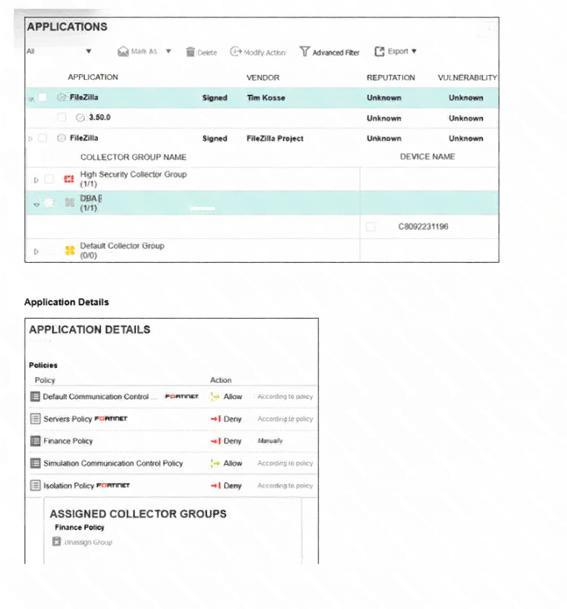
The application policy logs and application details are shown. Collector C8092231196 is a member of the Finance group. In this scenario, what must you do to block the FileZilla application? (Choose one answer)
Show answerHide answer

Correct answer: B Deny the application in the Finance policy.

Explanation

Explanation:
The exhibit shows that device C8092231196 is a member of the Finance group (under "Assigned Collector Groups," Finance Policy shows "Unassigned Group," but device is confirmed as Finance group member). The Finance policy currently shows "Permitted → Allow" for FileZilla. To block the application, you must change the Finance policy to "Deny" because the device inherits its policy from the Finance group assignment.

Correct Option:

B. Deny the application in the Finance policy.
Collector C8092231196 belongs to the Finance collector group. The Finance policy for FileZilla currently shows "Permitted" (Allow). By changing this to "Deny," the application will be blocked on all devices in the Finance group, including the target device. Policy inheritance follows the assigned collector group.

Incorrect Options:

A. Assign the Simulation Communication Control Policy to the DBA group.
The DBA group is not relevant to this device. The simulation policy currently shows "Deny" for FileZilla, but assigning it to DBA would not affect the Finance group device. Policy assignment must target the group the device belongs to.

C. Assign the Finance policy to the DBA group.
The Finance policy is already associated with the Finance group. Assigning it to DBA would not impact device C8092231196, which is not in DBA. This action is irrelevant to blocking FileZilla on the target device.

D. Assign the Finance policy to a broader collector group, such as the Default Collector Group.
The device is a member of Finance, not Default. Assigning Finance policy to Default would not affect the device unless the device were moved. Broader group assignment does not override existing group membership.

Reference:
FortiEDR Administration Guide, "Communication Control → Policy Assignment and Inheritance"; Fortinet NSE6_EDR_AD-7.0 Study Guide, "Collector Groups and Application Blocking."
Question 5 Choose 1
What action does an on-premises reputation server take when it receives a hash request that is not found in its local database? (Choose one answer)
Show answerHide answer

Correct answer: C Requests the missing hashes from the cloud reputation service

Explanation

Explanation:
FortiEDR on-premises reputation servers act as a local cache for file hash lookups to reduce latency and bandwidth. When a hash is not found locally, the server cannot make a verdict alone. It must query the upstream cloud reputation service (FortiGuard) to obtain the latest threat intelligence for that hash.

Correct Option:

C. Requests the missing hashes from the cloud reputation service.
The on-premises reputation server is designed to forward unknown hash queries to FortiGuard Cloud Services. The cloud service returns a verdict (malicious, suspicious, or safe), which the local server then caches for future requests. This ensures up-to-date protection without storing all hashes locally.

Incorrect Options:

A. Ignores them until manually updated.
Ignoring unknown hashes would create a blind spot, leaving endpoints unprotected. FortiEDR automates this process; manual updates are not required or recommended for hash reputation lookups.

B. Stores them locally and waits for endpoint input.
While the server may cache results after a cloud lookup, it does not store unknown hashes and wait. It actively queries the cloud immediately. Waiting for endpoint input would cause unacceptable latency and security gaps.

D. Automatically blocks applications with unknown hashes.
Blocking by default on "unknown" would generate excessive false positives. The reputation server follows a default-deny model only when explicitly configured; standard behavior is to query the cloud first for an authoritative verdict.

Reference:
FortiEDR Administration Guide, "Reputation Services" section; Fortinet NSE6_EDR_AD-7.0 Study Guide, "On-Premises Reputation Server Architecture."
Question 6 Choose 2
You added three new applications to FortiEDR using only the Path attribute. What are two expected outcomes of this configuration? (Choose two answers)
Show answerHide answer

Correct answer: A, B These applications will be disabled until explicitly enabled.Only applications in the specified directory paths will be blocked.

Explanation

Explanation:
In FortiEDR, adding applications using only the Path attribute creates a rule that targets executables within specific directory paths. When applications are newly added, they are disabled by default until explicitly enabled. The Path-only rule blocks applications found exactly in those specified directories, not elsewhere.

Correct Option:

A. These applications will be disabled until explicitly enabled.
FortiEDR requires administrative confirmation for new application rules. When you first add an application rule (especially by Path), it is created in a disabled state. You must manually enable it to enforce blocking, preventing accidental disruption.

B. Only applications in the specified directory paths will be blocked.
Since you used only the Path attribute (no file name, hash, or publisher), the rule matches any executable running from those exact folder locations. Applications with the same name or function outside those paths are not blocked.

Incorrect Option:

C. These applications will be blocked only if the file name also matches.
This is incorrect because no file name attribute was configured. The rule uses only Path. File name matching would require an additional attribute (e.g., "File Name" field), which you did not specify. Path alone matches all executables in that folder regardless of name.

D. All instances of these applications will be blocked, regardless of location.
Opposite of the truth. Without a hash, publisher, or global file name, the rule is location-dependent. Applications with identical names or behaviors elsewhere are not affected. Blocking all instances requires using other attributes like cryptographic hash or digital signature.

Reference:
FortiEDR Administration Guide, "Application Control → Adding Application Rules"; Fortinet NSE6_EDR_AD-7.0 Study Guide, "Application Blocking Policies and Path-Based Rules."
Question 7 Choose 2
Refer to the Exhibit:


Based on the FortiEDR status output shown in the exhibit, what are two reasons for the degraded state? (Choose two answers)
Show answerHide answer

Correct answer: B, C The collector is installed with an incorrect registration password.The collector is installed with an incorrect port number.

Explanation

Explanation:
The FortiEDR collector status shows "Degraded (no configuration)," indicating the collector is running but cannot obtain or apply its policy configuration. This typically occurs when registration fails or connectivity to the management server is impaired. Incorrect registration credentials or port misconfiguration directly prevent the collector from downloading its assigned blueprint and policies from the central manager.

Correct Options:

B. The collector is installed with an incorrect registration password.
During installation, the collector uses a registration password to authenticate with the FortiEDR central manager. If this password is incorrect, the collector registers but cannot receive configuration policies, resulting in a "Degraded (no configuration)" state.

C. The collector is installed with an incorrect port number.
The collector communicates with the central manager over specific TCP ports (e.g., default 443 or 8080). If an incorrect port number is specified during installation, the collector may establish a basic keepalive connection but fail to download full configuration data, leading to degraded status.

Incorrect Options:

A. The endpoint has windows firewall enabled.
Windows firewall enabled does not inherently cause a degraded state. The collector status shows core service and driver are "Up," indicating basic functionality. Firewall misconfiguration could block communication, but the status output does not indicate connectivity failure, only lack of configuration.

D. The endpoint cannot reach the central manager.
If the endpoint could not reach the central manager, the collector service would likely show "Down" or "Disconnected," not "Up" with "Degraded." The fact that the collector recognizes it has "no configuration" implies it reached the manager but failed to authenticate or receive data.

Reference:
FortiEDR Administration Guide, "Collector Installation and Troubleshooting"; Fortinet NSE6_EDR_AD-7.0 Study Guide, "Collector Status Codes and Degraded States."
Question 8 Choose 1
Refer to the exhibit:


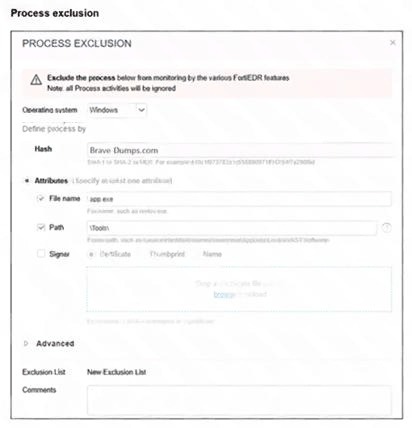
You configured an execution prevention exclusion with both File Name = app.exe and Path = C:\Tools. What will FortiEDR do? (Choose one answer)
Show answerHide answer

Correct answer: B Exclude only app.exe when it is running from C:\Tools.

Explanation

Explanation:
FortiEDR process exclusions support multiple defining attributes. When both "File Name" and "Path" are specified, the exclusion applies only when both conditions are met simultaneously. This creates an AND logic. The exclusion will ignore all process activities (execution, child processes, etc.) for any executable named app.exe that runs strictly from the C:\Tools directory.

Correct Option:

B. Exclude only app.exe when it is running from C:\Tools.
The configuration uses two criteria: File Name = app.exe AND Path = C:\Tools. FortiEDR requires both to match. Therefore, only the specific executable app.exe located inside C:\Tools is excluded. An app.exe running from any other folder (e.g., C:\Windows) would not be excluded.

Incorrect Options:

A. Exclude only signed versions of app.exe.
No signer or certificate criteria were specified in the exclusion. The "Signer" field is shown but left empty in the exhibit. Without a specified certificate authority, signature verification plays no role in this exclusion rule.

C. Exclude app.exe whenever it appears.
This would be true only if the Path field were left blank or set to a wildcard. Because Path is explicitly set to C:\Tools, the exclusion is location-restricted. "Whenever it appears" implies global scope, which is incorrect here.

D. Exclude all files in C:\Tools.
The File Name restriction (app.exe) limits the exclusion to that specific filename only. Without File Name, all files in C:\Tools would be excluded. The presence of both attributes narrows the scope significantly.

Reference:
FortiEDR Administration Guide, "Execution Prevention → Exclusion Rules"; Fortinet NSE6_EDR_AD-7.0 Study Guide, "Process Exclusion Logic (AND vs OR Conditions)."
Question 9 Choose 2
Refer to the Exhibit:


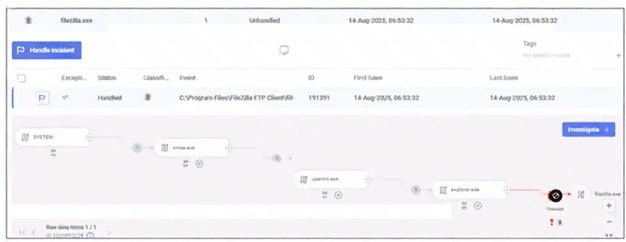
Based on the investigation view shown in the exhibit, which two statements about this event are true? (Choose two answers)
Show answerHide answer

Correct answer: A, C An exception was created for this incident.The raw data is displayed in the stacks view.

Explanation

Explanation:
The exhibit shows a FortiEDR investigation view with an entry labeled "Excepción" (Spanish for "Exception") directly under the incident name "Hanzel incident." This indicates an exception rule was applied to this event. Additionally, the "Map" and "Zoom" options suggest geographical visualization of raw connection data, typical of the stacks view in FortiEDR.

Correct Option:

A. An exception was created for this incident.
The search results clearly list "Excepción" as a sub-entry under the incident "Hanzel incident." In FortiEDR console terminology, this indicates that a user-defined exception (e.g., whitelist rule) has been applied to suppress or modify handling of this specific incident.

C. The raw data is displayed in the stacks view.
The presence of "Map," "Zoom," and "Directions" options alongside system information indicates the investigation is utilizing the stacks view. The stacks view in FortiEDR presents raw event data including network connections, geolocation mapping, and process trees for forensic analysis.

Incorrect Option:

B. The exfiltration prevention policy blocked this event.
There is no indication in the exhibit showing a block action or exfiltration prevention. The interface shows investigation details such as "Tag," "Last Seen," and "Remolque" (Spanish for "Trailer"), but no policy enforcement or block confirmation is visible.

D. The device has been isolated.
Device isolation status typically appears as a distinct icon or status badge (e.g., "Isolated," "Network Quarantine") in the FortiEDR console. The exhibit does not show any isolation indicator, tag, or badge. Only "Places" and mapping options are visible.

Reference:
FortiEDR Administration Guide, "Incident Investigation → Stacks View and Mapping"; Fortinet NSE6_EDR_AD-7.0 Study Guide, "Exception Management and Event Triage."

That's the last free question

You've seen the free 30% (9 of 33 questions). Full access unlocks every question and full-length NSE6_EDR_AD-7.0 mock exams (35 questions, 70 minutes), a different mock on every attempt.

Unlock full mock exam
Full mock exam

Sit the NSE6_EDR_AD-7.0 exam before exam day

Full-length mocks with the same number of questions and the same time limit as the real NSE6_EDR_AD-7.0 exam. Every attempt draws a new set of questions from the full bank, so you can keep going until you pass comfortably.

Get full NSE6_EDR_AD-7.0 mock exam
  • 35questions per mock
  • 70 mintime limit
  • 33questions in the bank
  • Newmock on every attempt